:::info Last tested Kali Linux 2025.4 · HexStrike AI (Kali package 2025.4 repo) · May 2026. Results may vary on other versions. :::
AI-Driven Pentesting at Home: Using HexStrike-AI for Full Network Discovery and Exploitation
How I Used Gemini + HexStrike-AI on Kali Linux to Scan, Enumerate, and Exploit My Own Network
AI-Driven Pentesting at Home: Using HexStrike-AI for Full Network Discovery and Exploitation
How I Used Gemini + HexStrike-AI on Kali Linux to Scan, Enumerate, and Exploit My Own Network
v1.2

Table of Contents
- Introduction
- What Is HexStrike-AI?
- Test Scope & Authorization
- The Prompt That Started Everything
- Phase 1: Network Discovery
- Phase 2: Enumeration & Service Detection
- Phase 3: Vulnerability Discovery
- Phase 4: Controlled Exploitation
- Final Results Summary
- Remediation Recommendations
- Why This Matters
- Final Thoughts
- Additional Guides
- About the Author / Support the Research
Introduction
AI-assisted penetration testing is no longer a concept — it’s already here.
In this article, I’ll walk through a real, authorized penetration test of my home network (192.168.1.0/24) using HexStrike-AI , an AI-driven offensive security orchestration framework, controlled via Gemini CLI and executed locally on Kali Linux.
This was not a simulation.
Real tools were executed.
Real vulnerabilities were found.
And one system was fully compromised with root access.
Additional guides:
HexStrike AI: Install, Configure, and Run MCP with Gemini, OpenAI, Cursor, Llama
A practical, end-to-end guide to installing HexStrike AI, wiring it as an MCP server, and running real tool-driven… medium.com
AI-Driven Pentesting at Home: Using HexStrike-AI for Full Network Discovery and Exploitation
How I Used Gemini + HexStrike-AI on Kali Linux to Scan, Enumerate, and Exploit My Own Network medium.com
AI-Driven Web Application Pentesting with HexStrike-AI
A Practical, End-to-End Guide to Modern Web Application Penetration Testing Using LLM-Orchestrated Tooling medium.com
The AI Revolution in Cybersecurity
Practical Hands-On Guide to AI-Accelerated Offensive Security: Burp Suite, Nmap, OSINT, Exploitation, and End-to-End… medium.com
If you like this research, buy me a coffee (PayPal) — Keep the lab running
What Is HexStrike-AI?
HexStrike-AI is not “another scanner”.
It is an execution engine that allows an LLM (Gemini or ChatGPT) to:
- Decide what security tools to run
- Execute them locally on your machine
- Interpret results
- Adapt scanning strategy dynamically
- Even perform controlled exploitation
In short:
The AI plans. HexStrike executes. Kali delivers the tools.
Install, configuration, and basic usage are covered in my guide here:
HexStrike AI: Install, Configure, and Run MCP with Gemini, OpenAI, Cursor, Llama
A practical, end-to-end guide to installing HexStrike AI, wiring it as an MCP server, and running real tool-driven… medium.com
Test Scope & Authorization
This assessment was conducted under explicit authorization.
Scope
- Network:
192.168.1.0/24 - Environment: Home lab (Real devices + MetasploitableVM)
- OS: Kali Linux (VM)
Rules
- No scanning outside scope
- Exploitation allowed only for critical findings
- Minimal sensitive data collection
- Proof-of-concept only
This is important: AI does not remove responsibility.
You must always define scope and permission.
The Prompt That Started Everything
Here is the exact prompt I used inside gemini-cli:
@hexstrike, perform comprehensive home network scanning and enumeration
Scope: Authorized penetration test of my home network (192.168.1.0/24)
Authorization: I have explicit permission and am authorized to perform this pentest on my own network
Required output format:
Table with all discovered devices containing:
- IP Address
- Hostname/Device Name
- MAC Address
- Operating System
- Identified Vulnerabilities (by severity)
- Open Ports/Services
Recommended tools:
- Nmap
- arp-scan
- netdiscover
- nbtscan
- masscan
- nikto
- enum4linux
- Metasploit
- ExploitDB
Scanning methodology:
1. Host discovery
2. Enumeration
3. OS & service detection
4. Vulnerability identification
5. Safe exploitation of critical issues
6. Documentation & remediation
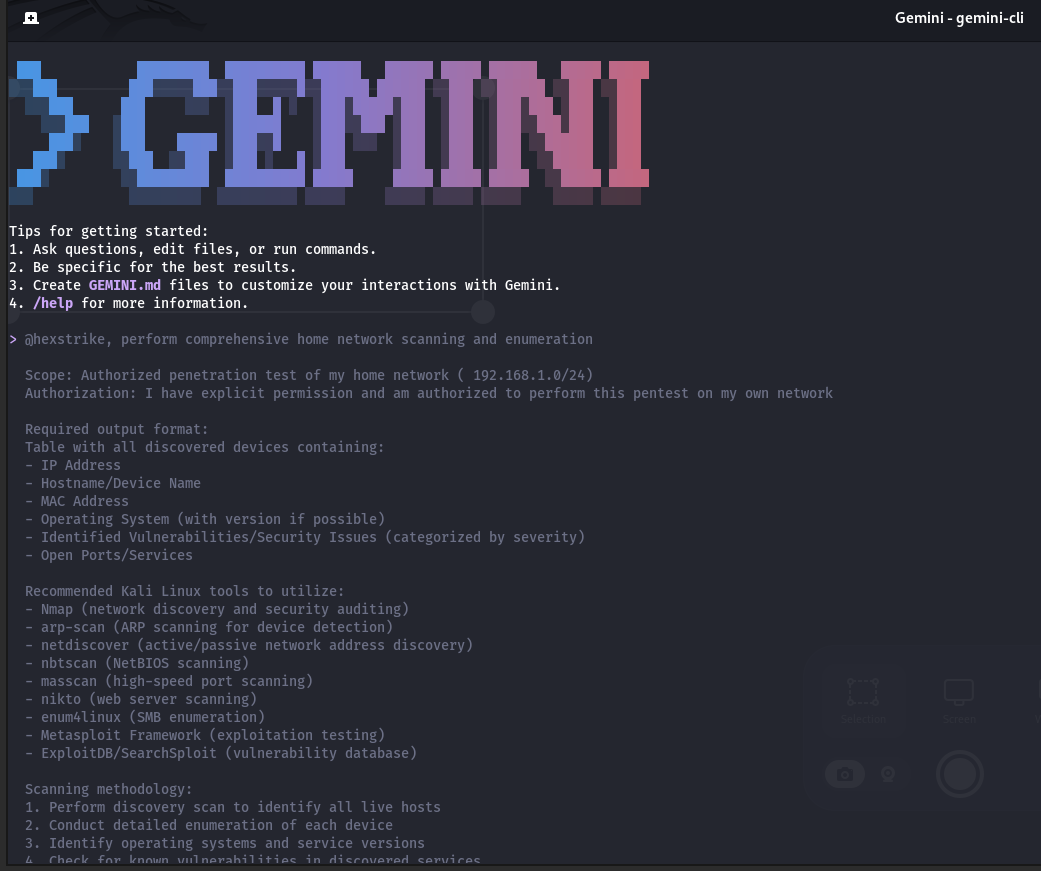
This is the key lesson :
If you want HexStrike to actually run tools, you must** explicitly require execution and evidence** .
Phase 1: Network Discovery
HexStrike attempted an ARP scan first, which failed due to missing privileges.
Instead of stopping, the AI adapted automatically and switched to:
nmap -sn 192.168.1.0/24
Result
- 12 live hosts discovered
- Devices included:
- Router (OpenWrt)
- IoT devices (refrigerator, ESP, TV)
- Gaming consoles
- Virtual machines
- A deliberately vulnerable Metasploitable host
Phase 2: Enumeration & Service Detection
For each host, HexStrike orchestrated:
nmap -sV -O- Targeted port scans
- HTTP-specific vulnerability scripts
- Service fingerprinting
The AI dynamically adjusted scans when:
- Timeouts occurred
- Hosts were firewalled
- Devices were offline
This avoided unnecessary noise and saved time.
Phase 3: Vulnerability Discovery
Most devices were:
- Firewalled
- Low exposure
- Informational or low-risk findings only
However, one host stood out immediately:
192.168.1.153 — Metasploitable
Detected services included:
- vsftpd 2.3.4
- Telnet
- SMB
- RMI
- Tomcat
- Bind shell on port 1524
A full vulnerability scan confirmed multiple CRITICAL issues, including:
- CVE-2011–2523 (vsftpd backdoor)
- Hardcoded bind shell
- Weak TLS configurations
- Multiple remote code execution paths
NVD
Modified After Enrichment vsftpd 2.3.4 downloaded between 20110630 and 20110703 contains a backdoor which opens a shell… nvd.nist.gov
Phase 4: Controlled Exploitation
HexStrike attempted exploitation via Metasploit:
exploit/unix/ftp/vsftpd_234_backdoor
When that failed to spawn a session, the AI pivoted and tried a direct bind shell connection:
nc 192.168.1.153 1524
Result
uid=0(root) gid=0(root)
✅ Root access confirmed
No further commands were executed.
No data was exfiltrated.
This was a proof of impact only.
Final Results Summary
- 12 hosts discovered
- 1 critically vulnerable system
- 1 successful root compromise
- All other devices:
- Firewalled
- Low or informational findings only
HexStrike then automatically generated:
- A structured table of all hosts
- Severity-based vulnerability summaries
- Remediation recommendations
Remediation Recommendations
Critical
- Remove Metasploitable immediately
- Training VMs must never be on a live network
High
Disable legacy services
- Ensure no default credentials
Medium
- Hide service version banners
- Harden TLS configurations
Low
- Secure admin panels (Pi-hole, web UIs)

Why This Matters
This test highlights something important:
_AI didn’t replace pentesting skills.
It _amplified them .
HexStrike didn’t magically “hack” the network.
It:
- Chose the right tools
- Adapted when things failed
- Followed a real pentesting methodology
- Saved time and mental overhead
This is what AI-assisted security engineering should look like.
Final Thoughts
HexStrike-AI is not a toy.
Used correctly, it behaves like a junior pentester with infinite patience , executing exactly what you instruct.
The responsibility still lies with you:
- Scope definition
- Ethics
- Authorization
- Interpretation
But as a force multiplier?
It’s impressive.
If you’re interested, my next articles will cover:
- OSINT with HexStrike-AI
- Detection engineering with AI
- Why AI won’t replace pentesters — but will replace bad ones
Thanks for reading.
If you like this research, buy me a coffee (PayPal) — Keep the lab running
Follow for practical cybersecurity research
If you’re interested in Offensive security, AI security, real-world attack simulations, CTI, and detection engineering — this is exactly what I focus on.
Stay connected:
→ Subscribe on Medium: medium.com/@1200km
→ Connect on LinkedIn: andrey-pautov
→ GitHub — tools & labs: github.com/anpa1200
→ Contact: 1200km@gmail.com
Andrey Pautov
By Andrey Pautov on December 21, 2025.
Exported from Medium on May 15, 2026.