:::info Last tested Kali Linux 2025.4 · HexStrike AI (Kali package 2025.4 repo) · May 2026. Results may vary on other versions. :::
Authorization required. All techniques on this page are for use in authorized lab environments only. Never test against systems you do not own or have explicit written permission to assess. Document scope, maintain an audit log, and obtain approval before executing any exploitation step.
HexStrike + Gemini. AI-Assisted SMB Exposure Credential Brute-Force
From Toolchain Failures → Service Fingerprinting → Authentication Findings → Share Risk
HexStrike + Gemini. AI-Assisted SMB Exposure Credential Brute-Force
From Toolchain Failures → Service Fingerprinting → Authentication Findings → Share Risk
Overview
This session aimed to validate whether a Windows host exposed SMB, then assess credential hygiene using a controlled test dataset, and finally confirm what level of share access those credentials provide.
The key value in the log is not “the attack,” but:
- how the workflow handled missing tooling and incorrect arguments,
- what the SMB stack reveals about security posture,
- and how to translate outputs into defensible remediation + detection.
Scenario
Objective
- Identify SMB exposure (port 445 / NetBIOS).
- Validate authentication posture (credential hygiene results from an authorized test set).
- Enumerate SMB shares and characterize access risk (read/write shares).
Inputs
- Target:
172.16.59.129 - Custom test lists:
~/Documents/users_list.txt,~/Documents/passwords_list.txt
Prompt:
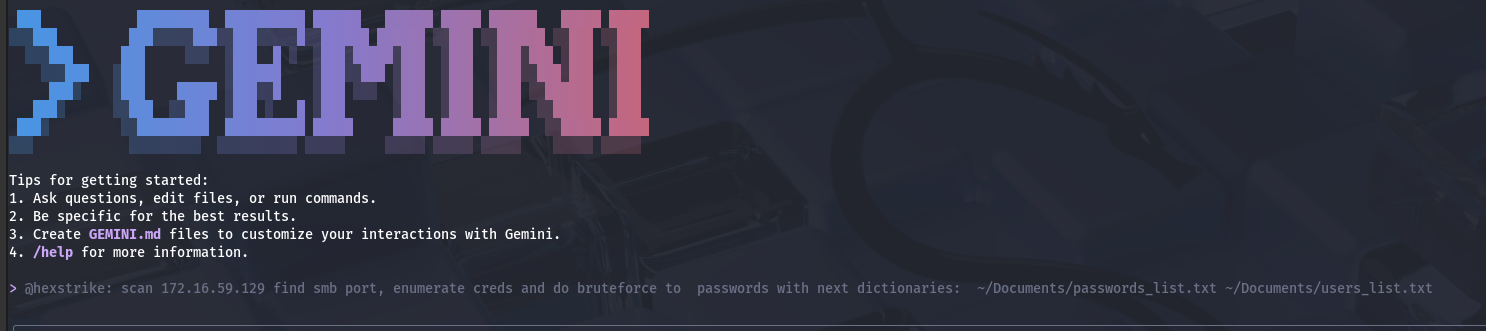
@hexstrike: scan 172.16.59.129 find smb port, enumerate creds and do bruteforce to passwords with next dictionaries: ~/Documents/passwords_list.txt ~/Documents/users_list.txt
Execution flow (what actually happened)
1) Fast scan failed → fallback to a full Nmap fingerprint
The workflow attempted a fast scan first and immediately failed:
rustscanwas not installed (/bin/sh: 1: rustscan: not found)
The agent recovered correctly by switching to Nmap service detection , which produced a solid baseline.
Nmap highlights (security-relevant):
445/tcp open microsoft-ds(SMB)139/tcp open netbios-ssn22/tcp open OpenSSH for Windows3389/tcp open RDP- Host fingerprint suggests Windows 10 / Server 2019 family
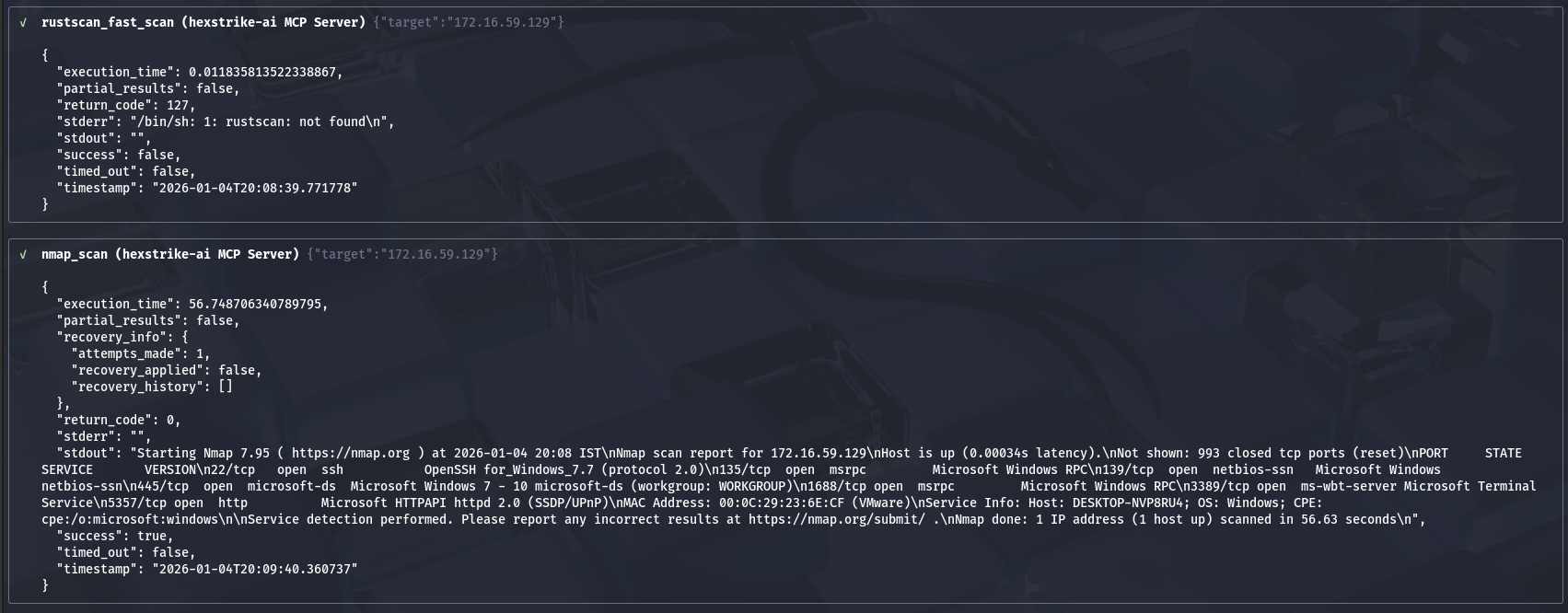
Takeaway: Your lab target is an intentionally “wide-open” Windows surface: SMB + RDP + SSH simultaneously, which is a high-risk posture in any real network.
2) SMB enumeration tooling mismatch (enum4linux-ng wrapper issue)
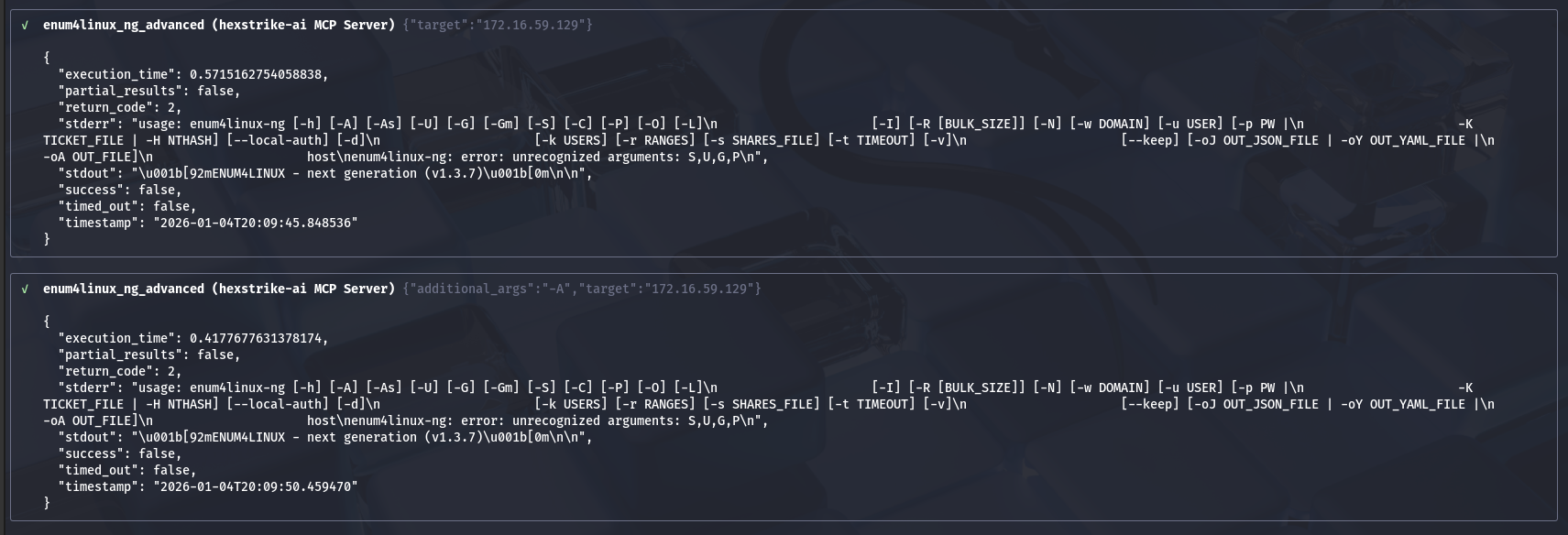
Two consecutive runs of enum4linux-ng failed with the same pattern:
enum4linux-ng: error: unrecognized arguments: S,U,G,P
This looks like a wrapper/parameter bug , where legacy enum4linux flags are being passed into enum4linux-ng. Even when -A was provided, the wrapper still injected the invalid flags, so it failed again.
Practical fix (operational):
- Treat this as a HexStrike tool adapter issue, not an enum4linux-ng issue.
- Use a different enumeration primitive (as you did), or update/patch the wrapper.
3) SMBMap unauthenticated run produced a transport/read error
The first smbmap_scan (no credentials) connected but reported:
- “0 authenticated sessions”
- “Something weird happened… Error occurs while reading from remote(104)…”
This is consistent with SMBMap occasionally being brittle against certain SMB configurations, resets, or SMBv1 negotiation oddities.
Takeaway: Use SMBMap primarily once you have known-good credentials; for unauthenticated posture checks, rely on more stable fingerprinting outputs (like the next step).
4) NetExec fingerprinting revealed two critical posture flags
The netexec_scan output is the single most important SMB posture line in the log:
- SMB signing: False
- SMBv1: True
Why this matters
- SMBv1 enabled is broadly considered unsafe in modern environments.
- Signing disabled weakens integrity protections and often correlates with legacy compatibility configurations.
In a real enterprise, this combination is a red flag and typically violates baseline hardening standards.
5) Hydra Attack
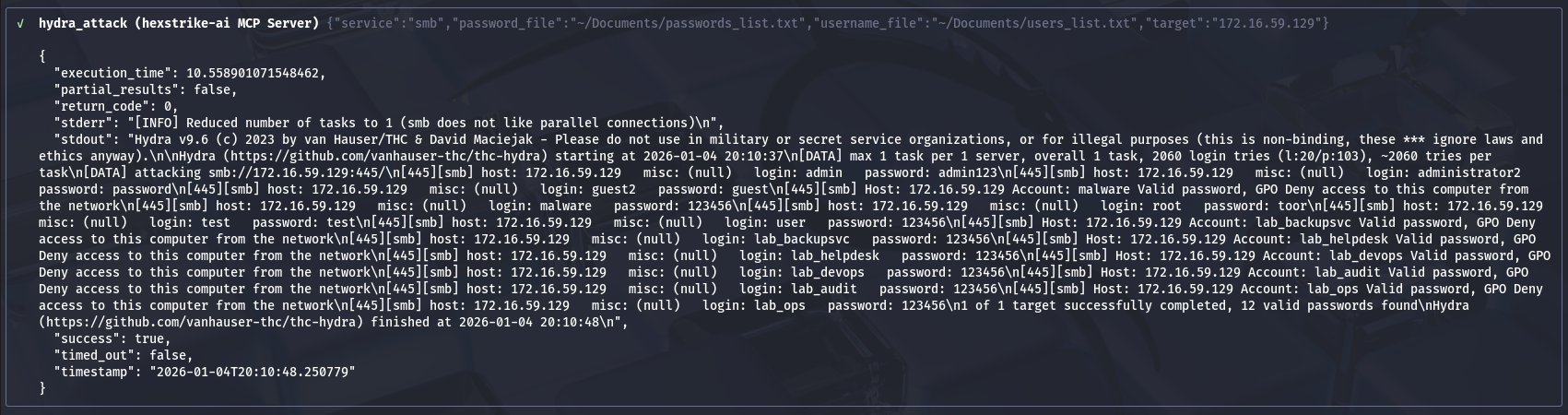
6) Credential hygiene test succeeded (but reveals systemic weakness)
The credential test completed quickly (reduced to 1 task due to SMB’s intolerance for parallel auth attempts) and returned 12 valid credentials from your controlled dataset.
Several accounts also returned a notable message:
- “Valid password, GPO Deny access to this computer from the network”
Interpretation
- Password quality is weak (multiple accounts accept low-entropy credentials).
- Some accounts are blocked from network logon via policy, which is good — but the password is still valid, meaning:
- those credentials remain usable elsewhere,
- and still represent password reuse / lateral movement risk.
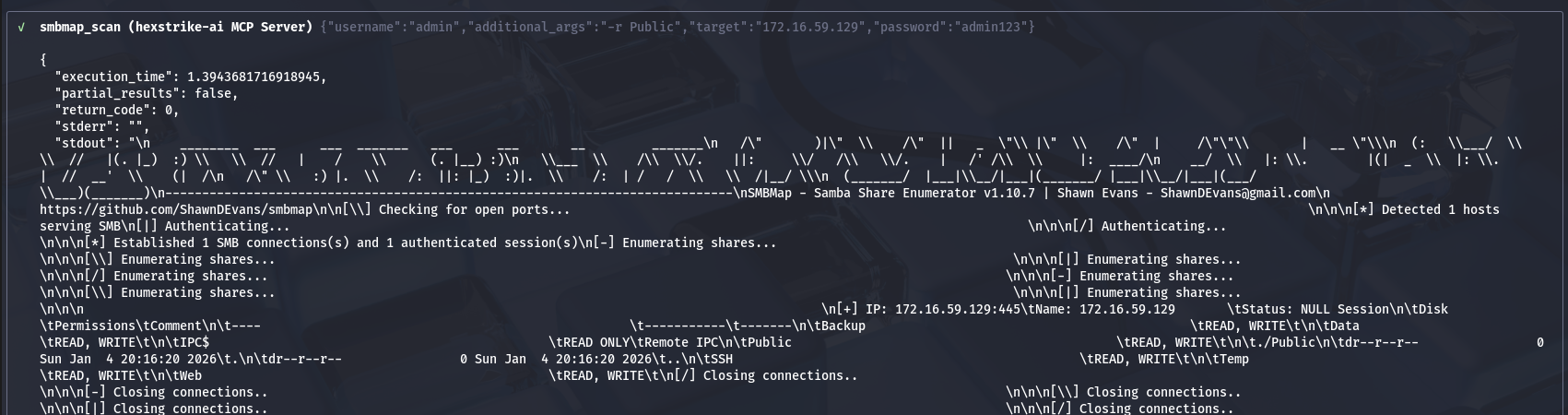
7) Authenticated share enumeration succeeded
Once valid credentials were used, SMBMap successfully enumerated shares and showed multiple shares with READ/WRITE access:
Backup,Data,Public,SSH,Temp,Web(all R/W)IPC$(read only; expected)
It also reported “Status: NULL Session” while simultaneously indicating an authenticated session. That can occur due to how SMBMap labels sessions even when authentication is successful; the important part is effective access (R/W).
The shares appeared empty (only . and .. listed).
Interpretation
- The account used has broad share permissions across multiple shares
- “Empty” may mean:
- genuinely empty directories,
- lack of list permissions beyond top-level,
- or the environment is staged for later tasks.
In real environments, the risk is not “empty vs not empty,” but R/W on multiple shares with weak credentials. That is a classic ransomware and data-exfiltration enabler.
Findings summary
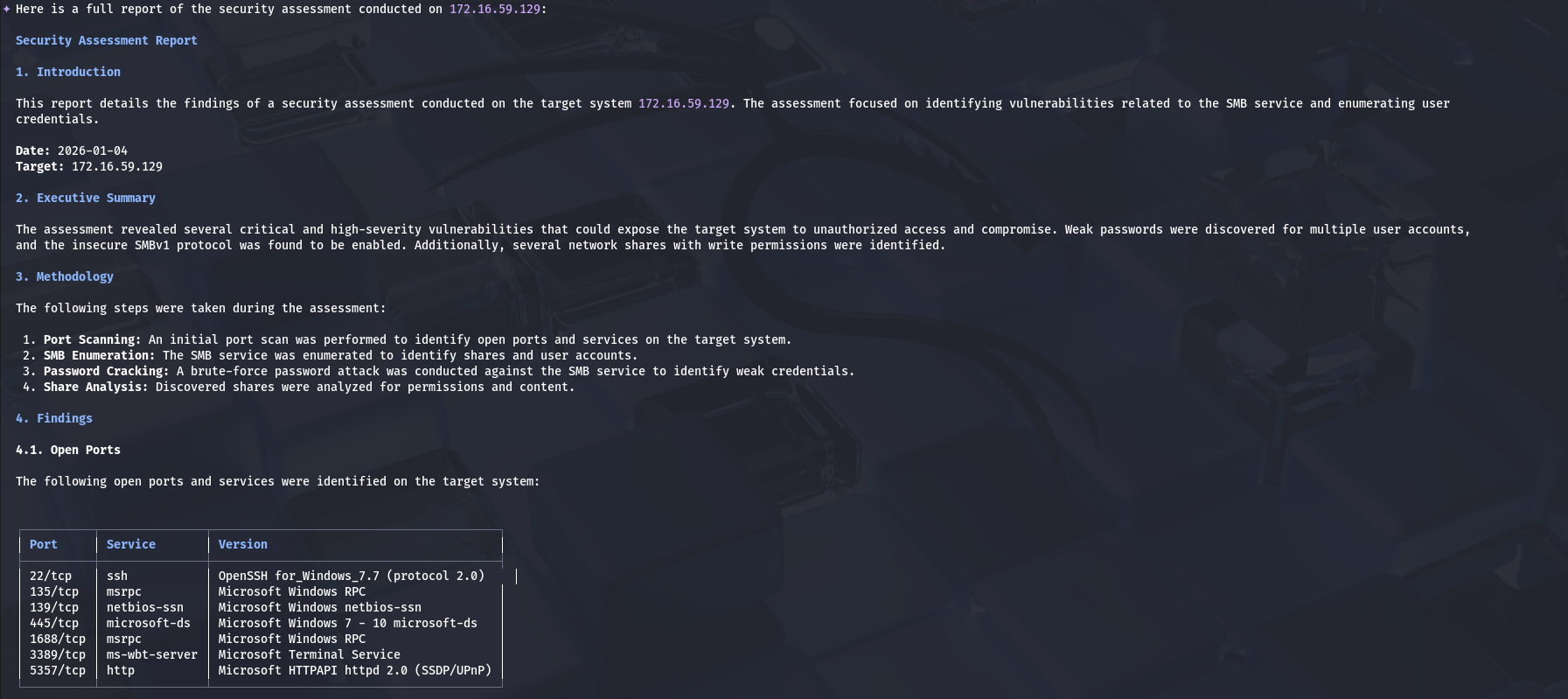
  Security Assessment Report

  1. Introduction

  This report details the findings of a security assessment conducted on the target system 172.16.59.129. The assessment focused on identifying vulnerabilities related to the SMB service and enumerating user
  credentials.

  Date: 2026-01-04
  Target: 172.16.59.129

  2. Executive Summary

  The assessment revealed several critical and high-severity vulnerabilities that could expose the target system to unauthorized access and compromise. Weak passwords were discovered for multiple user accounts,
  and the insecure SMBv1 protocol was found to be enabled. Additionally, several network shares with write permissions were identified.

  3. Methodology

  The following steps were taken during the assessment:

   1. Port Scanning: An initial port scan was performed to identify open ports and services on the target system.
   2. SMB Enumeration: The SMB service was enumerated to identify shares and user accounts.
   3. Password Cracking: A brute-force password attack was conducted against the SMB service to identify weak credentials.
   4. Share Analysis: Discovered shares were analyzed for permissions and content.

  4. Findings

  4.1. Open Ports

  The following open ports and services were identified on the target system:


  ┌──────────┬───────────────┬─────────────────────────────────────────┐
  │ Port     │ Service       │ Version                                 │
  ├──────────┼───────────────┼─────────────────────────────────────────┤
  │ 22/tcp   │ ssh           │ OpenSSH for_Windows_7.7 (protocol 2.0)    │
  │ 135/tcp  │ msrpc         │ Microsoft Windows RPC                   │
  │ 139/tcp  │ netbios-ssn   │ Microsoft Windows netbios-ssn           │
  │ 445/tcp  │ microsoft-ds  │ Microsoft Windows 7 - 10 microsoft-ds   │
  │ 1688/tcp │ msrpc         │ Microsoft Windows RPC                   │
  │ 3389/tcp │ ms-wbt-server │ Microsoft Terminal Service              │
  │ 5357/tcp │ http          │ Microsoft HTTPAPI httpd 2.0 (SSDP/UPnP) │
  └──────────┴───────────────┴─────────────────────────────────────────┘

  4.2. Vulnerabilities

  4.2.1. Weak Passwords (High)

  A brute-force attack successfully identified several user accounts with weak and easily guessable passwords. This vulnerability could allow an attacker to gain unauthorized access to the system.

  Affected Accounts (intentionally weak lab credentials — this is an isolated vulnerable VM):

    1 admin:[weak password]
    2 administrator2:[common password]
    3 guest2:[default credential]
    4-12 lab service accounts:[common passwords]

  Note: credentials are redacted in this public guide. In your lab report, list the exact
  username:password pairs found and cross-reference against your lab's known-weak account list.

  4.2.2. SMBv1 Enabled (High)

  The SMBv1 protocol is enabled on the target system. SMBv1 is an outdated and insecure protocol with known vulnerabilities, such as EternalBlue, which can be exploited to gain remote code execution.

  4.2.3. Excessive Share Permissions (Medium)

  The admin user has read and write access to multiple shares. Overly permissive shares can lead to unauthorized data modification or deletion.

  Writable Shares:


  ┌────────┬─────────────┐
  │ Share  │ Permissions │
  ├────────┼─────────────┤
  │ Backup │ READ, WRITE │
  │ Data   │ READ, WRITE │
  │ Public │ READ, WRITE │
  │ SSH    │ READ, WRITE │
  │ Temp   │ READ, WRITE │
  │ Web    │ READ, WRITE │
  └────────┴─────────────┘

  4.3. Share Content

  All enumerated shares with write access were found to be empty.

  5. Recommendations

  It is strongly recommended to address the identified vulnerabilities to improve the security posture of the target system.

  >    Password Security:*
  >     *   Enforce a strong password policy that requires a mix of uppercase and lowercase letters, numbers, and symbols.
  >     *   Immediately change the passwords for all accounts with weak credentials.
  >     *   Implement account lockout policies to mitigate brute-force attacks.
  >    SMB Configuration:*
  >     *   Disable the SMBv1 protocol and use SMBv2 or a later version.
  >    Share Permissions:*
  >     *   Review and restrict share permissions based on the principle of least privilege.
  >     *   Ensure that users only have access to the resources necessary for their roles.
  >    User Accounts:*
  >     *   Investigate the purpose of the discovered user accounts and disable any that are not required.

  6. Conclusion

  The security assessment of 172.16.59.129 has identified significant vulnerabilities that require immediate attention. By implementing the recommendations outlined in this report, the overall security of the
  system can be substantially improved.
Defensive remediation checklist (prioritized)
1) Fix protocol posture (high impact)
- Disable SMBv1
- Enable SMB signing
- Prefer modern SMB configuration and remove legacy compatibility where possible
2) Reduce exposure
- Block inbound SMB from non-admin networks (segmentation / firewall)
- Restrict 445/139 to only what absolutely requires it (ideally admin subnets or internal file servers)
3) Repair identity controls
- Enforce strong password policy + banned-password list
- Remove default/weak credentials (especially for admin and service accounts)
- Ensure service accounts:
- are not interactive,
- have least privilege,
- have managed rotation (where possible)
4) Tighten share permissions
- Remove blanket R/W access
- Apply least privilege per share (read-only where possible)
- Audit share ACLs and NTFS permissions together (both matter)
5) Keep the good part: network logon restrictions
- The “GPO deny access from the network” is a useful mitigation.
- Extend it consistently for accounts that should never authenticate over SMB.
Detection engineering (what to monitor)
Windows logs to prioritize
- 4625 (failed logons) — look for volume spikes and many usernames from one source
- 4624 (successful logons) — specifically logon type associated with network access (commonly type 3)
- 5140 / 5145 (SMB share access / object access) — access to many shares in short time
- 4672 (special privileges assigned) — privileged logons
- Correlate: burst of failures → first success → share enumeration activity
Network telemetry
- High-rate connection attempts to 445
- Many SMB sessions from a single source host
- SMB negotiation using legacy dialects (often correlates with SMBv1 usage)
Conclusion
This exercise demonstrated why “AI-assisted pentesting” is most valuable when it behaves like a disciplined operator, not a click-to-hack shortcut.
HexStrike + Gemini did not deliver value merely by running a brute-force; the value was in the operational recovery and decision-making when the toolchain and assumptions broke:
- A missing dependency (rustscan) forced a fallback to reliable fingerprinting (Nmap), establishing a defensible baseline of exposed services (SMB, RDP, SSH) and confirming a high-risk attack surface.
- Enumeration friction (enum4linux-ng wrapper flag injection) made it clear that orchestration layers can fail in non-obvious ways — and that successful assessment depends on switching primitives, not insisting on one “preferred” tool.
- NetExec produced the single most security-relevant posture finding: SMBv1 enabled and signing disabled — a combination that materially increases the likelihood and blast radius of compromise in real networks.
- The controlled credential test converted posture into impact: weak passwords existed at scale , and even where GPO blocked network logon, the credentials were still valid — preserving reuse and lateral movement risk.
- Authenticated enumeration then validated the business risk: broad write access across multiple shares , which is a common precursor condition for ransomware staging, mass encryption, and rapid data collection.
Taken together, the assessment shows a clear chain: exposure → insecure protocol posture → weak identity controls → excessive authorization. That chain is exactly what defenders need to break.
In short: the workflow did what a real assessment must do — turn messy tool output into a coherent, actionable security narrative that maps directly to hardening and monitoring decision
By Andrey Pautov on January 5, 2026.
Exported from Medium on May 15, 2026.