:::info Last tested Kali Linux 2025.4 · HexStrike AI (Kali package 2025.4 repo) · May 2026. Results may vary on other versions. :::
AI-Assisted Password Security Auditing with HexStrike AI
Authorized password audit methodology — ZIP, PDF, Office, WiFi, and credential security validation
AI-Assisted Password Security Auditing with HexStrike AI
Authorized methodology for validating password strength, auditing credential exposure, and hardening authentication in lab environments
Dive into modern, AI-assisted password security auditing with HexStrikeAI + Gemini. This guide shows how an LLM-driven workflow can orchestrate and evaluate password-strength tests in a controlled, authorized environment — helping you identify weak credentials faster, prioritize remediation, and validate hardening efforts. Using real-world scenarios, we explain the why behind common failure patterns (reuse, low entropy, predictable formats) and provide practical defense guidance — MFA, password managers, strong passphrases, rate limiting, and monitoring — so you can reduce account takeover risk. Ideal for security practitioners and serious learners focused on defensive outcomes.
Disclaimer: Educational Purpose Only
The information provided in this article, “AI-Assisted Password Security Auditing,” is intended for educational purposes only. The techniques and methods described herein are discussed as a means to understand and improve security measures and should not be used for illegal purposes. The author and publisher disclaim any liability from the misuse of this information. Readers are urged to use this knowledge to enhance their cybersecurity defenses and are reminded that unauthorized hacking into any system is illegal and unethical.
Table of contents:
- Introduction
- Password Security Fundamentals
- Authorized Audit Methods
- Brute-Force Testing
- Dictionary Attacks
- Default Credential Risk
- Hash Cracking Techniques
- Credential Exposure Review
- Social Engineering Risk
- Defensive Hardening Resources
- Conclusion
Real-World Audit Examples
- Manual Zip files password cracking here
One promptAI Zip files password cracking here - Manual PDF files password cracking here
One promptAI PDF files password cracking here - Manual Office files password cracking here
One prompt AI Office files password cracking here - Manual WiFi password cracking here
One prompt AI WiFi password cracking here - One prompt AI SMB credentials enumerating and pass crackinghere
- RDP passwords cracking here
- SSH password cracking here
One prompt AI SSH password cracking here - FTP passwords cracking here
- Telnet password cracking here
- Security Camera password cracking here
- Web interface cracking here
Best tools:
Overview of Password Security
In the digital age, passwords function as the primary gatekeepers to our online identities, guarding access to personal, financial, and business information. However, the security of a password is only as robust as its creation and management practices. This section explores the fundamentals of password security, highlighting why strong passwords are critical and how vulnerabilities can be exploited.
The Why and Where of Password Hashing
Passwords are hashed as a security measure to protect the original plaintext password from being easily accessed or stolen. Hashing transforms the plaintext password into a fixed-size string of characters, which is typically a sequence of random-looking characters. Here’s why this is crucial for security:
- Irreversibility : A hash function is designed to be a one-way function, which means it’s computationally infeasible to reverse the function to retrieve the original input (the plaintext password). This protects passwords even if the hash is stolen.
- Uniqueness : Ideally, each unique password should produce a unique hash. This means even small changes in the password (like changing a single letter) should result in a completely different hash, making it difficult to guess the original password.
- Consistency : The same password will always result in the same hash when the same hashing algorithm and salt are used. This allows systems to verify passwords without needing to store the actual password.
- Salting : To defend against precomputed attacks (like rainbow tables), salts (random data) are added to passwords before hashing. This ensures that even if two users have the same password, their hashes will be different.
Where Password Hashes Appear in Authorized Audits:
During an authorized password security audit, hashes may be encountered in the following locations. Access to these locations requires system-owner authorization and appropriate legal permissions.
- User Databases : In web applications, user passwords are stored in databases as hashes. These can be part of the backend of nearly any system requiring user authentication, from small websites to large corporate networks.
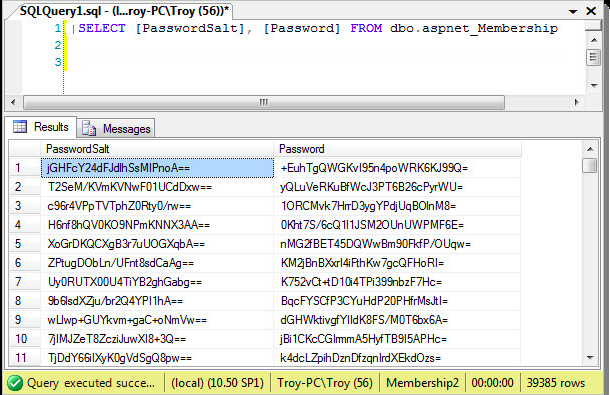
- Operating System Authentication : Systems like Linux and Windows store user password hashes locally. For example, Linux stores these hashes in the
/etc/shadowfile, which is accessible only by privileged users.
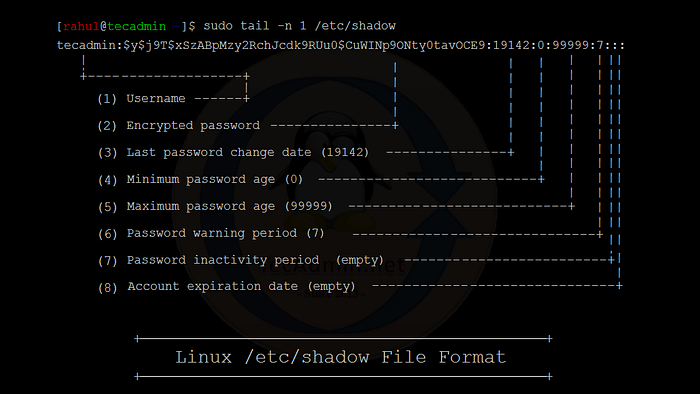
- Here is my own shadow file:

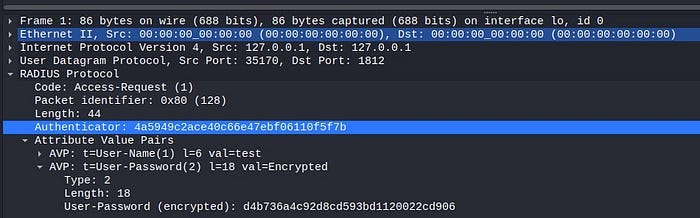
- Network Authentication Servers : Technologies like RADIUS and LDAP, which are used for managing network authentication, store password hashes to verify user credentials during the authentication process.
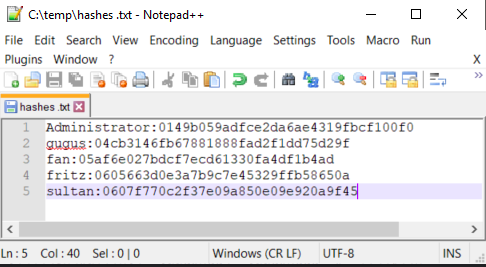
- Authorized penetration test evidence : During a scoped engagement, extracted hashes are handled as sensitive evidence — encrypted, access-controlled, and destroyed after the engagement per the rules of engagement.
Importance of Understanding Cracking Techniques
The landscape of cybersecurity is perpetually evolving, with new threats emerging as rapidly as the technologies designed to counteract them. One of the pivotal areas of knowledge for any cybersecurity professional — or indeed, any user — concerns the methods by which passwords can be cracked. Understanding these techniques is crucial for several reasons:
1. Enhancing Security Measures
- By understanding how attackers exploit weak passwords, individuals and organizations can develop more effective security strategies. This includes implementing stronger password policies, using advanced authentication methods, and employing comprehensive monitoring tools to detect intrusion attempts.
2. Predicting Vulnerabilities
- Knowledge of password cracking techniques allows security teams to anticipate potential vulnerabilities in their systems before they are exploited. It helps in conducting proactive assessments and implementing defenses against specific types of attacks such as brute force or dictionary attacks.
3. Educating Users
- Awareness campaigns that educate users about the dangers of weak passwords and the sophistication of cracking techniques can lead to better security practices, such as choosing stronger passwords and avoiding phishing traps. Education is often the first line of defense against cyber threats.
4. Compliance and Best Practices
- Various regulations and standards require that specific security measures be in place to protect sensitive data. Understanding password cracking methods helps ensure compliance with these standards by adopting industry best practices for password security.
5. Ethical Hacking and Penetration Testing
- Cybersecurity professionals often employ the same techniques as attackers for ethical hacking purposes. By using these techniques in controlled, consensual scenarios, they can identify and fix security weaknesses, thus fortifying the system against malicious attacks.
6. Innovation in Security Technologies
- As attackers evolve their methods, security researchers and technology developers must innovate to stay ahead. Understanding current cracking techniques drives the development of more robust and advanced security solutions, like biometric authentication and AI-driven threat detection systems.
Authorized Audit Methods
Brute Force Attacks
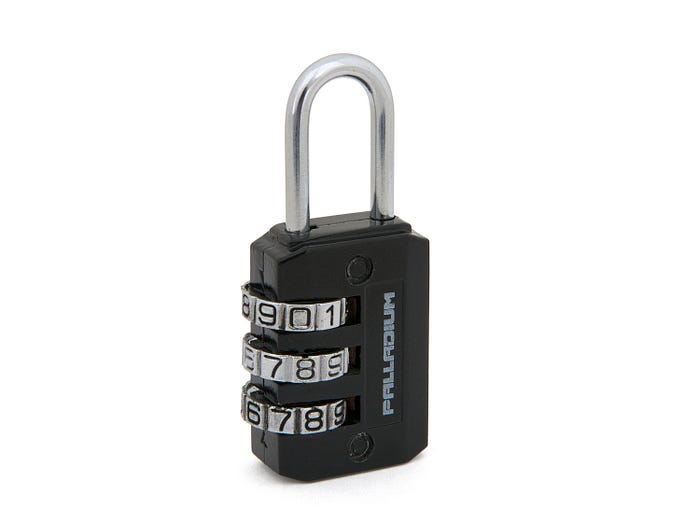
A brute force attack is one of the simplest yet most aggressive methods to crack a password. It involves systematically checking all possible combinations of characters until the correct one is found. This technique does not attempt to guess or infer password clues but relies purely on exhaustive efforts.
How It Works
In a brute force attack, an attacker uses software that continuously inputs passwords into a system until it achieves success. The process starts with the shortest possible password and typically uses a predetermined sequence to attempt every possible combination of characters from the defined character set (letters, numbers, symbols).
Character Sets and Complexity
- Character Sets : The complexity of a brute force attack depends on the character set used. Common sets include:
- Alphanumeric only (letters and numbers).
- Full ASCII set (letters, numbers, and special characters).
- Password Length : The length of the password exponentially increases the number of possible combinations. For example:
- A 4-digit numeric PIN (0–9) has 10,000 possible combinations (10⁴).
- A 5-character password using only lowercase letters (a-z) has 11,881,376 possible combinations (26⁵).
Examples
- Numeric PINs : One of the most common targets for brute force attacks is numeric PINs, such as those used in ATMs or mobile phones. Because these PINs are usually only 4 to 6 digits long, they can be cracked in a relatively short time using brute force.
- Web Login Forms : Brute force attacks on web login forms try every combination of username and password until one works. Websites try to mitigate these attacks by implementing account lockouts after a few failed attempts or by using CAPTCHAs.
- Encrypted Files : Attackers use brute force attacks to access encrypted files. If the file is encrypted with a weak or short password, brute force software can discover the password by trying every possible key.
Defense Against Credential Attacks
- Strong Passwords : The simplest defense is the use of long, complex passwords. Increasing length and complexity exponentially increases the time required for a brute force attack to succeed.
- Account Lockout Policies : After several failed login attempts, systems can lock the account, thereby stopping the brute force attack in its tracks.
- Two-Factor Authentication (2FA) : Implementing 2FA can significantly enhance security, as accessing the account requires more than just knowing the password.
- Rate Limiting and CAPTCHAs : Slowing down the login attempts and adding CAPTCHAs can deter automated brute force tools.
Dictionary Attacks
A dictionary attack is a method used to crack passwords by systematically entering each word from a dictionary file as a password. Unlike brute force attacks, which attempt every possible combination of characters, dictionary attacks use pre-existing lists of words that are more likely to be used as passwords. This technique exploits the tendency of users to choose passwords that are easy to remember, often derived from common words or phrases.
How Dictionary Attacks Work
Dictionary attacks are executed using software that automates the login process with each entry from a precompiled list of common passwords, phrases, or words. These lists can include:
- Words from a language dictionary.
- Common password lists available through various sources, including databases of passwords leaked in previous breaches.
- Customized entries that include common substitutions, like using ‘0’ instead of ‘o’, or adding numbers and symbols to the end of words.
Examples of Dictionary Attacks
1. Simple Dictionary Attack:
An attacker might use a straightforward list of the most common passwords (such as “123456”, “password”, “admin”, etc.) to gain access to accounts where users have not bothered to create a strong password.
You can obtain dictionaries for dictionary attacks from various online sources, often used for educational and ethical hacking purposes. Here are some common places to find them:
Security Websites : Websites like Weakpass offer extensive collections of wordlists and password dictionaries specifically designed for cracking passwords.
GitHub : Many security professionals and researchers share their custom wordlists on GitHub. You can find these by searching for repositories labeled as “password wordlists” or “security wordlists”.
For example: SecLists
Public Data Breaches : Sometimes, data from public breaches, which include password dumps, are compiled into wordlists that can be used to understand common password trends.
Forums and Communities : Cybersecurity forums and communities such as Packet Storm Security often share resources, including wordlists, which are useful for penetration testing and learning about password security.
2. Customized Dictionary Attack:
Advanced dictionary attacks can customize their lists based on target-specific details. For instance, if targeting a particular company, an attacker might include common industry terms, the company’s history, or known interests of employees derived from social media.
To create customized passwords list you can use special tool like: PersonalPass Generator (PPG): The Ultimate Tool for Custom Password Lists, full guide to this tool here.
- Hybrid Dictionary Attack : Combining dictionary words with brute force elements, these attacks try adding numbers or symbols to dictionary words (e.g., “password1!”, “winter2023”). Use can use PPG for this propose to.
Defense Against Dictionary Attacks
- Strong, Unique Passwords : Encouraging or enforcing the creation of passwords that are not only long and complex but also unique and not directly related to easily guessable words.
- Password Salting : Adding a unique, random string to each password before it is hashed can significantly reduce the effectiveness of dictionary attacks. Even if two users have the same password, their salted and hashed passwords will be different.
- Account Lockout Mechanisms : Temporarily locking an account after several failed login attempts can help prevent automated dictionary attacks.
- Using CAPTCHAs : Incorporating CAPTCHAs on login pages can help deter automated login attempts, as it requires solving challenges that are typically difficult for bots.
- Advanced Authentication Methods : Implementing multi-factor authentication (MFA) provides an additional layer of security, ensuring that knowing the password alone is not enough to gain access.
Default Credential Risk
Default passwords are the factory-set passwords that devices or software systems come with when they are first installed or activated. These passwords are meant to be temporary and changed upon initial setup by the user or administrator. However, many users neglect to change these default credentials, which can pose significant security risks.
Importance of Changing Default Passwords
Manufacturers often use simple and widely known default passwords for the sake of convenience. This practice makes it easier for users to set up their devices, but it also makes it easier for attackers to gain unauthorized access if the passwords are not changed. The reuse of default passwords across multiple devices of the same model or software further compounds the risk, as a known default password for one device can potentially unlock many others.
Common Devices with Default Passwords
- Routers and Modems : These are often shipped with default administrator passwords, which can be used to alter network settings or apply firmware updates.
- Security Cameras : Default passwords can allow unauthorized access to live feeds if not updated.
- Printers and Other Office Equipment : Like routers, these devices can often be accessed and configured using default credentials.
- Software Applications : Administrative interfaces of many applications are protected by default passwords noted in the user manuals or installation guides.
How to Find Default Passwords
- User Manuals and Documentation : The easiest and most straightforward way to find default passwords is by looking in the device or software’s user manual. Manufacturers typically list the default login credentials in these documents.
- Manufacturer Websites : Many manufacturers provide support and resources sections on their websites where default credentials can be found, especially for older models not covered in recent manuals.
- Online Databases of Default Passwords : There are several websites dedicated to listing default passwords for a wide range of devices. These databases are searchable and are kept up-to-date with new devices and models. Examples include sites like DefaultPasswords.com or RouterPasswords.com.
- Security Research Publications : Researchers often publish findings related to device vulnerabilities, including default passwords, especially if they are part of a larger security concern affecting many devices.
Security Practices to Mitigate Risks
- Change Default Passwords : Always change the default passwords before deploying a new device or software in a network.
- Use Strong, Unique Passwords : Replace default passwords with strong, unique passwords that use a combination of letters, numbers, and symbols.
- Regular Updates and Patches : Regularly update firmware and software to protect against vulnerabilities that might exploit default settings.
- Network Segmentation : Place critical devices on separate network segments to limit the potential impact should default credentials be compromised.
Audit Examples
- Zip files passwords cracking here
- PDF files passwords cracking here
- Office files passwords cracking here
- WiFi passwords cracking here
- RDP passwords cracking here
- SSH passwords cracking here
- FTP passwords cracking here
- Telnet passwords cracking here
- Cameras passwords cracking here
- Web interface cracking here
Rainbow tables
Rainbow tables are a precomputed data structure used to speed up the process of cracking encrypted passwords, particularly those hashed without additional security measures like salts. By using rainbow tables, attackers can bypass the time-consuming task of calculating hashes during password cracking attempts, leveraging a time-memory trade-off. Here’s a detailed explanation of how rainbow tables work and their implications in cybersecurity.
How Rainbow Tables Work
- Precomputation : The first step in creating a rainbow table is the precomputation of hash values for a comprehensive set of possible plaintext passwords. These precomputed hashes are then organized into a table where each row typically consists of a starting plaintext password, a chain of hashes and reductions, and the resulting endpoint.
- Hash Functions and Reduction Functions : A rainbow table uses a cyclic pattern of hash and reduction functions. The hash function converts passwords into hash values (what you would find in a password database). The reduction function then turns these hash values back into a new set of possible plaintext passwords, which are then hashed again. This process creates chains of alternate hashes and plaintexts.
- Storage and Lookup : After computing these chains, only the starting and ending points of each chain are stored in the table. This drastically reduces the amount of storage needed compared to storing every hash and its corresponding plaintext.
- Cracking Passwords : When an attacker obtains a hash they want to crack, they use the reduction function on that hash to predict the endpoint of a potential chain in the rainbow table. If a match is found, the attacker then regenerates the chain from the matching endpoint’s starting point, applying the hash and reduction functions iteratively to find the plaintext password that produces the original hash.
Advantages of Rainbow Tables
- Efficiency : They allow for rapid password cracking, bypassing the need to compute hashes in real-time.
- Cost-effective : After the initial time and computational cost of generating a rainbow table, it can be used repeatedly to crack any hash of the same type without additional computation costs.
Limitations and Countermeasures
- Salting : Adding a unique salt to each password before hashing it effectively counters the effectiveness of rainbow tables, as the salt requires each password hash to be unique, thus nullifying the benefit of precomputation.
- Storage and Scalability : Rainbow tables can be very large and their effectiveness diminishes as the required password complexity (length and character set) increases because the size of the tables becomes impractically large.
- Advanced Hashing Algorithms : Modern cryptographic practices recommend using advanced hashing algorithms like bcrypt, scrypt, or Argon2, which incorporate salting and multiple iterations, further defending against rainbow table attacks.
Usage in Security Practices
Rainbow tables are a powerful demonstration of why basic hashing is insufficient for securing passwords and highlight the need for additional security measures like salting and the use of advanced hash functions. In the context of ethical hacking and security testing, understanding rainbow tables helps security professionals evaluate the strength of current password storage techniques and improve them to withstand such attacks.
Credential Exposure Review
Password leaks are major security breaches where large numbers of usernames, passwords, and often other personal information are exposed to unauthorized parties. These incidents can lead to identity theft, unauthorized access to private accounts, and further cyber attacks. Below are five of the largest password leaks in history, along with explanations and sources for further reading.
1. Yahoo (2013)
- Details : In what is considered the largest known password leak, Yahoo disclosed in 2016 that about 3 billion accounts were compromised in a 2013 breach. The stolen data included names, email addresses, telephone numbers, dates of birth, hashed passwords, and in some cases, encrypted or unencrypted security questions and answers.
- Impact : This breach had a significant impact on Yahoo’s business, affecting its valuation and leading to a reduction in the price Verizon paid to acquire Yahoo.
- Source : Yahoo’s 2013 Email Hack Actually Compromised Three Billion Accounts
2. LinkedIn (2012)
- Details : Originally reported in 2012, LinkedIn announced a breach affecting 6.5 million encrypted passwords. However, in 2016, it became clear that a total of 117 million accounts were compromised, with both emails and passwords being sold on dark web markets.
- Impact : LinkedIn had to reset the passwords for all affected accounts and increased their security measures as a result.
- Source : LinkedIn Data Breach
3. Adobe (2013)
- Details : In October 2013, Adobe reported a security breach that initially appeared to impact 3 million accounts. Further investigations revealed that the breach affected more than 153 million user records. The leaked data included usernames, encrypted passwords, and encrypted payment card numbers.
- Impact : Adobe faced significant criticism for its security practices, particularly for using a single encryption key to encrypt all passwords.
- Source : Adobe Breach Impacted At Least 38 Million Users
4. MySpace (2016)
- Details : The data for approximately 360 million accounts were stolen during a MySpace breach that occurred around 2008 but was only made public in 2016. The leaked data included emails, usernames, and passwords.
- Impact : This massive breach was one of several factors that contributed to the decline of MySpace.
- Source : MySpace breach reportedly affects 360 million records
5. eBay (2014)
- Details : eBay suffered a cyberattack in late February and early March of 2014, affecting 145 million users. Hackers gained access to a database that included encrypted passwords and other non-financial data.
- Impact : eBay requested all users to change their passwords; however, the company reported no unauthorized access to financial information or fraudulent activity on its main site following the breach.
- Source : eBay urges 145 million users to change passwords after cyber attack
Social Engineering Risk
Social engineering is a sophisticated form of manipulation that exploits human psychology, rather than technical hacking techniques, to gain access to information, systems, or facilities. It relies on tricking individuals into breaking normal security protocols. This tactic is particularly dangerous because it often bypasses sophisticated technical safeguards and directly targets the human element within an organization.
Types of Social Engineering Attacks
- Phishing : The attacker sends fraudulent emails resembling those from reputable sources to extract personal data, such as credit card numbers and login credentials.
- Spear Phishing : This is a more targeted version of phishing where the attacker knows some personal details about their victim, making the fraudulent communication seem more legitimate.
- Pretexting : The attacker fabricates a situation to gain the victim’s trust, persuading them to disclose confidential information. For example, they might impersonate co-workers, police, bank officials, or other persons who have right-to-know authority.
- Baiting : Similar to phishing, baiting involves offering something enticing to the victim in exchange for private information; this could be a physical item (like a USB drive labeled as something interesting left in a public space) or a digital download via malicious links.
- Tailgating : Also known as “piggybacking,” this involves an unauthorized person following an authorized person into a secured area without the latter’s consent, often physically.
How Social Engineering Works
Social engineering attacks typically follow a step-by-step process:
- Investigation : The attacker gathers background information, such as potential points of entry and weak security protocols, from sources such as social media and other online information.
- Hook : Next, they engage with the victim using the gathered information to make the interaction seem valid. They exploit human emotions like fear, urgency, or the desire to be helpful or liked.
- Play : The attacker will exploit the established relationship and deceived trust to coax the victim into divulging confidential information or breaking security procedures.
- Exit : Once the desired information is obtained or action is taken (such as malicious software installation), the attacker ends the interaction and disappears, often leaving little trace.
Useful links
- Password Monster :
- URL : Password Monster
- Description : This is a tool that evaluates the strength of a password by estimating how long it would take to crack it using different methods. Users can input a password, and the tool will assess its complexity and resilience against common password-cracking techniques, providing insights into the security level of the password.
- Have I Been Pwned :
- URL : Have I Been Pwned
- Description : Created by security expert Troy Hunt, this service allows users to check if their personal data has been compromised in any data breaches. By entering an email or password, users can see if their information has appeared in data leaks collected across various breaches, helping them understand their exposure and encouraging better password practices.
Conclusion: Navigating the Complex Landscape of Password Security
As we conclude this detailed exploration of password cracking techniques, it’s clear that understanding these methods is not just about learning how to break into systems but is crucial for defending them. Whether it’s through brute force attacks, exploiting weak default passwords, or leveraging sophisticated methods like rainbow tables, each technique offers insights into the vulnerabilities that exist within current security frameworks.
For cybersecurity professionals and enthusiasts, the knowledge gained here should serve as a double-edged sword — capable of testing and reinforcing the security barriers that protect sensitive data. It’s a powerful reminder that the strength of a password lies not just in its complexity, but in the systems and practices that secure it.
Moreover, we must recognize the ethical and legal boundaries that govern the use of such knowledge. Ethical hacking and penetration testing are conducted under strict guidelines, with the aim of improving security and protecting against malicious attacks. It is our responsibility to ensure that these skills are used for the betterment of security postures, not to undermine them.
Let this guide serve as a stepping stone towards more secure, informed, and conscientious practices in handling password security. Remember, a robust cybersecurity strategy is not a one-time setup but a continuous journey of learning, adapting, and implementing the best practices.
Stay curious, stay informed, and above all, stay ethical in your cybersecurity endeavors.
Andrey Pautov
Exported from Medium on May 15, 2026.