Source article: The Intelligent Shield, published by Andrey Pautov on Medium in May 2026.
The Intelligent Shield
Beyond Ingestion: Deploying AI-Driven Enrichment in OpenCTI
Transforming Threat Data into High-Confidence Intelligence
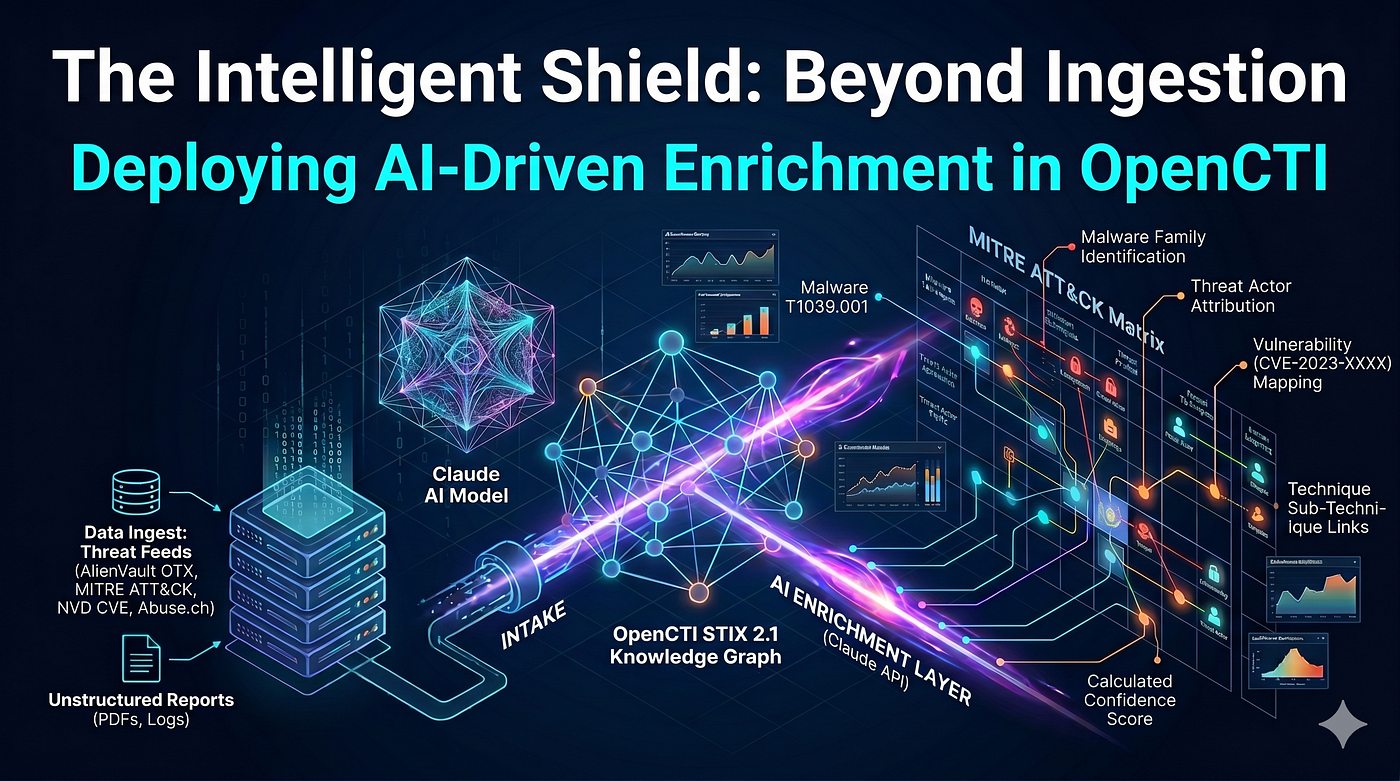
In an era of relentless and complex cyber attacks, traditional, manual threat intelligence cannot keep pace. Security teams are overwhelmed by data fragmentation and the critical lack of context. “The Intelligent Shield” introduces a new paradigm: beyond simply ingesting data, it’s about deploying advanced, automated machine learning pipelines for AI-driven enrichment.
This guide demonstrates how to integrate state-of-the-art Large Language Models (LLMs), such as Claude AI , into an OpenCTI ecosystem. By leveraging the OpenCTI STIX 2.1 Knowledge Graph and natural language processing, this architecture converts disparate, unstructured data feeds into high-fidelity, actionable intelligence. It automatically builds context, executes deep mapping to frameworks like the MITRE ATT &CK Matrix, and generates calculated, real-time Confidence Scores , enabling organizations to proactively strengthen their defenses with an intuitive, automated Intelligent Shield.
Table of Contents
- What is OpenCTI?
- Core Capabilities
- Architecture Overview
- Threat Intelligence Feeds
- AI Integration Layer
- Prerequisites
- Docker Compose Deployment
- Connector Configuration
- AI-Driven Enrichment Pipeline
- Post-Deployment Hardening
- Operational Runbook
- Troubleshooting
- Usage Examples
1. What is OpenCTI?
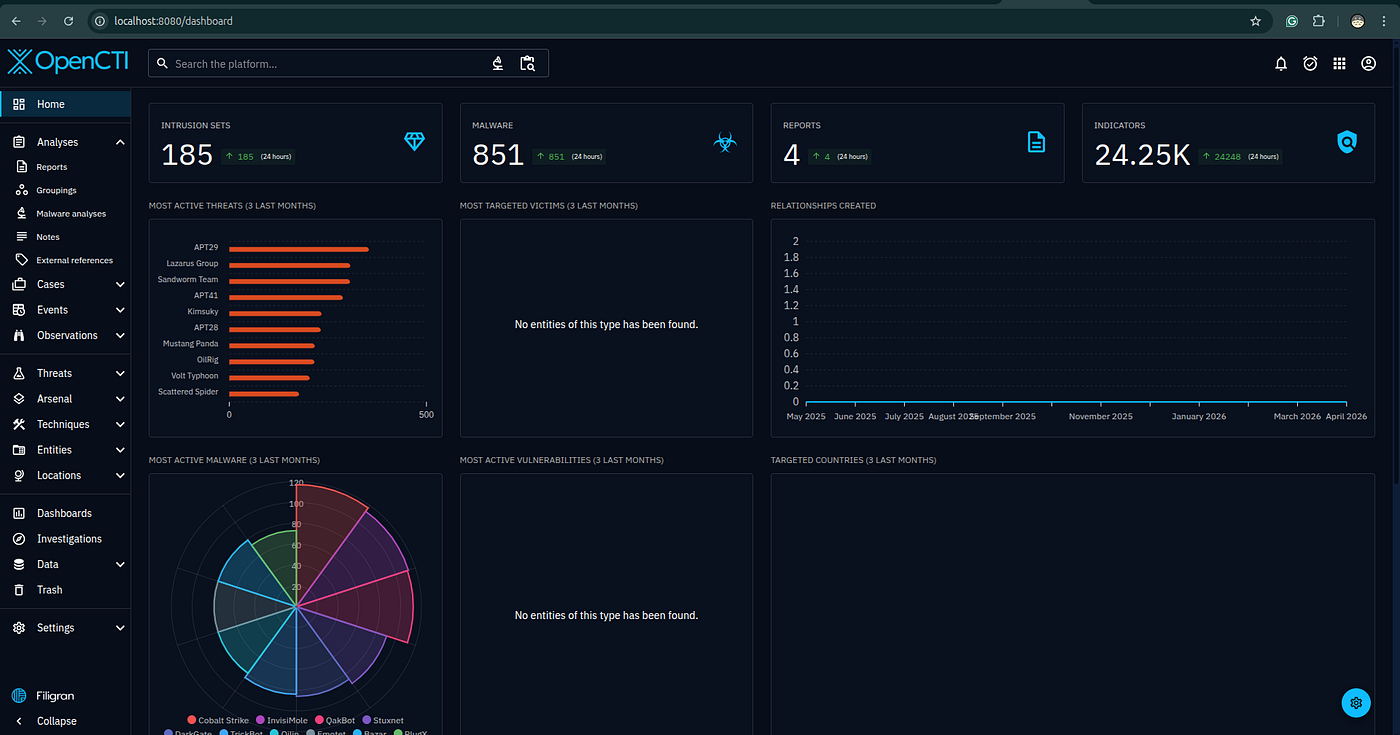
OpenCTI (Open Cyber Threat Intelligence) is an open-source platform developed by Filigran (formerly a project of ANSSI, the French national cybersecurity agency) for structuring, storing, organizing, visualizing, and sharing cyber threat intelligence (CTI).
It implements the STIX 2.1 (Structured Threat Information eXpression) standard as its native data model and exposes a GraphQL API for all read/write operations. Every object — threat actors, campaigns, malware, vulnerabilities, indicators, attack patterns — is stored as a STIX Domain Object (SDO) or STIX Relationship Object (SRO) backed by two databases:
- ElasticSearch / OpenSearch — full-text search and analytics
- Apache Cassandra (via JanusGraph) — graph relationship storage
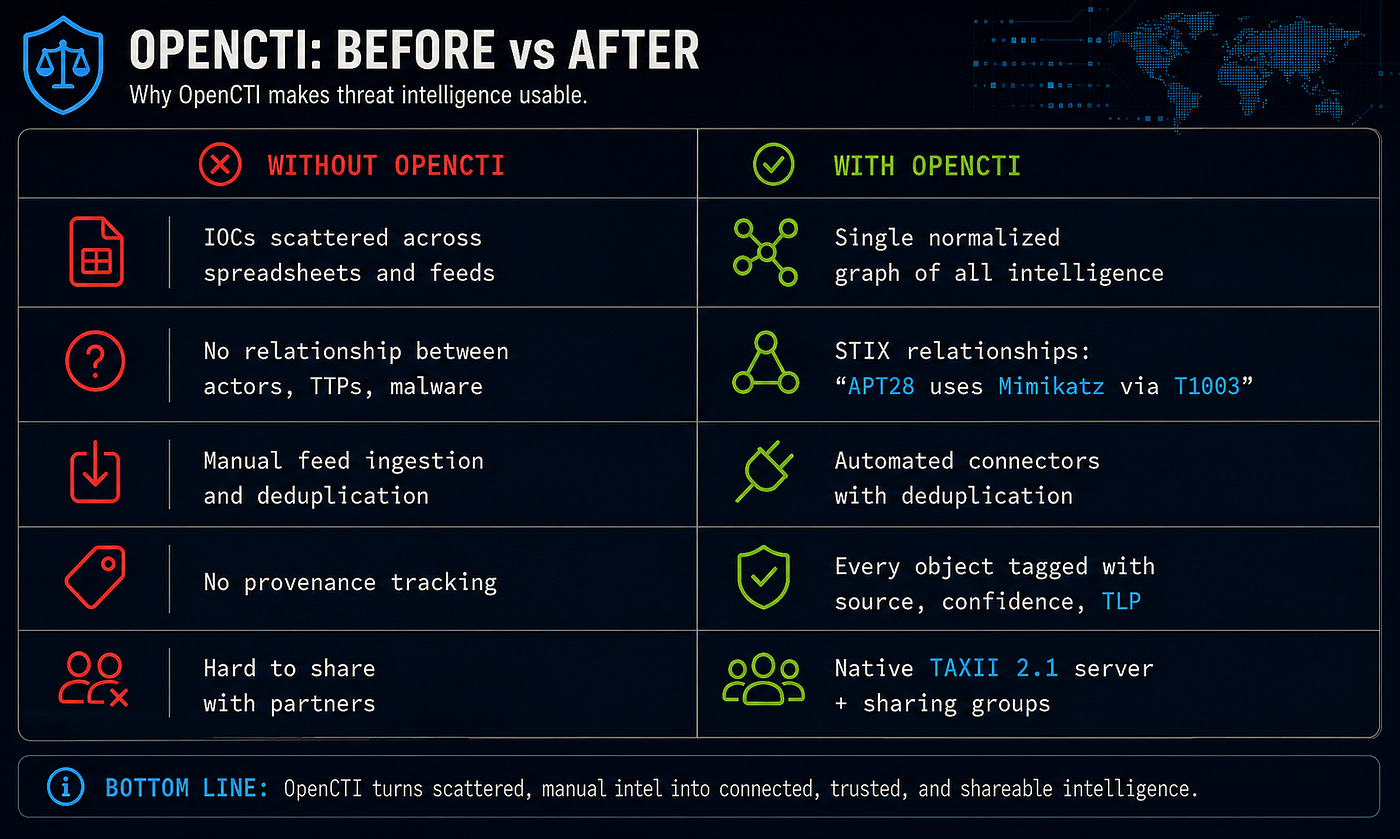
Why OpenCTI?
2. Core Capabilities
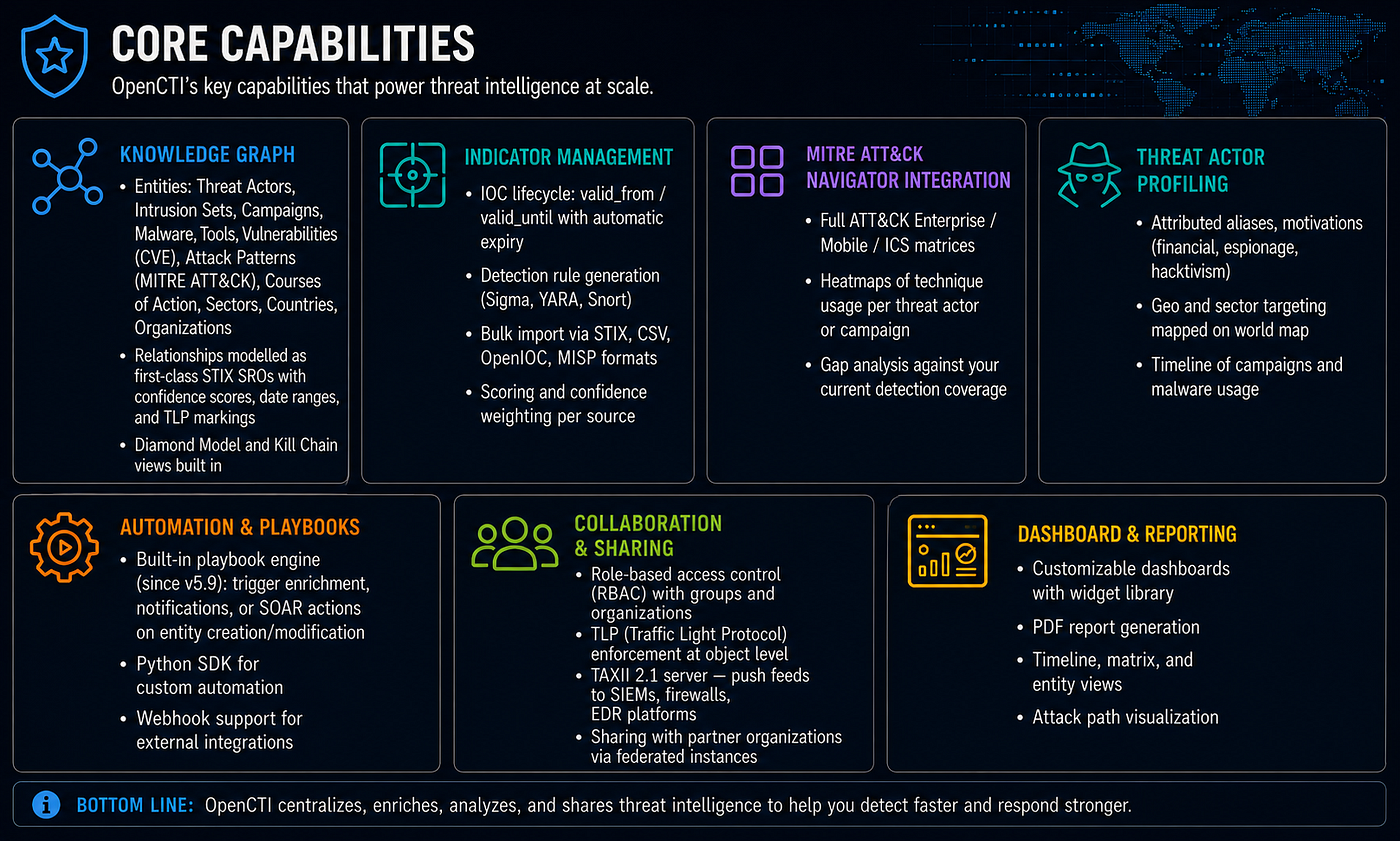
2.1 Knowledge Graph
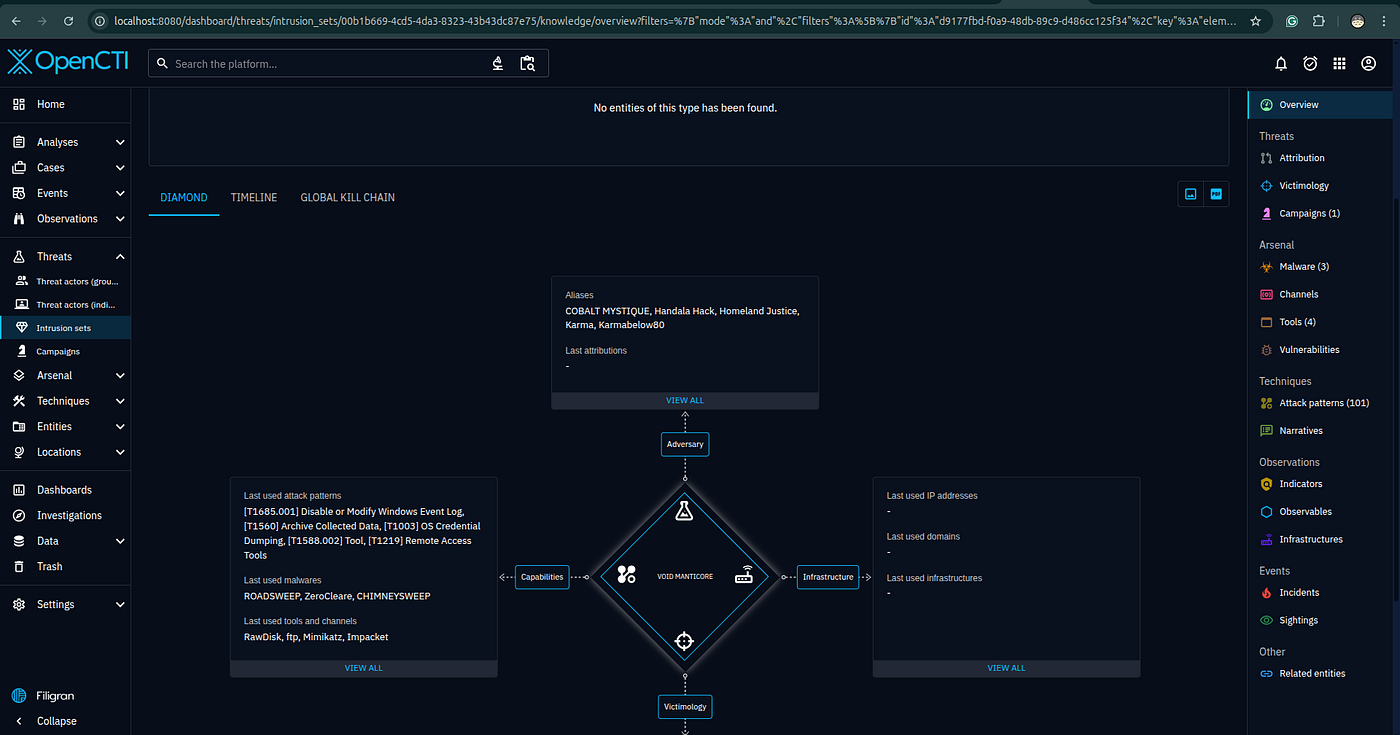
- Entities: Threat Actors, Intrusion Sets, Campaigns, Malware, Tools, Vulnerabilities (CVE), Attack Patterns (MITRE ATT&CK), Courses of Action, Sectors, Countries, Organizations
- Relationships modelled as first-class STIX SROs with confidence scores, date ranges, and TLP markings
- Diamond Model and Kill Chain views built in
2.2 Indicator Management
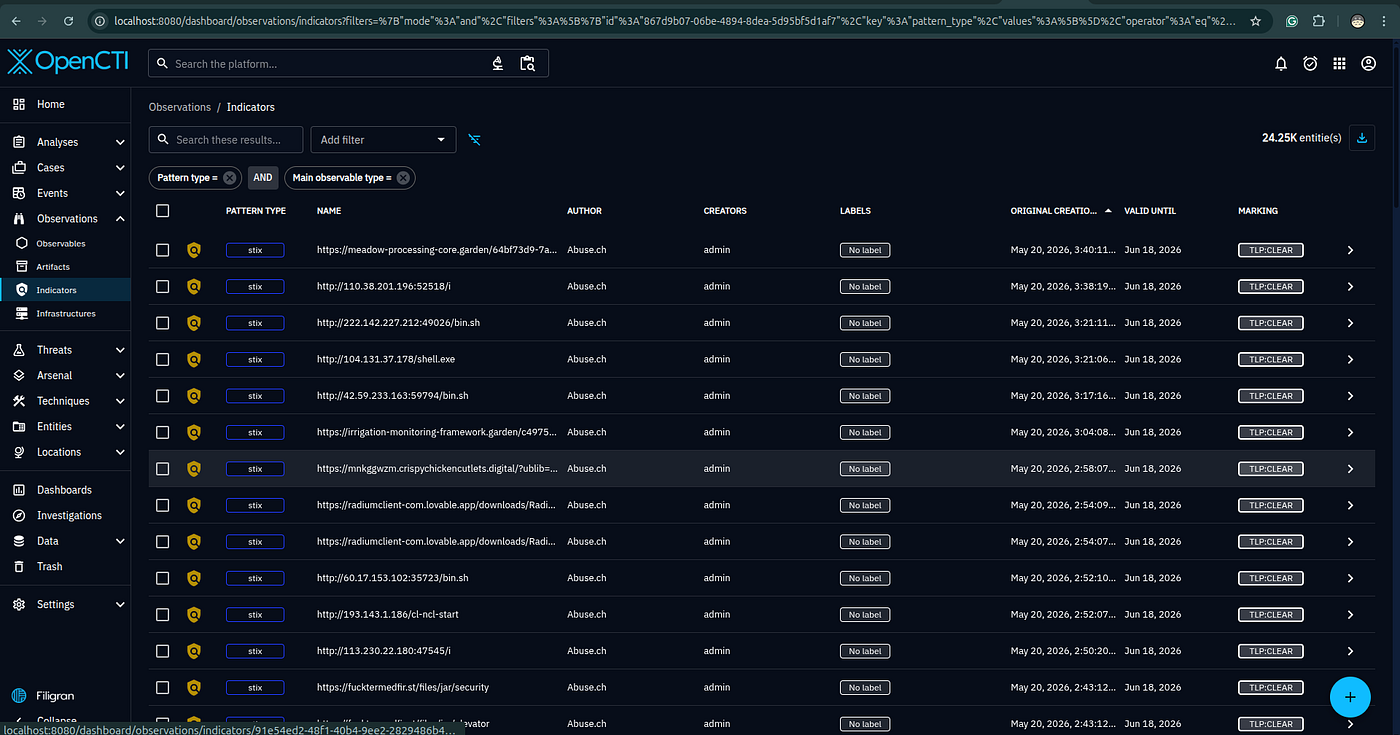
- IOC lifecycle:
valid_from/valid_untilwith automatic expiry - Detection rule generation (Sigma, YARA, Snort)
- Bulk import via STIX, CSV, OpenIOC, MISP formats
- Scoring and confidence weighting per source
2.3 MITRE ATT&CK Navigator Integration
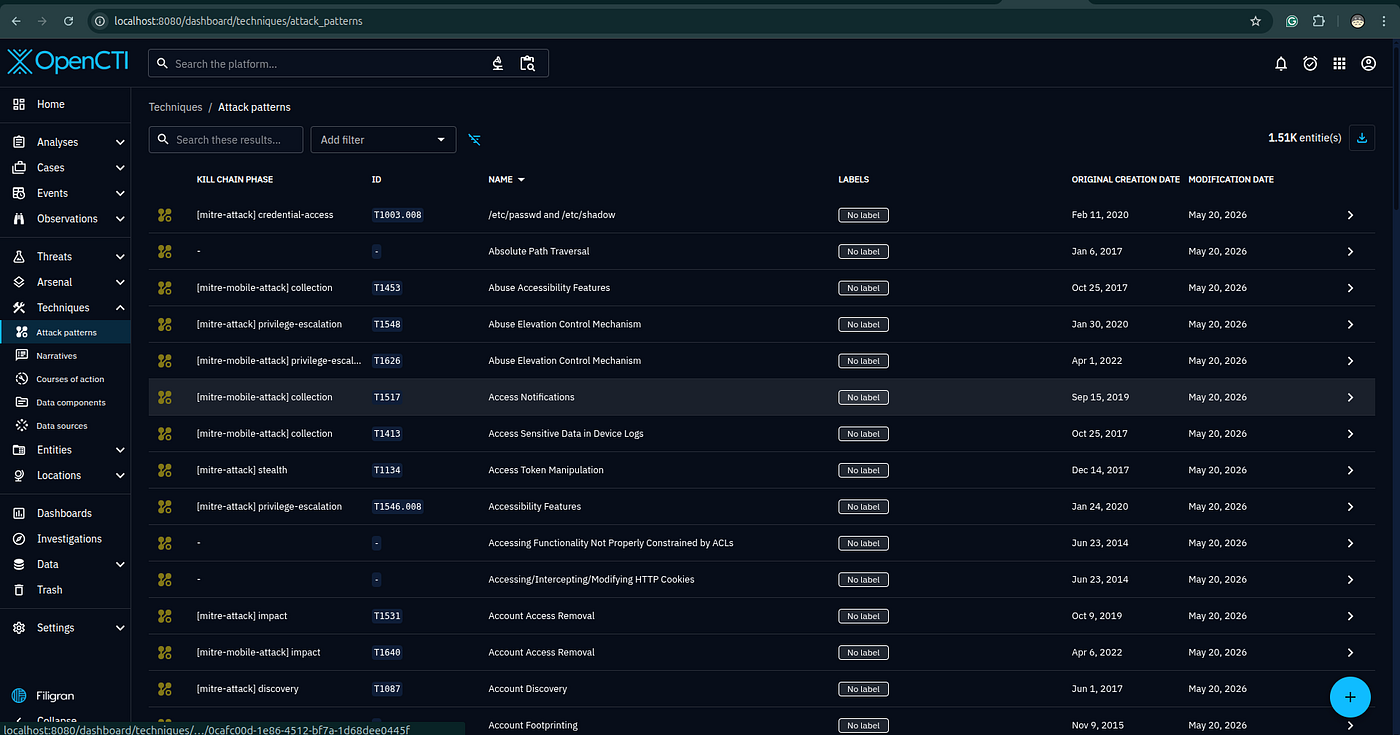
- Full ATT&CK Enterprise / Mobile / ICS matrices
- Heatmaps of technique usage per threat actor or campaign
- Gap analysis against your current detection coverage
2.4 Threat Actor Profiling
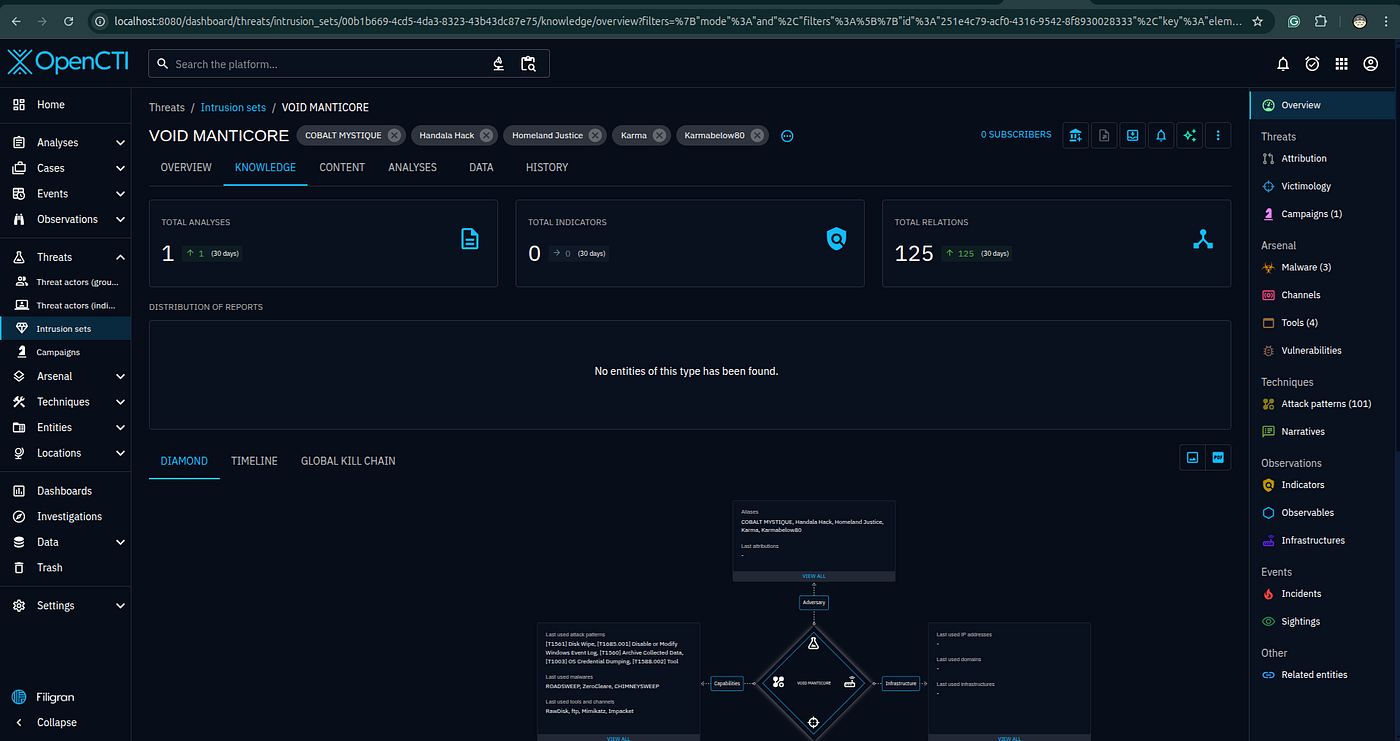
- Attributed aliases, motivations (financial, espionage, hacktivism)
- Geo and sector targeting mapped on world map
- Timeline of campaigns and malware usage
2.5 Automation & Playbooks
- Built-in playbook engine (since v5.9): trigger enrichment, notifications, or SOAR actions on entity creation/modification(Enterprise Edition only)
- Python SDK for custom automation
- Webhook support for external integrations
2.6 Collaboration & Sharing
- Role-based access control (RBAC) with groups and organizations
- TLP (Traffic Light Protocol) enforcement at object level
- TAXII 2.1 server — push feeds to SIEMs, firewalls, EDR platforms
- Sharing with partner organizations via federated instances
2.7 Dashboard & Reporting
- Customizable dashboards with widget library
- PDF report generation
- Timeline, matrix, and entity views
- Attack path visualization
3. Architecture Overview
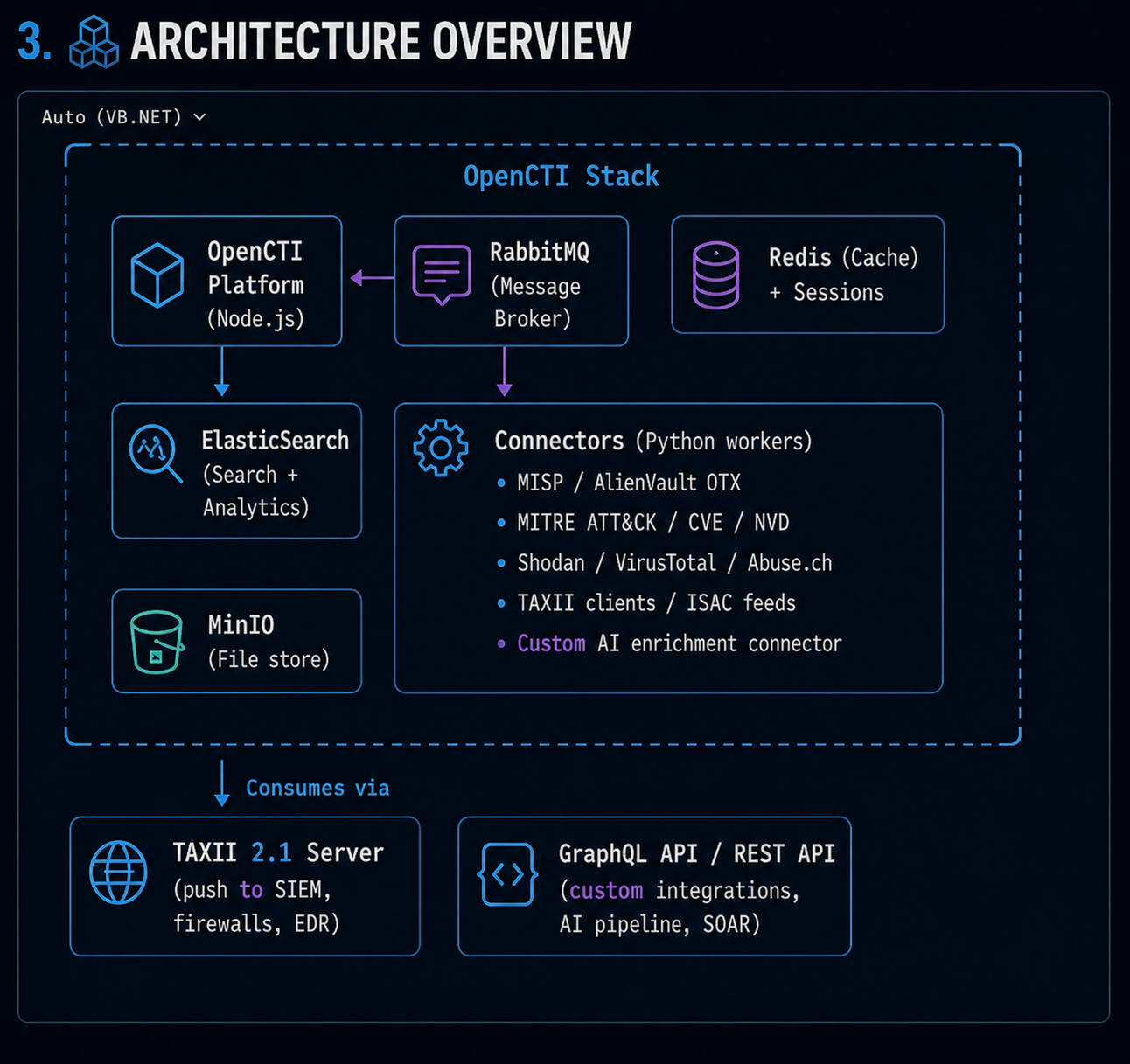
4. Threat Intelligence Feeds
4.1 Free / Open-Source Feeds
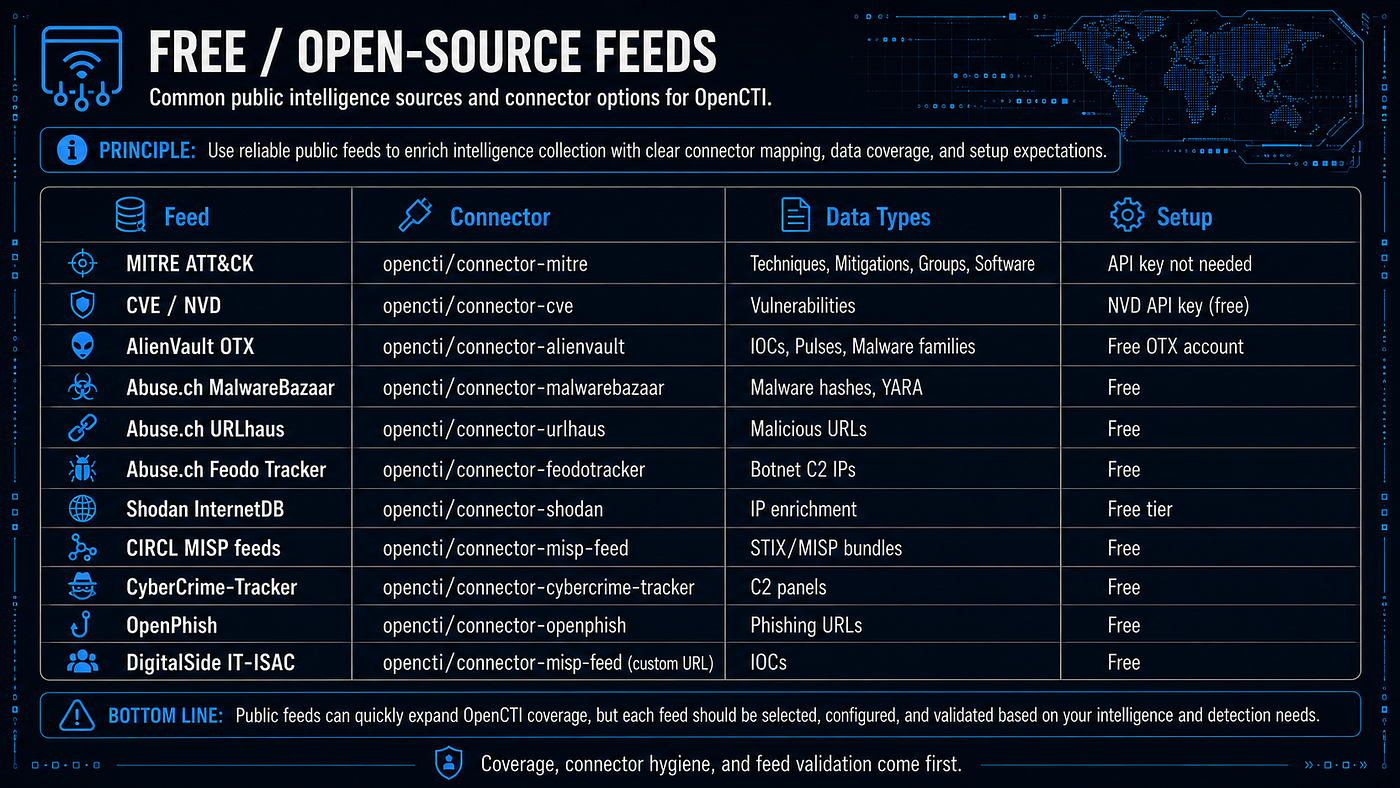
- MITRE ATT &CK — Connector:
opencti/connector-mitre— Data: Techniques, mitigations, groups, software — Setup: API key not needed. - CVE / NVD — Connector:
opencti/connector-cve— Data: Vulnerabilities — Setup: NVD API key recommended/required depending on configuration. - AlienVault OTX — Connector:
opencti/connector-alienvault— Data: IOCs, pulses, malware families — Setup: Free OTX account/API key. - Abuse.ch MalwareBazaar — Connector:
opencti/connector-malwarebazaar— Data: Malware hashes, malware metadata, file observables — Setup: Free MalwareBazaar API key. - Abuse.ch URLhaus — Connector:
opencti/connector-urlhaus— Data: Malicious URLs — Setup: Public feed; no API key for CSV feed. - Abuse.ch Feodo Tracker — Connector: use
[opencti/connector-misp-feed](https://github.com/OpenCTI-Platform/connectors/tree/master/external-import/misp-feed?utm_source=chatgpt.com)or ingest the Feodo CSV/blocklist feed manually — Data: Botnet C2 IPs — Setup: Free. - Shodan InternetDB — Connector:
opencti/connector-shodan-internetdb— Data: IP enrichment, domains, CPEs, CVEs, tags — Setup: No API key required. - MISP Default / CIRCL OSINT Feeds — Connector:
[opencti/connector-misp-feed](https://github.com/OpenCTI-Platform/connectors/tree/master/external-import/misp-feed?utm_source=chatgpt.com)— Data: STIX/MISP bundles, indicators, observables — Setup: Free. - CyberCrime-Tracker feed via MISP default feeds — Connector: use
[opencti/connector-misp-feed](https://github.com/OpenCTI-Platform/connectors/tree/master/external-import/misp-feed?utm_source=chatgpt.com)rather than a dedicated current connector — Data: C2 panels / freetext indicators — Setup: Free. - OpenPhish — Connector: no verified current dedicated OpenCTI connector in the main repo; use generic feed ingestion where suitable — Data: Phishing URLs — Setup: Free/community feed options.
- DigitalSide IT-ISAC MISP Feed — Connector:
[opencti/connector-misp-feed](https://github.com/OpenCTI-Platform/connectors/tree/master/external-import/misp-feed?utm_source=chatgpt.com)with customMISP_FEED_URL— Data: IOCs / MISP-format feed — Setup: Free.
4.2 Commercial Feeds (require license/API key)
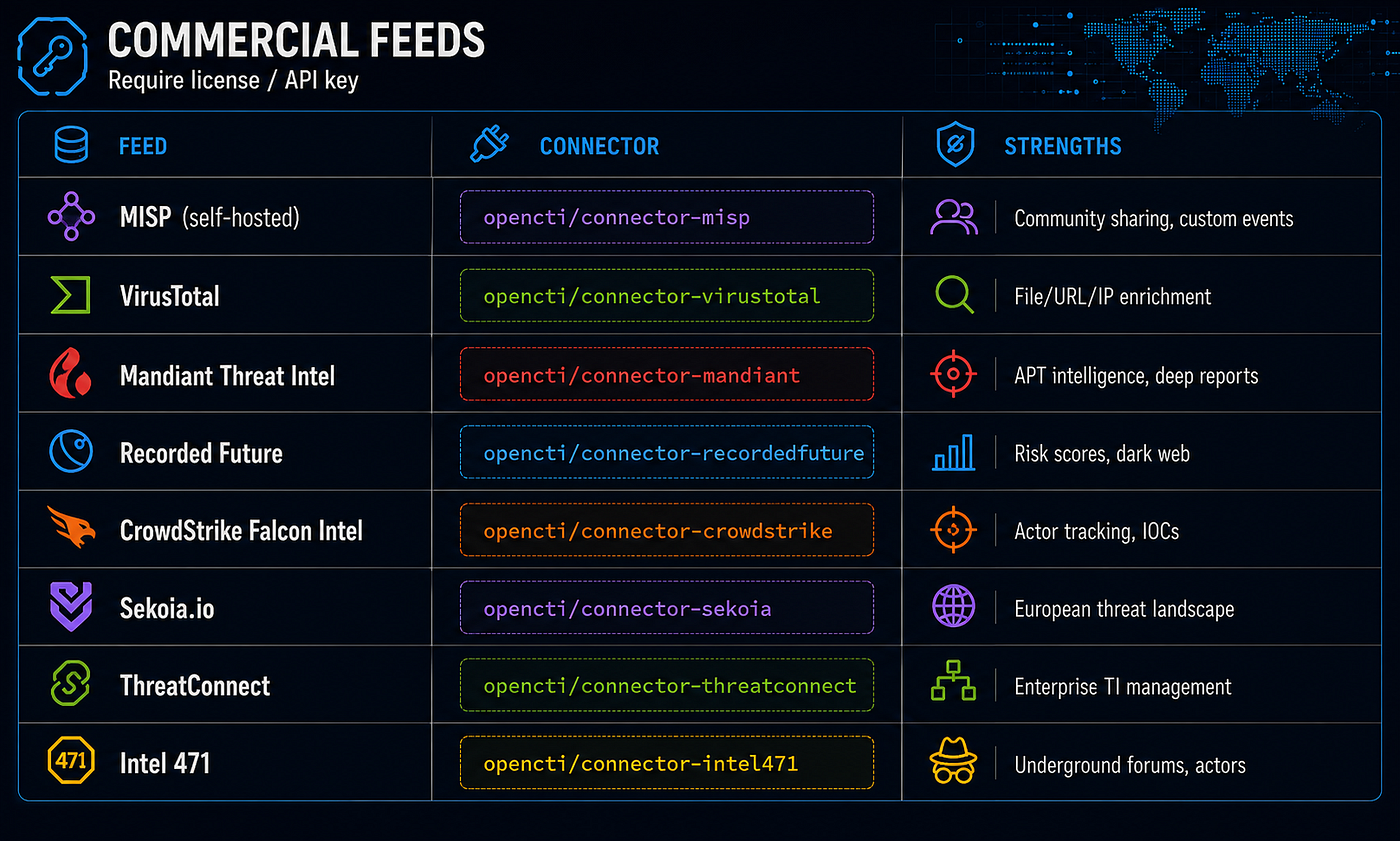
- MISP — self-hosted — Connector:
opencti/connector-misp— Strengths: community sharing, custom events, internal/private CTI exchange. The OpenCTI repo lists bothmispandmisp-feed; usemispfor a live MISP instance with API access, andmisp-feedfor static MISP feed URLs. - VirusTotal / Google Threat Intelligence — Connector:
opencti/connector-virustotal— Strengths: file, URL, domain, and IP enrichment. The connector is underinternal-enrichment, notexternal-import. - Mandiant Threat Intelligence / Google Threat Intelligence — Connector:
opencti/connector-mandiant— Strengths: APT intelligence, actor reporting, malware/campaign context. - Recorded Future — Connectors:
opencti/connector-recordedfutureandopencti/connector-recordedfuture-enrichment— Strengths: risk lists, enrichment, vulnerability/contextual intelligence, dark web and external threat data. Recorded Future documentation describes the OpenCTI integration as two components: an enrichment connector and a Recorded Future connector. - CrowdStrike Falcon Intelligence — Connector:
opencti/connector-crowdstrike— Strengths: actor tracking, indicators, adversary intelligence, Falcon ecosystem context. - Sekoia.io Intelligence — Connector:
opencti/connector-sekoia— Strengths: European threat landscape, CTI feed ingestion, actor/campaign context. Sekoia’s own documentation points to the OpenCTI GitHub connector path. - ThreatConnect — Connector: no verified current dedicated connector in the main OpenCTI connector tree — Strengths: enterprise TI management, source aggregation, workflow and case management. I found an OpenCTI GitHub label/feature reference for “threat connect,” but not a confirmed current connector folder equivalent to
external-import/threatconnect. - Intel 471 — Connectors:
opencti/connector-intel471,opencti/connector-intel471-darknet, andopencti/connector-intel471_v2— Strengths: underground forums, cybercrime actors, malware, infrastructure, dark web intelligence.
4.3 ISAC / Government Feeds
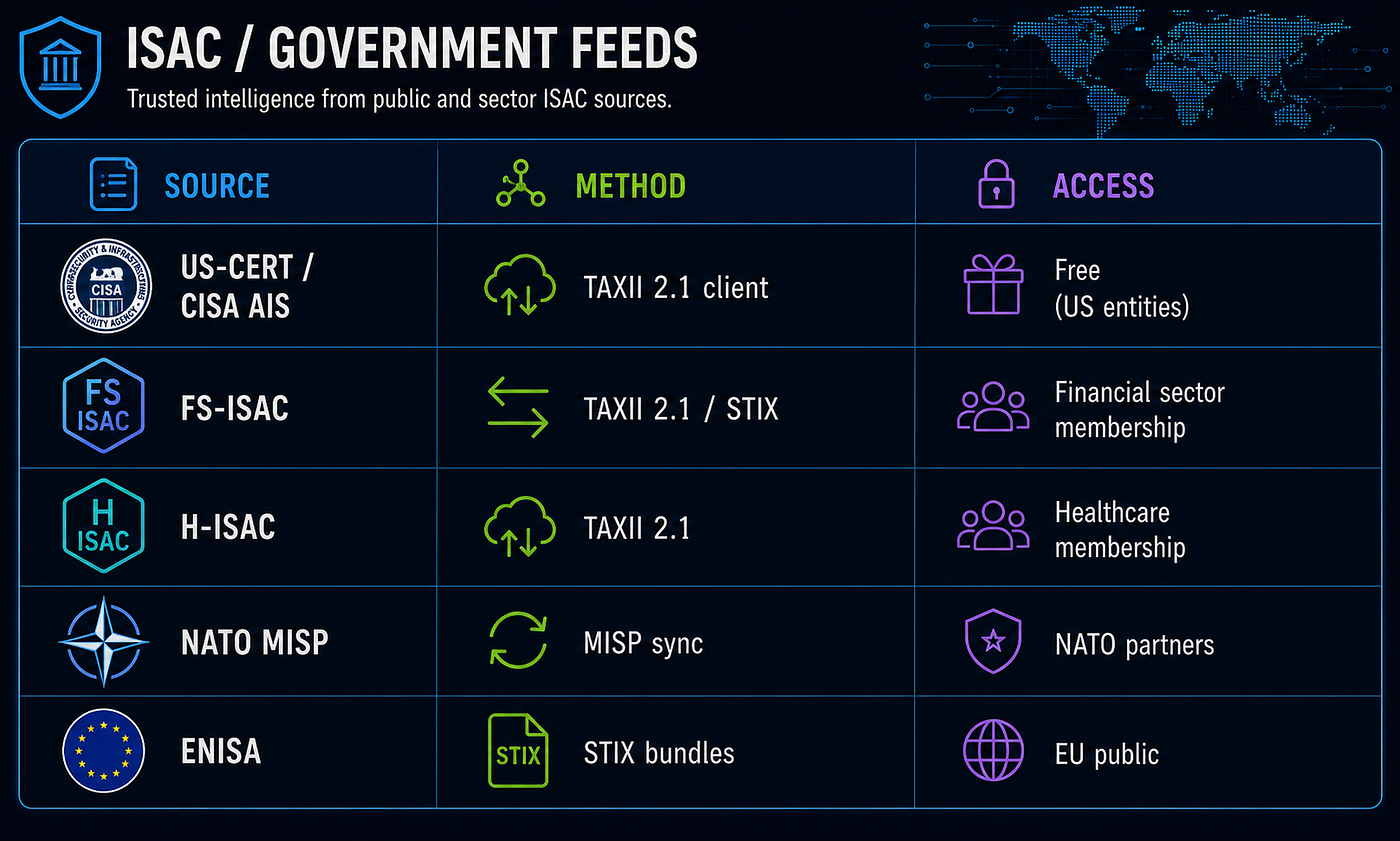
- CISA Automated Indicator Sharing / AIS — Method: TAXII/STIX client, AIS 2.0 uses TAXII 2.1 — Access: free service for eligible participants; contact CISA to onboard.
- FS-ISAC — Method: STIX/TAXII and MISP automated feeds — Access: financial-sector membership; automated-feed credentials/licensing must be explicitly requested.
- Health-ISAC / H-ISAC — Method: HITS indicator-sharing feed; STIX/TAXII-compatible threat intelligence sharing — Access: healthcare-sector membership / Health-ISAC member access.
- NATO MISP Community — Method: MISP community / MISP sync — Access: official government cyber-defense entities from NATO nations, sponsored by their national representative in the NATO Multinational MISP Steering Board.
- ENISA Threat Landscape — Method: public reports and CTI publications; not a confirmed public TAXII/STIX feed. ENISA’s CTL methodology references STIX 2.1 as a common CTI representation format, but this is different from offering a public feed endpoint.
4.4 Feed Priority and TLP Assignment
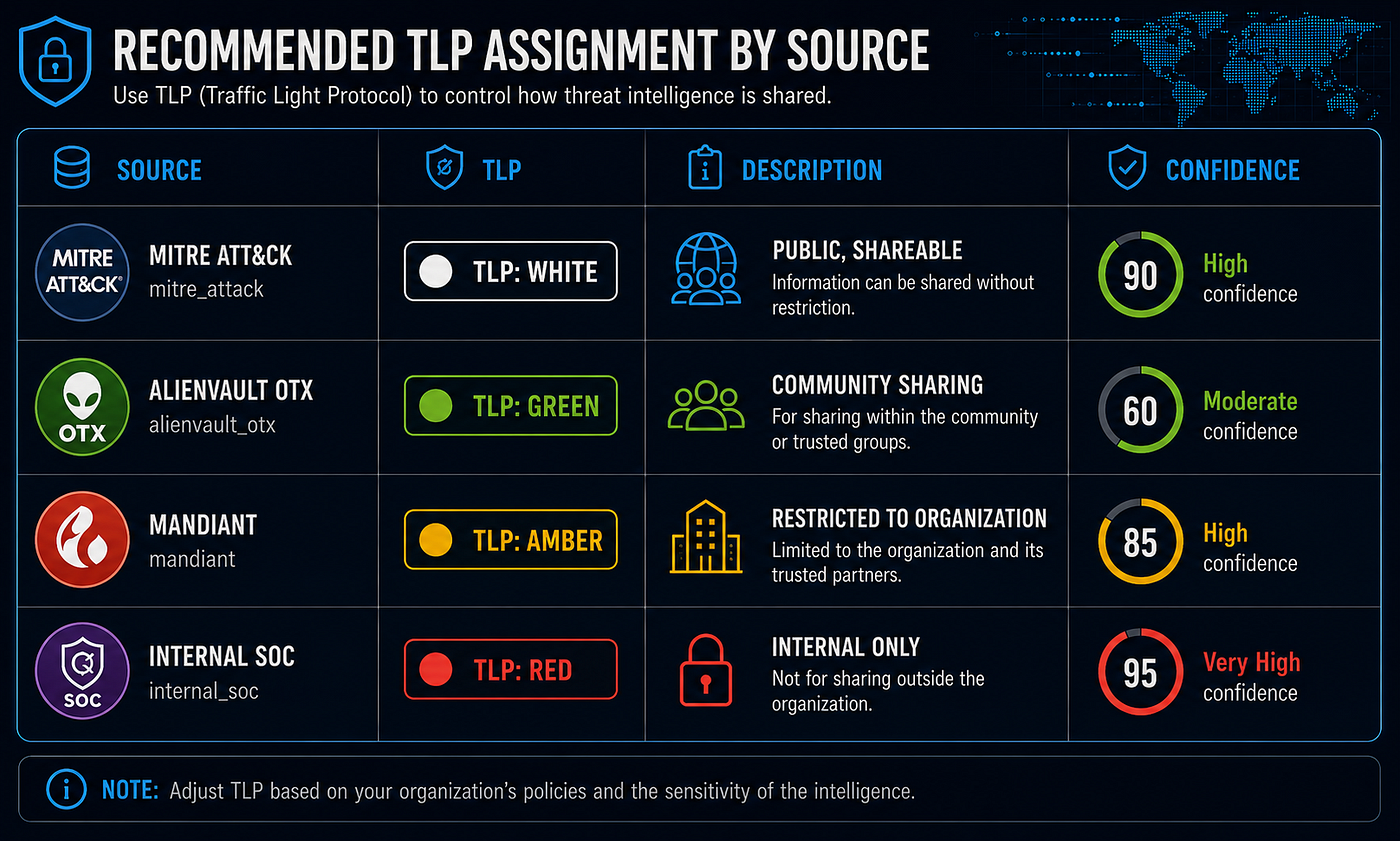
# Recommended TLP assignment by source
feeds:
  - source: mitre_attack
    tlp: WHITE          # public, shareable
    confidence: 90
  - source: alienvault_otx
    tlp: GREEN          # community sharing
    confidence: 60
  - source: mandiant
    tlp: AMBER          # restricted to org
    confidence: 85
  - source: internal_soc
    tlp: RED            # internal only
    confidence: 95
5. AI Integration Layer
This is the “AI-driven” layer on top of standard OpenCTI — a custom connector and MCP server that adds:
5.1 AI Enrichment Connector (Claude API)
- On every new
Report,Malware, orThreat-Actoringested → call Claude API - Extract structured STIX entities from unstructured text (PDFs, blog posts)
- Summarize long reports into 3-sentence executive briefs
- Score indicator relevance against your organization’s sector profile
- Suggest ATT&CK technique mappings from narrative descriptions
5.2 AI Pipeline Architecture
New Report ingested
        │
        ▼
[AI Enrichment Connector]
        │
        ├─► Claude API: Extract entities → creates STIX SDOs
        ├─► Claude API: Map to ATT&CK techniques
        ├─► Claude API: Generate executive summary
        └─► Claude API: Score severity for your sector
                │
                ▼
        Update Report in OpenCTI
        (summary, related entities, confidence scores)
6. Prerequisites
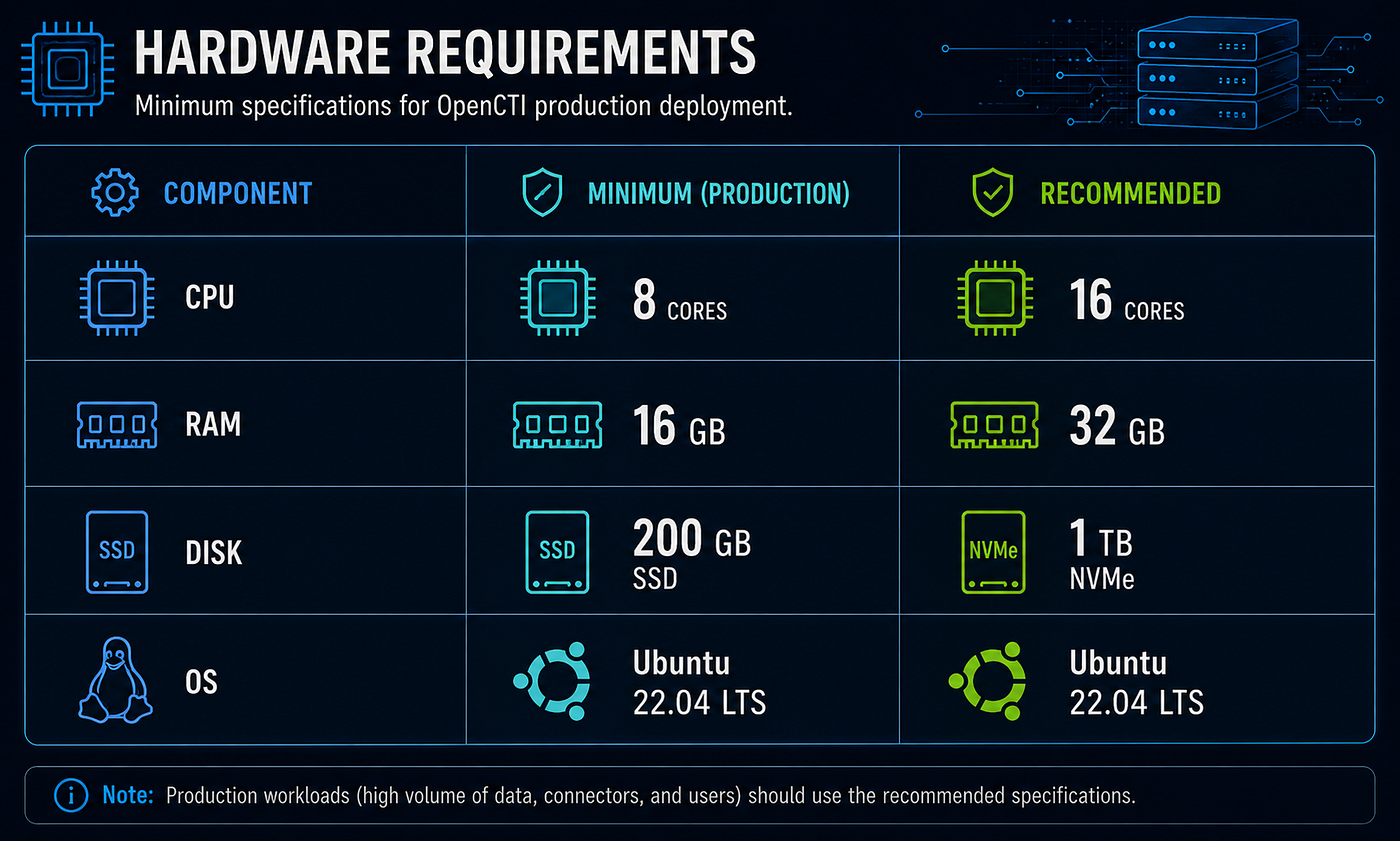
6.1 Hardware (minimum production)
6.2 Software
# Install Docker Engine (Ubuntu 22.04)
sudo apt-get update
sudo apt-get install -y ca-certificates curl gnupg lsb-release
sudo install -m 0755 -d /etc/apt/keyrings
curl -fsSL https://download.docker.com/linux/ubuntu/gpg | \
  sudo gpg --dearmor -o /etc/apt/keyrings/docker.gpg
sudo chmod a+r /etc/apt/keyrings/docker.gpg
echo "deb [arch=$(dpkg --print-architecture) signed-by=/etc/apt/keyrings/docker.gpg] \
  https://download.docker.com/linux/ubuntu $(lsb_release -cs) stable" | \
  sudo tee /etc/apt/sources.list.d/docker.list > /dev/null
sudo apt-get update
sudo apt-get install -y docker-ce docker-ce-cli containerd.io docker-compose-plugin
# Add user to docker group
sudo usermod -aG docker $USER
newgrp docker
# Verify
docker compose version

6.3 System Tuning (required for ElasticSearch)
# ElasticSearch requires high vm.max_map_count
sudo sysctl -w vm.max_map_count=1048575
echo "vm.max_map_count=1048575" | sudo tee -a /etc/sysctl.conf

# Increase file descriptor limits
echo "* soft nofile 65536" | sudo tee -a /etc/security/limits.conf
echo "* hard nofile 65536" | sudo tee -a /etc/security/limits.conf
7. Docker Compose Deployment
7.1 Deploy from GitHub (recommended)
The fastest deployment path is to clone the maintained project repository and create a local .env from the sanitized template:
cd /home/andrey
git clone https://github.com/anpa1200/opencti-intelligent-shield.git openCTI
cd /home/andrey/openCTI

# Create local secrets/config. This file is ignored by Git.
cp .env.example .env
nano .env

# Start the full stack after filling in .env
./scripts/start-all.sh
This gives you the Docker Compose files, OpenCTI patches, AI enrichment connector, helper scripts, and Docusaurus documentation in one checkout. Use the manual sections below if you want to recreate the files by hand or compare the generated content.
7.2 Directory Structure
/home/andrey/openCTI/
├── .env                          # secrets and config
├── docker-compose.yml            # core stack
├── docker-compose.connectors.yml # feed connectors
├── docker-compose.ai.yml         # AI enrichment connector
├── patches/
│   └── back.js                   # ILM race condition fix (ES 8.13 + OpenCTI 6.2.0)
└── connectors/
    └── ai-enrichment/            # custom AI connector source
7.3 Environment File
cat > /home/andrey/openCTI/.env << 'EOF'
# === Core ===
OPENCTI_ADMIN_EMAIL=admin@opencti.local
OPENCTI_ADMIN_PASSWORD=CHANGE_ME_STRONG_PASSWORD
OPENCTI_ADMIN_TOKEN=CHANGE_ME_UUID4_TOKEN
OPENCTI_BASE_URL=http://localhost:8080

# === Secrets ===
APP__ADMIN__TOKEN=CHANGE_ME_UUID4_TOKEN
APP__SECRET_KEY=CHANGE_ME_SECRET

# === ElasticSearch ===
# NOTE: key is ELASTIC_PASSWORD, not ELASTIC_AUTH
ELASTIC_PASSWORD=CHANGE_ME_ELASTIC_PASS

# === Redis ===
REDIS_PASSWORD=opencti

# === MinIO ===
MINIO_ROOT_USER=opencti
MINIO_ROOT_PASSWORD=CHANGE_ME_MINIO_PASS

# === RabbitMQ ===
RABBITMQ_DEFAULT_USER=opencti
RABBITMQ_DEFAULT_PASS=CHANGE_ME_RABBITMQ_PASS

# === Connector IDs (unique UUID4 per connector — NOT used for auth) ===
CONNECTOR_MITRE_TOKEN=CHANGE_ME_UUID4
CONNECTOR_CVE_TOKEN=CHANGE_ME_UUID4
CONNECTOR_ALIENVAULT_TOKEN=CHANGE_ME_UUID4
CONNECTOR_ABUSE_SSL_TOKEN=CHANGE_ME_UUID4
CONNECTOR_URLHAUS_TOKEN=CHANGE_ME_UUID4
CONNECTOR_AI_ENRICHMENT_TOKEN=CHANGE_ME_UUID4

# === External API keys ===
ALIENVAULT_API_KEY=your_otx_key_here
NVD_API_KEY=your_nvd_api_key_here     # UUID format from nvd.nist.gov/developers/request-an-api-key
ANTHROPIC_API_KEY=your_claude_api_key_here
EOF

# Generate unique UUIDs for connector IDs
python3 -c "import uuid; [print(uuid.uuid4()) for _ in range(8)]"# Generate proper tokens
python3 -c "import uuid; [print(f'Token: {uuid.uuid4()}') for _ in range(10)]"
7.4 Core Stack — docker-compose.yml
nano docker-compose.yml


version: "3"
services:
  redis:
    image: redis:7.2
    restart: always
    volumes:
      - redisdata:/data
    command: redis-server --requirepass ${REDIS_PASSWORD:-opencti}
  elasticsearch:
    image: docker.elastic.co/elasticsearch/elasticsearch:8.13.0
    volumes:
      - esdata:/usr/share/elasticsearch/data
    environment:
      - discovery.type=single-node
      - xpack.ml.enabled=false
      - xpack.security.enabled=true
      - ELASTIC_PASSWORD=${ELASTIC_PASSWORD:-CHANGE_ME}
      - "ES_JAVA_OPTS=-Xms2g -Xmx2g"
      - cluster.routing.allocation.disk.threshold_enabled=false
    ulimits:
      memlock:
        soft: -1
        hard: -1
    restart: always
  minio:
    image: minio/minio:RELEASE.2024-01-16T16-07-38Z
    volumes:
      - miniodata:/data
    ports:
      - "9001:9001"   # console
    environment:
      MINIO_ROOT_USER: ${MINIO_ROOT_USER:-opencti}
      MINIO_ROOT_PASSWORD: ${MINIO_ROOT_PASSWORD:-CHANGE_ME}
    command: server /data --console-address ":9001"
    restart: always
  rabbitmq:
    image: rabbitmq:3.13-management
    environment:
      RABBITMQ_DEFAULT_USER: ${RABBITMQ_DEFAULT_USER:-opencti}
      RABBITMQ_DEFAULT_PASS: ${RABBITMQ_DEFAULT_PASS:-CHANGE_ME}
      RABBITMQ_NODENAME: rabbit01@localhost
    volumes:
      - rabbitmqdata:/var/lib/rabbitmq
    restart: always
  opencti:
    image: opencti/platform:6.2.0
    environment:
      NODE_OPTIONS: --max-old-space-size=8096
      APP__PORT: 8080
      APP__BASE_URL: ${OPENCTI_BASE_URL:-http://localhost:8080}
      APP__ADMIN__EMAIL: ${OPENCTI_ADMIN_EMAIL}
      APP__ADMIN__PASSWORD: ${OPENCTI_ADMIN_PASSWORD}
      APP__ADMIN__TOKEN: ${OPENCTI_ADMIN_TOKEN}
      APP__APP_LOGS__LOGS_LEVEL: error
      REDIS__HOSTNAME: redis
      REDIS__PORT: 6379
      REDIS__USE_SSL: "false"
      REDIS__PASSWORD: ${REDIS_PASSWORD:-opencti}
      ELASTICSEARCH__URL: http://elasticsearch:9200
      ELASTICSEARCH__USERNAME: elastic
      ELASTICSEARCH__PASSWORD: ${ELASTIC_PASSWORD:-CHANGE_ME}
      MINIO__ENDPOINT: minio
      MINIO__PORT: 9000
      MINIO__USE_SSL: "false"
      MINIO__ACCESS_KEY: ${MINIO_ROOT_USER:-opencti}
      MINIO__SECRET_KEY: ${MINIO_ROOT_PASSWORD:-CHANGE_ME}
      RABBITMQ__HOSTNAME: rabbitmq
      RABBITMQ__PORT: 5672
      RABBITMQ__USERNAME: ${RABBITMQ_DEFAULT_USER:-opencti}
      RABBITMQ__PASSWORD: ${RABBITMQ_DEFAULT_PASS:-CHANGE_ME}
      SMTP__HOSTNAME: localhost
      PROVIDERS__LOCAL__STRATEGY: LocalStrategy
    volumes:
      - ./patches/back.js:/opt/opencti/build/back.js:ro
    ports:
      - "8080:8080"
    depends_on:
      - redis
      - elasticsearch
      - minio
      - rabbitmq
    restart: always
  worker:
    image: opencti/worker:6.2.0
    environment:
      OPENCTI_URL: http://opencti:8080
      OPENCTI_TOKEN: ${OPENCTI_ADMIN_TOKEN}
      WORKER_LOG_LEVEL: error
    depends_on:
      - opencti
    deploy:
      mode: replicated
      replicas: 3
    restart: always
volumes:
  esdata:
  redisdata:
  miniodata:
  rabbitmqdata:
networks:
  default:
    name: opencti_network
    external: true
7.5 Connectors — docker-compose.connectors.yml
nano docker-compose.connectors.yml


version: "3"
services:
  # MITRE ATT&CK (no API key needed)
  connector-mitre:
    image: opencti/connector-mitre:6.2.0
    environment:
      OPENCTI_URL: http://opencti:8080
      OPENCTI_TOKEN: ${OPENCTI_ADMIN_TOKEN}
      CONNECTOR_ID: ${CONNECTOR_MITRE_TOKEN}
      CONNECTOR_NAME: "MITRE ATT&CK"
      CONNECTOR_SCOPE: "marking-definition,identity,attack-pattern,course-of-action,intrusion-set,campaign,malware,tool,vulnerability,x-mitre-matrix,x-mitre-tactic,x-mitre-collection"
      CONNECTOR_CONFIDENCE_LEVEL: 75
      CONNECTOR_UPDATE_EXISTING_DATA: "true"
      CONNECTOR_LOG_LEVEL: error
      MITRE_REMOVE_STATEMENT_MARKING: "true"
      MITRE_INTERVAL: 7  # days between full refresh
    restart: always
  # CVE / NVD Vulnerabilities
  connector-cve:
    image: opencti/connector-cve:6.2.0
    volumes:
      - ./patches/cve/api.py:/opt/opencti-connector-cve/services/client/api.py:ro
      - ./patches/cve/vulnerability.py:/opt/opencti-connector-cve/services/client/vulnerability.py:ro
    environment:
      OPENCTI_URL: http://opencti:8080
      OPENCTI_TOKEN: ${OPENCTI_ADMIN_TOKEN}
      CONNECTOR_ID: ${CONNECTOR_CVE_TOKEN}
      CONNECTOR_NAME: "Common Vulnerabilities and Exposures"
      CONNECTOR_SCOPE: "identity,vulnerability"
      CONNECTOR_CONFIDENCE_LEVEL: 75
      CONNECTOR_LOG_LEVEL: info
      CONNECTOR_UPDATE_EXISTING_DATA: "true"
      CVE_BASE_URL: "https://services.nvd.nist.gov/rest/json/cves"
      CVE_API_KEY: ${NVD_API_KEY}
      CVE_MAX_DATE_RANGE: 120
      CVE_MAINTAIN_DATA: "true"
      CVE_INTERVAL: 2
    restart: always
  # AlienVault OTX
  connector-alienvault:
    image: opencti/connector-alienvault:6.2.0
    environment:
      OPENCTI_URL: http://opencti:8080
      OPENCTI_TOKEN: ${OPENCTI_ADMIN_TOKEN}
      CONNECTOR_ID: ${CONNECTOR_ALIENVAULT_TOKEN}
      CONNECTOR_NAME: "AlienVault OTX"
      CONNECTOR_SCOPE: "stix-core-object"
      CONNECTOR_CONFIDENCE_LEVEL: 40
      CONNECTOR_LOG_LEVEL: error
      ALIENVAULT_BASE_URL: "https://otx.alienvault.com"
      ALIENVAULT_API_KEY: ${ALIENVAULT_API_KEY}
      ALIENVAULT_TLP: "White"
      ALIENVAULT_CREATE_OBSERVABLES: "true"
      ALIENVAULT_CREATE_INDICATORS: "true"
      ALIENVAULT_PULSE_START_TIMESTAMP: "2020-01-01T00:00:00"
      ALIENVAULT_REPORT_STATUS: "New"
      ALIENVAULT_REPORT_TYPE: "threat-report"
      ALIENVAULT_GUESS_MALWARE: "false"
      ALIENVAULT_GUESS_CVE: "false"
      ALIENVAULT_INTERVAL: 30   # minutes
    restart: always
  # Abuse.ch SSL Blacklist
  connector-abuse-ssl:
    image: opencti/connector-abuse-ssl:6.2.0
    environment:
      OPENCTI_URL: http://opencti:8080
      OPENCTI_TOKEN: ${OPENCTI_ADMIN_TOKEN}
      CONNECTOR_ID: ${CONNECTOR_MALWAREBAZAAR_TOKEN}
      CONNECTOR_NAME: "Abuse.ch SSL Blacklist"
      CONNECTOR_SCOPE: "stix-core-object"
      CONNECTOR_CONFIDENCE_LEVEL: 50
      CONNECTOR_LOG_LEVEL: error
      ABUSE_SSL_URL: "https://sslbl.abuse.ch/blacklist/sslblacklist.csv"
      ABUSE_SSL_INTERVAL: 30  # minutes
    restart: always
  # Abuse.ch URLhaus
  connector-urlhaus:
    image: opencti/connector-urlhaus:6.2.0
    environment:
      OPENCTI_URL: http://opencti:8080
      OPENCTI_TOKEN: ${OPENCTI_ADMIN_TOKEN}
      CONNECTOR_ID: ${CONNECTOR_URLHAUS_TOKEN}
      CONNECTOR_NAME: "Abuse.ch URLhaus"
      CONNECTOR_SCOPE: "stix-core-object"
      CONNECTOR_CONFIDENCE_LEVEL: 40
      CONNECTOR_LOG_LEVEL: error
      URLHAUS_CSV_URL: "https://urlhaus.abuse.ch/downloads/csv_recent/"
      URLHAUS_IMPORT_OFFLINE: "true"
      URLHAUS_INTERVAL: 2  # hours
    restart: always
  connector-threatfox:
    image: opencti/connector-threatfox:6.2.0
    environment:
      OPENCTI_URL: http://opencti:8080
      OPENCTI_TOKEN: ${OPENCTI_ADMIN_TOKEN}
      CONNECTOR_ID: ${CONNECTOR_THREATFOX_TOKEN}
      CONNECTOR_NAME: "ThreatFox"
      CONNECTOR_SCOPE: "stix-core-object"
      CONNECTOR_CONFIDENCE_LEVEL: 40
      CONNECTOR_LOG_LEVEL: error
      THREATFOX_API_URL: "https://threatfox-api.abuse.ch/api/v1/"
      THREATFOX_CREATE_INDICATORS: "true"
      THREATFOX_CREATE_OBSERVABLES: "true"
      THREATFOX_INTERVAL: 3
    restart: always
  connector-import-document:
    image: opencti/connector-import-document:6.2.0
    environment:
      OPENCTI_URL: http://opencti:8080
      OPENCTI_TOKEN: ${OPENCTI_ADMIN_TOKEN}
      CONNECTOR_ID: ${CONNECTOR_IMPORT_DOCUMENT_TOKEN}
      CONNECTOR_NAME: "ImportDocument"
      CONNECTOR_SCOPE: "application/pdf,text/plain,text/html"
      CONNECTOR_AUTO: "true"
      CONNECTOR_CONFIDENCE_LEVEL: 75
      CONNECTOR_LOG_LEVEL: error
    restart: always
networks:
  default:
    name: opencti_network
    external: true
7.6 AI Enrichment Connector — docker-compose.ai.yml
nano docker-compose.ai.yml


version: "3"

services:
  connector-ai-enrichment:
    build:
      context: ./connectors/ai-enrichment
      dockerfile: Dockerfile
    environment:
      OPENCTI_URL: http://opencti:8080
      OPENCTI_TOKEN: ${OPENCTI_ADMIN_TOKEN}
      CONNECTOR_ID: ${CONNECTOR_AI_ENRICHMENT_TOKEN}
      CONNECTOR_NAME: "AI Enrichment (Claude)"
      CONNECTOR_LOG_LEVEL: info
      ANTHROPIC_API_KEY: ${ANTHROPIC_API_KEY}
      AI_MODEL: claude-opus-4-7
      AI_ENRICHMENT_REPORTS: "true"
      AI_ENRICHMENT_MALWARE: "true"
      AI_ENRICHMENT_THREAT_ACTORS: "true"
    restart: always

networks:
  default:
    name: opencti_network
    external: true
8. Connector Configuration
8.1 Start the Core Stack
cd /home/andrey/openCTI

# Pre-flight: ElasticSearch refuses allocation above 90% disk usage
df -h /var/lib/docker
# If > 90% full, run: docker system prune -a   (frees ~47 GB of unused images)

# Create the shared Docker network (idempotent — safe to re-run)
docker network create opencti_network 2>/dev/null || true

# Start core services
docker compose -f docker-compose.yml up -d

# Wait for ElasticSearch to be healthy before OpenCTI finishes initializing
until curl -s -u "elastic:${ELASTIC_PASSWORD}" \
  http://localhost:9200/_cluster/health | grep -q '"status":"green"\|"status":"yellow"'; do
  echo "Waiting for ES..."; sleep 5
done

# Watch logs — first-run index creation takes 5-10 minutes
# Look for "Listening on port 8080"
docker compose -f docker-compose.yml logs -f opencti | grep -E "Listening|ERROR|indices"
8.2 Start Connectors
# Start feed connectors (after OpenCTI is healthy)
docker compose -f docker-compose.connectors.yml up -d
# Verify connectors registered (wait ~60s for startup)
docker compose -f docker-compose.connectors.yml ps
8.3 Verify in UI
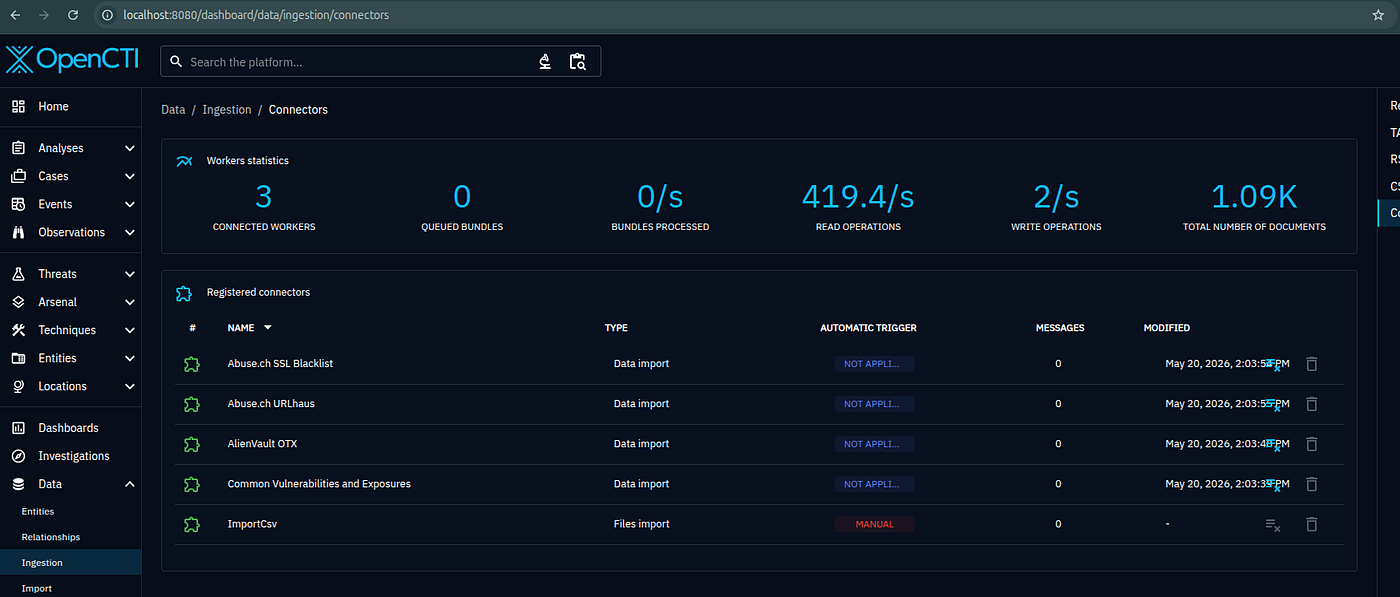
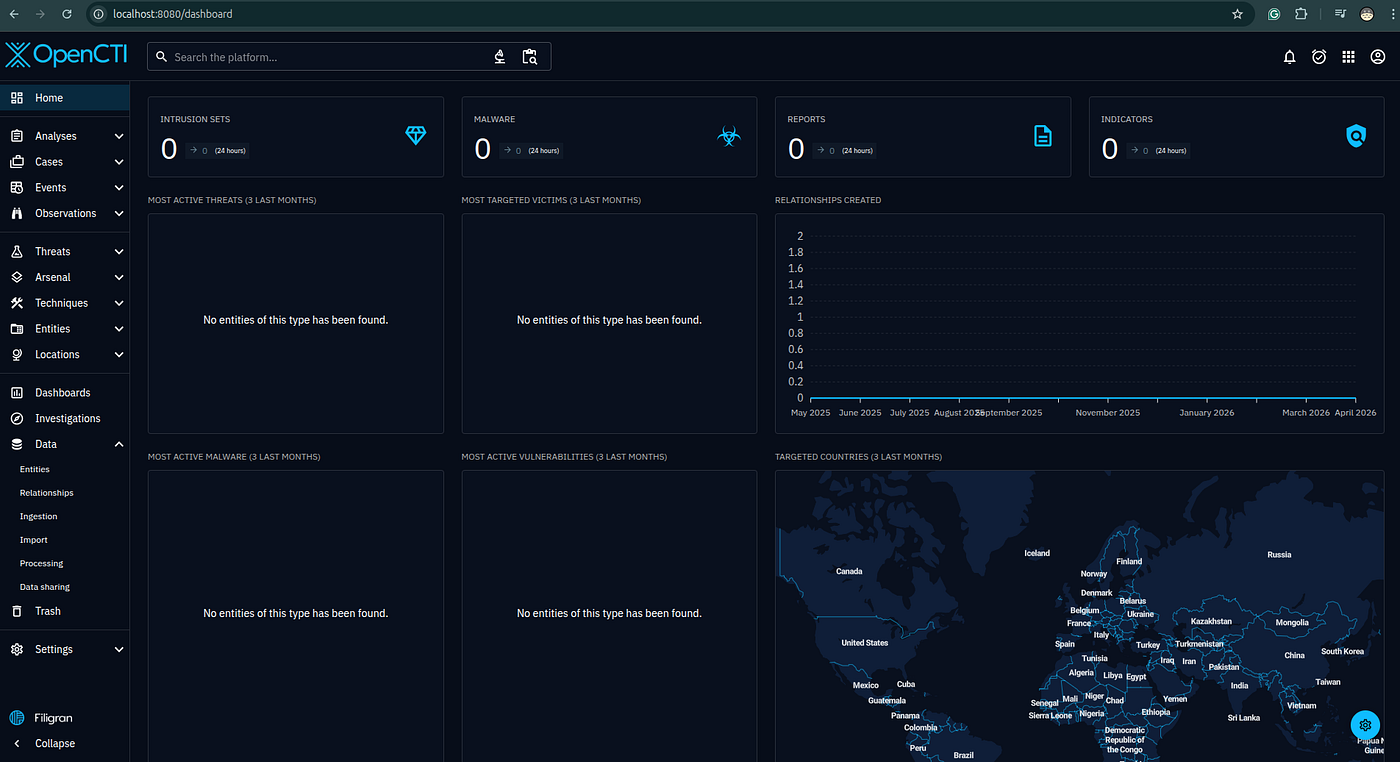
http://localhost:8080
Login: admin@opencti.local / <your password>Navigation:
  Data → Connectors → check all show status "connected"
  Knowledge → Malwares → should start populating within minutes
  Activities → Logs → watch ingest events
9. AI-Driven Enrichment Pipeline
Overview
The AI enrichment pipeline adds a Claude-powered layer on top of the standard OpenCTI ingestion flow. Every time a connector (AlienVault, MITRE, URLhaus, etc.) writes a new object into OpenCTI, an event is published to RabbitMQ. The AI connector subscribes to that event stream, calls the Claude API with the object’s content, and writes the extracted structured intelligence back into the graph as STIX relationships, notes, and entity updates — all automatically.
Without AI enrichment:
 AlienVault pulse → Report object in OpenCTI
                   (raw text, no relationships, no ATT&CK mapping)
With AI enrichment:
 AlienVault pulse → Report object in OpenCTI
                       ↓ AI connector picks it up from event stream
                   Claude API: extract entities, map techniques, score severity
                       ↓
                   Report now has:
                   ├── Note: executive summary (2-3 sentences)
                   ├── Relationship → ThreatActor (if found in graph)
                   ├── Relationship → Malware (if found in graph)
                   ├── Relationship → AttackPattern T1059.001 (created if missing)
                   └── x_opencti_score updated based on AI confidence
9.1 How the Event Stream Works
OpenCTI uses RabbitMQ as its internal message bus. Every write operation (create, update, delete) on any STIX object publishes a message to a topic exchange. Connectors subscribe to this exchange via pycti's OpenCTIConnectorHelper.listen() method.
OpenCTI platform
      │
      │ write event (STIX bundle)
      ▼
  RabbitMQ
  exchange: amq.topic
      │
      ├──► worker-1 (standard workers — write to ES/graph)
      ├──► worker-2
      ├──► worker-3
      └──► connector-ai-enrichment  ← our connector subscribes here
                  │
                  │ reads event payload:
                  │ {
                  │   "type": "create",
                  │   "data": { "id": "report--uuid", "type": "report", ... }
                  │ }
                  ▼
            calls Claude API
                  ▼
            writes enrichment back via GraphQL API
Each message contains the full STIX object that was just created. The connector processes it and acknowledges the message — if it crashes mid-processing, RabbitMQ redelivers it.
Connector type**INTERNAL_ENRICHMENT** means:
- It does not import data on a schedule
- It reacts to existing objects as they are created or updated
- It appears in Settings → Connectors → Enrichment in the UI
9.2 Rules Engine (CE Automation)
Note: Playbooks are an Enterprise Edition feature. The Community Edition uses the built-in Rules Engine, which automatically infers and propagates relationships as data arrives.
All 20 rules are enabled. To verify or toggle: Settings → Customization → Rules
To enable all rules via API (already done — included for re-initialization):
RULES="attribution_attribution attribution_targets indicate_sighted attribution_use \
localization_of_targets location_location location_targets participate-to_parts \
observable_related observe_sighting part_part part-of_targets sighting_incident \
sighting_observable sighting_indicator report_ref_identity_part_of \
report_ref_indicator_based_on report_ref_observable_based_on \
report_ref_location_located_at parent_technique_use"
TOKEN=$(grep OPENCTI_ADMIN_TOKEN /home/andrey/openCTI/.env | cut -d= -f2)
for rule in $RULES; do
  curl -s -X POST http://localhost:8080/graphql \
    -H "Authorization: Bearer $TOKEN" \
    -H "Content-Type: application/json" \
    -d "{\"query\":\"mutation { ruleSetActivation(id: \\\"$rule\\\", enable: true) { id activated } }\"}" \
    | python3 -c "import sys,json; d=json.load(sys.stdin); print('$rule:', d['data']['ruleSetActivation']['activated'])"
done
What these rules do automatically once data arrives:
RuleEffectattribution_attributionIf APT-X is attributed to Country-A, and APT-Y is a sub-group of APT-X → APT-Y also attributed to Country-Asighting_incidentIf an indicator is sighted, automatically raise an Incidentindicate_sightedIf indicator is sighted → infer the targeted entity from the indicator's relationshipreport_ref_indicator_based_onIf a Report references Observable X, and X has an Indicator → auto-link the Indicator to the Reportobservable_relatedIf two objects share a common Observable → infer a related-to relationshipparent_technique_useIf a sub-technique (T1059.001) is used → auto-link parent technique (T1059) as used
For custom event-driven automation in CE , use a pycti script or the AI connector (section 9.1). The pycti library supports streaming the live event feed via helper.listen() — the AI connector in 9.1 uses exactly this pattern.10. Post-Deployment Hardening
9.2 What Claude Extracts and How It Maps to STIX
The connector sends the report’s description text to Claude with a structured prompt. Claude returns JSON. The connector then maps each field to STIX operations:
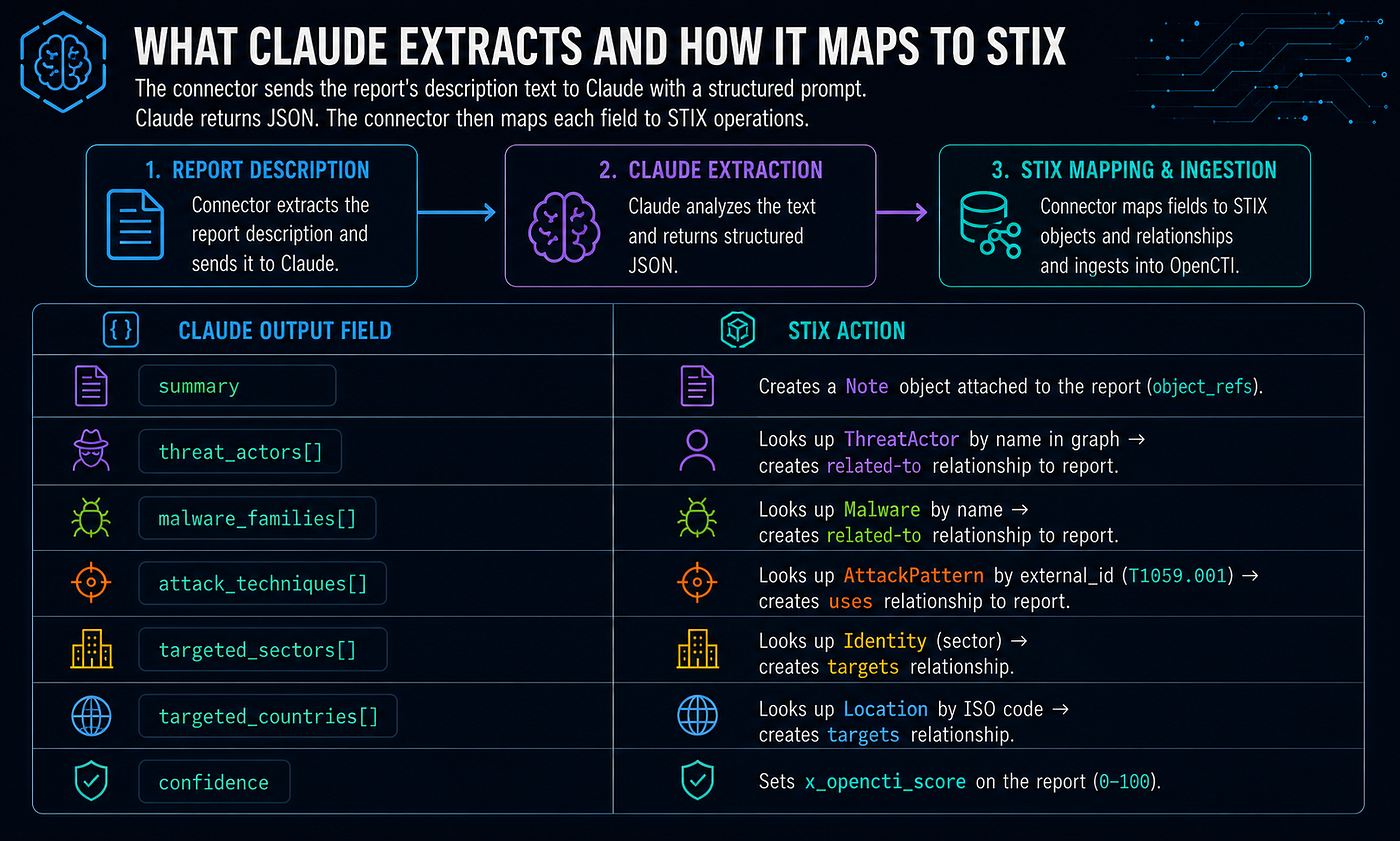
Claude output fieldSTIX actionsummaryCreates a Note object attached to the report (object_refs)threat_actors[]Looks up ThreatActor by name in graph → creates related-to relationship to reportmalware_families[]Looks up Malware by name → creates related-to relationship to reportattack_techniques[]Looks up AttackPattern by external_id (T1059.001) → creates uses relationship to reporttargeted_sectors[]Looks up Identity (sector) → creates targets relationshiptargeted_countries[]Looks up Location by ISO code → creates targets relationshipconfidenceSets x_opencti_score on the report (0–100)
Why look up instead of creating? MITRE ATT&CK and identity data is already loaded by the MITRE connector. Looking up prevents duplicates. Only AttackPattern objects are created if missing (since Claude may identify techniques not yet in the graph).
9.3 Connector Code
mkdir -p /home/andrey/openCTI/connectors/ai-enrichment
connectors/ai-enrichment/connector.py
 import os
import json
import time
import anthropic
from pycti import OpenCTIConnectorHelper

SYSTEM_PROMPT = """You are a senior cyber threat intelligence analyst.
Analyze threat intelligence content and return structured JSON only.
No prose, no markdown fences, no explanation — raw JSON."""

REPORT_PROMPT = """Analyze this threat intelligence report. Return JSON with exactly these keys:
- summary: string (2-3 sentence executive brief, plain text)
- threat_actors: list of strings (actor names, aliases, groups mentioned)
- malware_families: list of strings (malware/tool names)
- attack_techniques: list of strings (MITRE ATT&CK IDs only, e.g. ["T1059.001", "T1003"])
- targeted_sectors: list of strings (e.g. ["Finance", "Healthcare", "Government"])
- targeted_countries: list of strings (ISO 3166-1 alpha-2, e.g. ["US", "UA", "DE"])
- confidence: integer 0-100

Report:
{content}"""

INTRUSION_SET_PROMPT = """Analyze this threat actor / intrusion set profile. Return JSON with exactly these keys:
- summary: string (2-3 sentence executive brief)
- aliases: list of strings (other known names)
- malware_families: list of strings (malware/tools this actor uses)
- attack_techniques: list of strings (MITRE ATT&CK IDs, e.g. ["T1059.001", "T1003"])
- targeted_sectors: list of strings (sectors this actor targets)
- targeted_countries: list of strings (ISO 3166-1 alpha-2 codes)
- motivation: string (one of: "espionage", "financial", "hacktivism", "destruction", "unknown")
- sophistication: string (one of: "minimal", "intermediate", "advanced", "expert", "unknown")
- confidence: integer 0-100

Profile:
{content}"""


class AIEnrichmentConnector:
    def __init__(self):
        config = {
            "opencti": {
                "url": os.environ.get("OPENCTI_URL", "http://opencti:8080"),
                "token": os.environ["OPENCTI_TOKEN"],
            },
            "connector": {
                "id": os.environ["CONNECTOR_ID"],
                "type": "INTERNAL_ENRICHMENT",
                "name": os.environ.get("CONNECTOR_NAME", "AI Enrichment (Claude)"),
                "scope": "Report,Intrusion-Set,Threat-Actor-Group,Malware",
                "log_level": os.environ.get("CONNECTOR_LOG_LEVEL", "info"),
                "auto": False,
            },
        }
        self.helper = OpenCTIConnectorHelper(config)
        self.client = anthropic.Anthropic(api_key=os.environ["ANTHROPIC_API_KEY"])
        self.model = os.environ.get("AI_MODEL", "claude-opus-4-7")

    # -------------------------------------------------------------------------
    # Claude call with retry on rate limit
    # -------------------------------------------------------------------------

    def _call_claude(self, prompt_template: str, content: str) -> dict | None:
        for attempt in range(3):
            try:
                msg = self.client.messages.create(
                    model=self.model,
                    max_tokens=2048,
                    system=SYSTEM_PROMPT,
                    messages=[{"role": "user", "content": prompt_template.format(content=content[:8000])}],
                )
                return json.loads(msg.content[0].text)
            except anthropic.RateLimitError:
                wait = 60 * (attempt + 1)
                self.helper.log_warning(f"Rate limited — waiting {wait}s")
                time.sleep(wait)
            except (json.JSONDecodeError, anthropic.APIError) as e:
                self.helper.log_error(f"Claude call failed: {e}")
                return None
        return None

    # -------------------------------------------------------------------------
    # STIX write-back helpers
    # -------------------------------------------------------------------------

    def _add_note(self, entity_id: str, summary: str, confidence: int) -> None:
        self.helper.api.note.create(
            abstract="AI Summary",
            content=summary,
            confidence=confidence,
            object_ids=[entity_id],
        )

    def _link_threat_actors(self, entity_id: str, names: list, confidence: int) -> None:
        for name in names:
            actor = self.helper.api.threat_actor_group.read(
                filters={"mode": "and", "filters": [{"key": "name", "values": [name]}], "filterGroups": []}
            )
            if actor:
                self.helper.api.stix_core_relationship.create(
                    fromId=entity_id,
                    toId=actor["id"],
                    relationship_type="related-to",
                    confidence=confidence,
                )

    def _link_malware(self, entity_id: str, names: list, confidence: int) -> None:
        for name in names:
            malware = self.helper.api.malware.read(
                filters={"mode": "and", "filters": [{"key": "name", "values": [name]}], "filterGroups": []}
            )
            if malware:
                self.helper.api.stix_core_relationship.create(
                    fromId=entity_id,
                    toId=malware["id"],
                    relationship_type="uses",
                    confidence=confidence,
                )

    def _link_attack_patterns(self, entity_id: str, technique_ids: list, confidence: int) -> None:
        for tid in technique_ids:
            pattern = self.helper.api.attack_pattern.read(
                filters={"mode": "and", "filters": [{"key": "x_mitre_id", "values": [tid]}], "filterGroups": []}
            )
            if not pattern:
                pattern = self.helper.api.attack_pattern.create(
                    name=tid,
                    x_mitre_id=tid,
                    confidence=50,
                )
            if pattern:
                self.helper.api.stix_core_relationship.create(
                    fromId=entity_id,
                    toId=pattern["id"],
                    relationship_type="uses",
                    confidence=confidence,
                )

    def _update_score(self, entity_id: str, confidence: int) -> None:
        self.helper.api.stix_domain_object.update_field(
            id=entity_id,
            input={"key": "x_opencti_score", "value": str(confidence)},
        )

    # -------------------------------------------------------------------------
    # Enrichment handlers per entity type
    # -------------------------------------------------------------------------

    def _enrich_report(self, report: dict) -> str:
        content = report.get("description") or ""
        if len(content) < 50:
            content = report.get("name", "")
        if not content or len(content) < 10:
            return "Skipped: content too short"

        self.helper.log_info(f"Enriching report: {report['name']}")
        result = self._call_claude(REPORT_PROMPT, content)
        if not result:
            return "Skipped: Claude error"

        confidence = result.get("confidence", 50)
        entity_id = report["id"]

        if result.get("summary"):
            self._add_note(entity_id, result["summary"], confidence)
        if result.get("threat_actors"):
            self._link_threat_actors(entity_id, result["threat_actors"], confidence)
        if result.get("malware_families"):
            self._link_malware(entity_id, result["malware_families"], confidence)
        if result.get("attack_techniques"):
            self._link_attack_patterns(entity_id, result["attack_techniques"], confidence)

        self._update_score(entity_id, confidence)
        self.helper.log_info(f"Enriched report '{report['name']}'")
        return "Enriched"

    def _enrich_intrusion_set(self, entity: dict) -> str:
        content = entity.get("description") or entity.get("name", "")
        if not content or len(content) < 10:
            return "Skipped: content too short"

        self.helper.log_info(f"Enriching intrusion set: {entity['name']}")
        result = self._call_claude(INTRUSION_SET_PROMPT, content)
        if not result:
            return "Skipped: Claude error"

        confidence = result.get("confidence", 50)
        entity_id = entity["id"]

        if result.get("summary"):
            self._add_note(entity_id, result["summary"], confidence)
        if result.get("malware_families"):
            self._link_malware(entity_id, result["malware_families"], confidence)
        if result.get("attack_techniques"):
            self._link_attack_patterns(entity_id, result["attack_techniques"], confidence)

        self.helper.log_info(f"Enriched intrusion set '{entity['name']}'")
        return "Enriched"

    # -------------------------------------------------------------------------
    # Event handler
    # -------------------------------------------------------------------------

    def process_message(self, data: dict) -> str:
        entity_type = data.get("entity_type", "").lower()
        entity_id = data.get("entity_id")
        enrichment_entity = data.get("enrichment_entity", {})

        self.helper.log_info(f"Received entity_type='{entity_type}' id='{entity_id}'")

        if not entity_id:
            return "Skipped"

        entity = enrichment_entity or {}

        if entity_type == "report":
            if not entity:
                entity = self.helper.api.report.read(id=entity_id) or {}
            if entity.get("confidence", 0) < 40:
                return "Skipped: low confidence"
            return self._enrich_report(entity)

        if entity_type in ("intrusion-set", "threat-actor-group"):
            if not entity:
                entity = self.helper.api.intrusion_set.read(id=entity_id) or {}
            if not entity:
                return "Not found"
            return self._enrich_intrusion_set(entity)

        if entity_type == "malware":
            if not entity:
                entity = self.helper.api.malware.read(id=entity_id) or {}
            if not entity:
                return "Not found"
            content = entity.get("description") or entity.get("name", "")
            if not content or len(content) < 10:
                return "Skipped: content too short"
            self.helper.log_info(f"Enriching malware: {entity['name']}")
            result = self._call_claude(REPORT_PROMPT, content)
            if not result:
                return "Skipped: Claude error"
            confidence = result.get("confidence", 50)
            if result.get("summary"):
                self._add_note(entity["id"], result["summary"], confidence)
            if result.get("attack_techniques"):
                self._link_attack_patterns(entity["id"], result["attack_techniques"], confidence)
            self._update_score(entity["id"], confidence)
            return "Enriched"

        return "Skipped"

    def start(self):
        self.helper.log_info("AI Enrichment connector starting...")
        self.helper.listen(self.process_message)


if __name__ == "__main__":
    AIEnrichmentConnector().start()
connectors/ai-enrichment/Dockerfile
 FROM python:3.11-slim
WORKDIR /app
COPY requirements.txt .
RUN pip install --no-cache-dir -r requirements.txt
COPY connector.py .
CMD ["python", "connector.py"]
connectors/ai-enrichment/requirements.txt
 pycti>=6.2.0
anthropic>=0.40.0
9.4 Deploy the AI Connector
Prerequisites: Set ANTHROPIC_API_KEY in .env first.
cd /home/andrey/openCTI
# Build the image
docker compose -f docker-compose.ai.yml build
# Start it
docker compose -f docker-compose.ai.yml up -d
# Verify it registered with OpenCTI (look for "AI Enrichment" in connector list)
docker logs opencti-connector-ai-enrichment-1 --tail=20
In the OpenCTI UI: Settings → Connectors → Enrichment — the connector should appear with status connected after ~10 seconds.
9.5 Testing the Pipeline
Trigger a manual enrichment by importing a real threat report:
# Import a STIX report via the API to trigger the connector
curl -s -X POST http://localhost:8080/graphql \
  -H "Authorization: Bearer $(grep OPENCTI_ADMIN_TOKEN .env | cut -d= -f2)" \
  -H "Content-Type: application/json" \
  -d '{
    "query": "mutation { reportAdd(input: { name: \"Test: APT29 spearphishing campaign\", description: \"APT29, also known as Cozy Bear, conducted a spearphishing campaign targeting NATO members using a malicious PDF dropper that installed Cobalt Strike beacon via PowerShell (T1059.001). The campaign targeted defense contractors in Poland and Germany. The malware communicated with C2 over HTTPS using domain fronting (T1090.004).\", published: \"2024-01-15T00:00:00Z\", report_types: [\"threat-report\"] }) { id name } }"
  }'
Then check what the AI connector wrote back:
# Watch connector logs for the enrichment
docker logs -f opencti-connector-ai-enrichment-1 2>&1 | grep -E "Enriching|Enriched|Error"
# Expected output:
# Enriching report: Test: APT29 spearphishing campaign
# Enriched: 1 actors, 1 malware, 2 techniques
In the UI, open the report — it should now have a Note with the summary, relationships to APT29 and Cobalt Strike, and links to T1059.001 and T1090.004.
9.6 Cost and Rate Limiting
Estimated Claude API cost per report:
- ~500–2000 tokens input (report text, truncated at 8000 chars)
- ~300 tokens output (JSON response)
- At
claude-opus-4-7pricing: ~$0.01–0.05 per report
Rate limiting: The Anthropic API has per-minute token limits. If AlienVault imports hundreds of reports in a burst, the connector will hit rate limits. Add a simple backoff:
import time
def _call_claude(self, content: str) -> dict | None:
    for attempt in range(3):
        try:
            msg = self.client.messages.create(...)
            return json.loads(msg.content[0].text)
        except anthropic.RateLimitError:
            time.sleep(60 * (attempt + 1))
        except (json.JSONDecodeError, anthropic.APIError) as e:
            self.helper.log_error(f"Claude call failed: {e}")
            return None
    return None
To limit scope (only enrich reports above a confidence threshold, skip low-quality feeds):
def process_message(self, data: dict) -> str:
    report = self.helper.api.report.read(id=entity_id)
    # Skip reports with low confidence (e.g. AlienVault auto-generated)
    if report.get("confidence", 0) < 40:
        return "Skipped: low confidence"
    return self._enrich_report(report)
9.7 Rules Engine (CE Automation)
Note: Playbooks are an Enterprise Edition feature. The Community Edition uses the built-in Rules Engine, which automatically infers and propagates relationships as data arrives.
All 20 rules are enabled. To verify or toggle: Settings → Customization → Rules
To enable all rules via API (already done — included for re-initialization):
RULES="attribution_attribution attribution_targets indicate_sighted attribution_use \
localization_of_targets location_location location_targets participate-to_parts \
observable_related observe_sighting part_part part-of_targets sighting_incident \
sighting_observable sighting_indicator report_ref_identity_part_of \
report_ref_indicator_based_on report_ref_observable_based_on \
report_ref_location_located_at parent_technique_use"
TOKEN=$(grep OPENCTI_ADMIN_TOKEN /home/andrey/openCTI/.env | cut -d= -f2)
for rule in $RULES; do
  curl -s -X POST http://localhost:8080/graphql \
    -H "Authorization: Bearer $TOKEN" \
    -H "Content-Type: application/json" \
    -d "{\"query\":\"mutation { ruleSetActivation(id: \\\"$rule\\\", enable: true) { id activated } }\"}" \
    | python3 -c "import sys,json; d=json.load(sys.stdin); print('$rule:', d['data']['ruleSetActivation']['activated'])"
done
What these rules do automatically once data arrives:
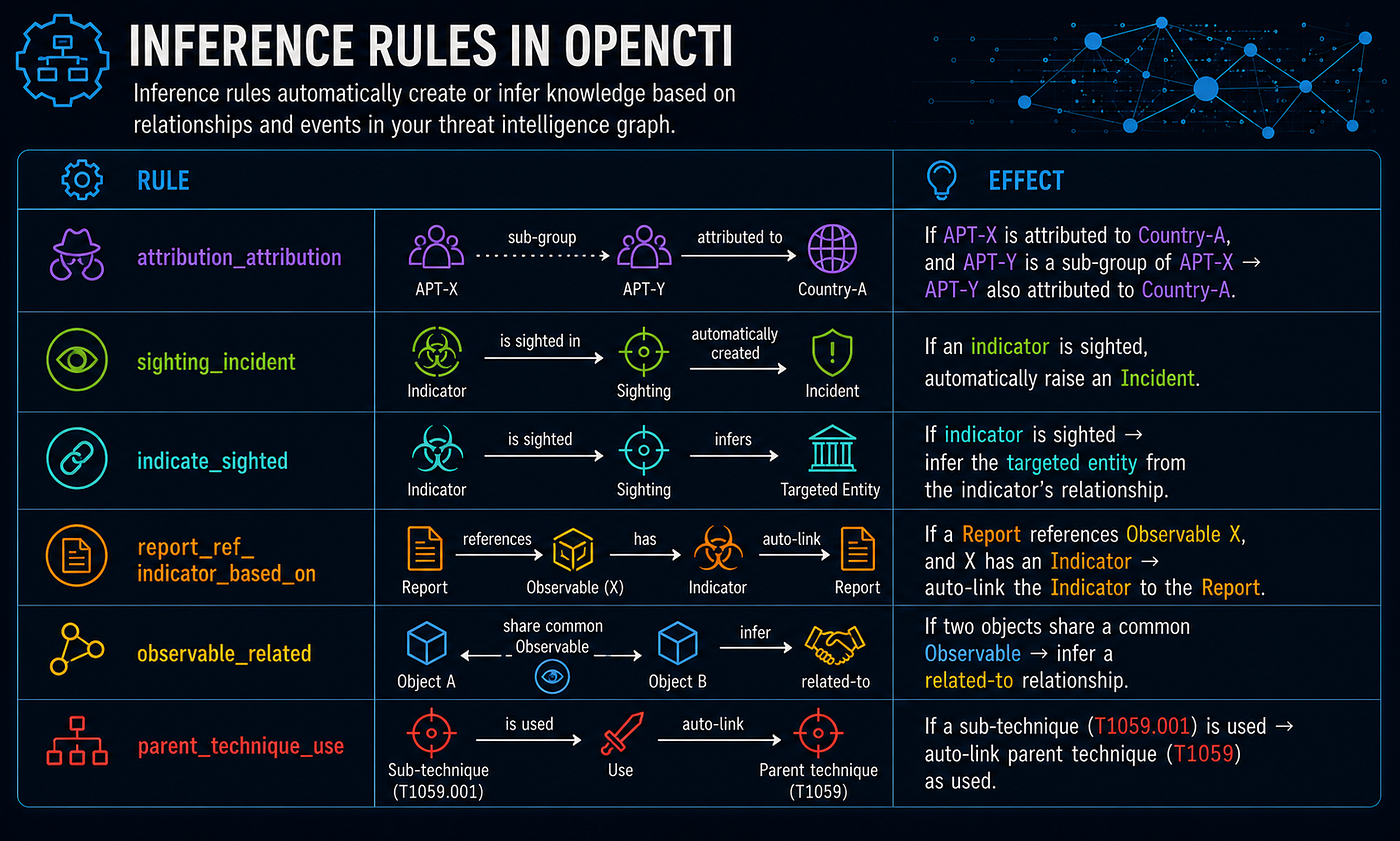
RuleEffectattribution_attributionIf APT-X is attributed to Country-A, and APT-Y is a sub-group of APT-X → APT-Y also attributed to Country-Asighting_incidentIf an indicator is sighted, automatically raise an Incidentindicate_sightedIf indicator is sighted → infer the targeted entity from the indicator's relationshipreport_ref_indicator_based_onIf a Report references Observable X, and X has an Indicator → auto-link the Indicator to the Reportobservable_relatedIf two objects share a common Observable → infer a related-to relationshipparent_technique_useIf a sub-technique (T1059.001) is used → auto-link parent technique (T1059) as used
For custom event-driven automation in CE , use a pycti script or the AI connector (section 9.1). The pycti library supports streaming the live event feed via helper.listen() — the AI connector in 9.1 uses exactly this pattern.
10. Post-Deployment Hardening
10.1 Reverse Proxy with TLS (nginx)
# /etc/nginx/sites-available/opencti
server {
    listen 443 ssl http2;
    server_name opencti.yourdomain.com;
ssl_certificate     /etc/letsencrypt/live/opencti.yourdomain.com/fullchain.pem;
    ssl_certificate_key /etc/letsencrypt/live/opencti.yourdomain.com/privkey.pem;
    ssl_protocols       TLSv1.2 TLSv1.3;
    ssl_ciphers         ECDHE-ECDSA-AES256-GCM-SHA384:ECDHE-RSA-AES256-GCM-SHA384;
    location / {
        proxy_pass         http://127.0.0.1:8080;
        proxy_set_header   Host $host;
        proxy_set_header   X-Real-IP $remote_addr;
        proxy_set_header   X-Forwarded-For $proxy_add_x_forwarded_for;
        proxy_set_header   X-Forwarded-Proto $scheme;
        proxy_read_timeout 300s;
        client_max_body_size 100m;
    }
}
server {
    listen 80;
    server_name opencti.yourdomain.com;
    return 301 https://$host$request_uri;
}
10.2 Backup Strategy
#!/bin/bash
# /home/andrey/openCTI/scripts/backup.sh
set -euo pipefail
BACKUP_DIR="/mnt/backup/opencti/$(date +%Y%m%d_%H%M%S)"
mkdir -p "$BACKUP_DIR"
# Snapshot ElasticSearch
curl -s -u elastic:${ELASTIC_PASSWORD} \
  -X PUT "http://localhost:9200/_snapshot/backup/snapshot_$(date +%Y%m%d)" \
  -H 'Content-Type: application/json' \
  -d '{"indices": "*", "ignore_unavailable": true}'
# Dump MinIO (reports, files)
docker run --rm \
  --network opencti_network \
  -v "$BACKUP_DIR:/backup" \
  minio/mc:latest \
  mirror myminio/opencti /backup/minio/
echo "Backup completed: $BACKUP_DIR"
10.3 Security Checklist
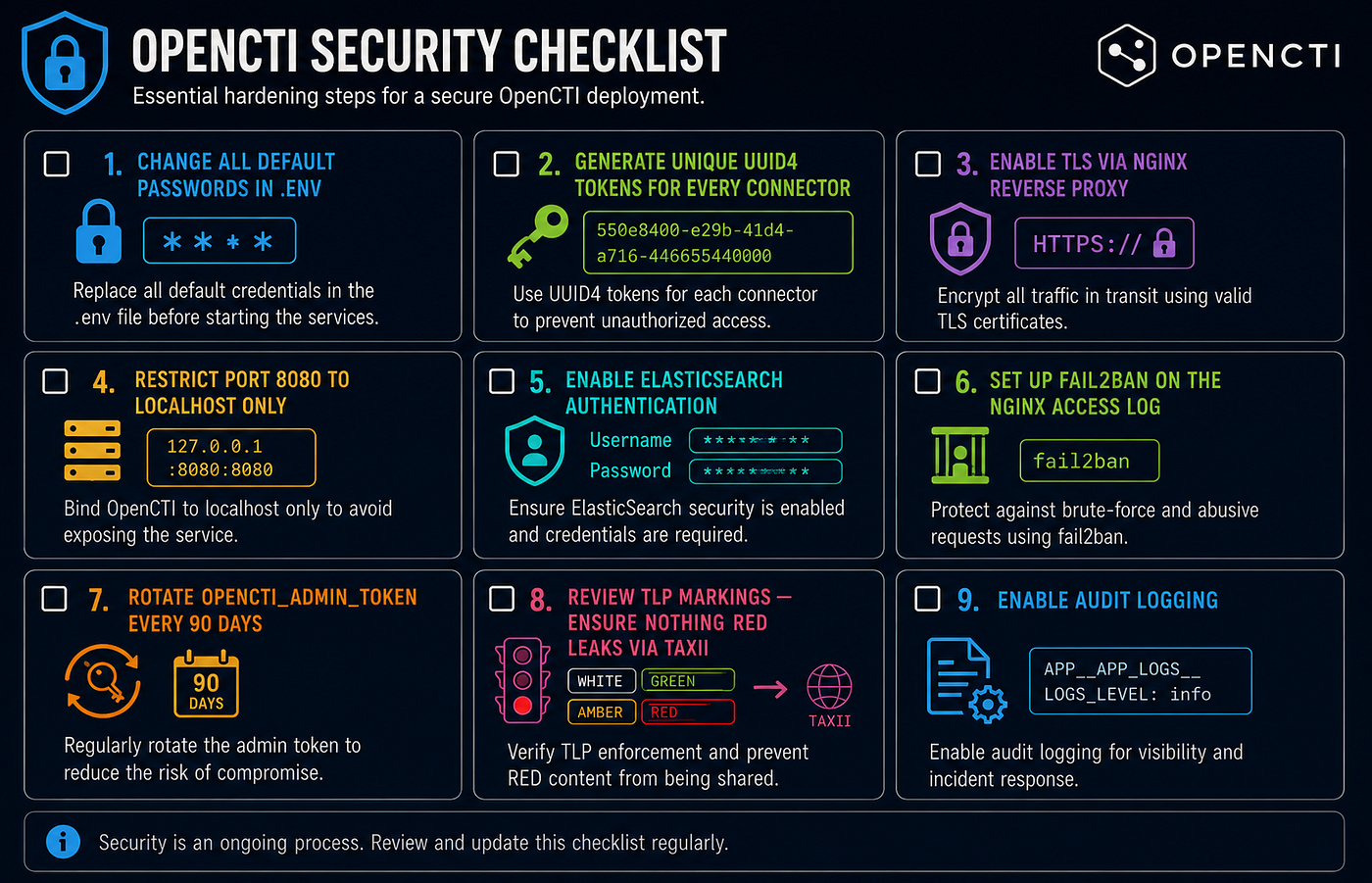
- Change all default passwords in
.env - Generate unique UUID4 tokens for every connector
- Enable TLS via nginx reverse proxy
- Restrict port 8080 to localhost only (
127.0.0.1:8080:8080) - Enable ElasticSearch authentication (already configured above)
- Set up fail2ban on the nginx access log
- Rotate
OPENCTI_ADMIN_TOKENevery 90 days - Review TLP markings — ensure nothing RED leaks via TAXII
- Enable audit logging:
APP__APP_LOGS__LOGS_LEVEL: info
11. Operational Runbook
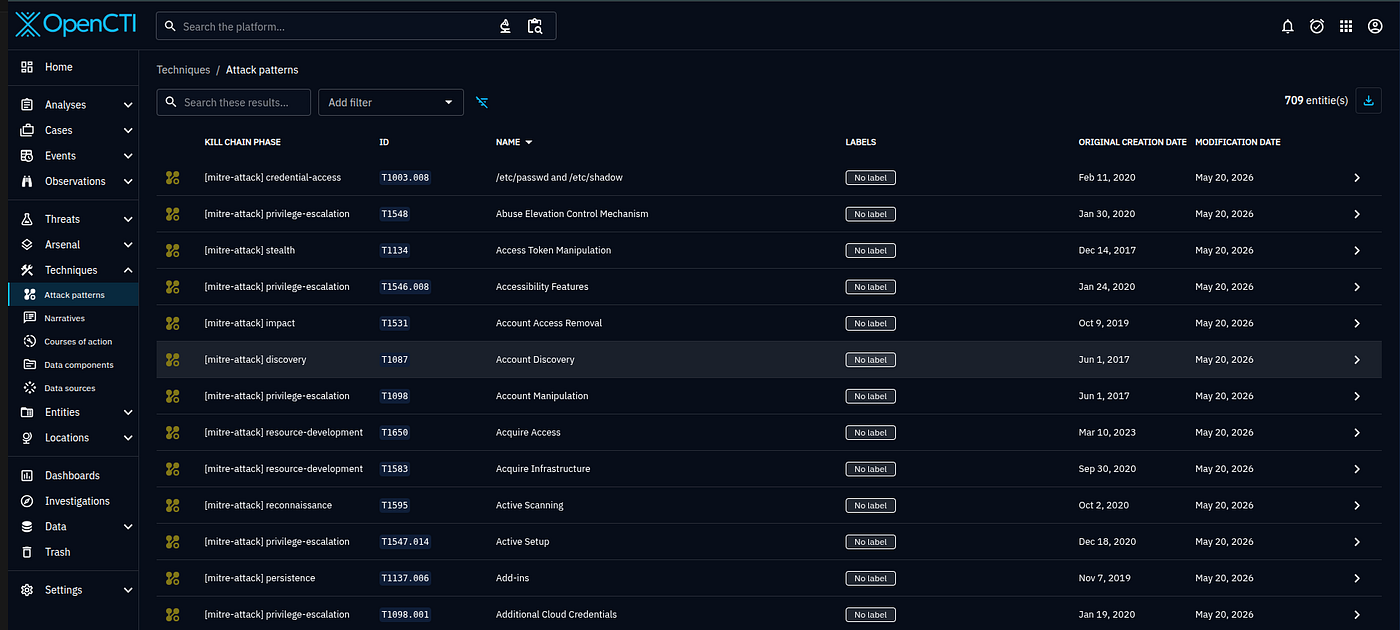
Day 1 — Initial Data Load
# MITRE ATT&CK loads first (foundational framework)
# Wait ~10 minutes for it to complete, then verify:
TOKEN=$(grep OPENCTI_ADMIN_TOKEN /home/andrey/openCTI/.env | cut -d= -f2)

curl -s -X POST http://localhost:8080/graphql \
  -H "Authorization: Bearer $TOKEN" \
  -H "Content-Type: application/json" \
  -d '{"query": "{ attackPatterns { edges { node { name } } } }"}' | \
  python3 -c "import sys,json; d=json.load(sys.stdin); print('Techniques loaded:', len(d['data']['attackPatterns']['edges']))"
# Should return 500+ techniques
Common Operations
# Check all connector health
docker compose -f docker-compose.connectors.yml ps
# View connector logs
docker compose -f docker-compose.connectors.yml logs --tail=50 connector-alienvault
# Restart a stuck connector
docker compose -f docker-compose.connectors.yml restart connector-malwarebazaar
# Scale workers for high ingest load
docker compose -f docker-compose.yml up -d --scale worker=5
# Check ElasticSearch cluster health
curl -s -u elastic:${ELASTIC_PASSWORD} http://localhost:9200/_cluster/health?pretty
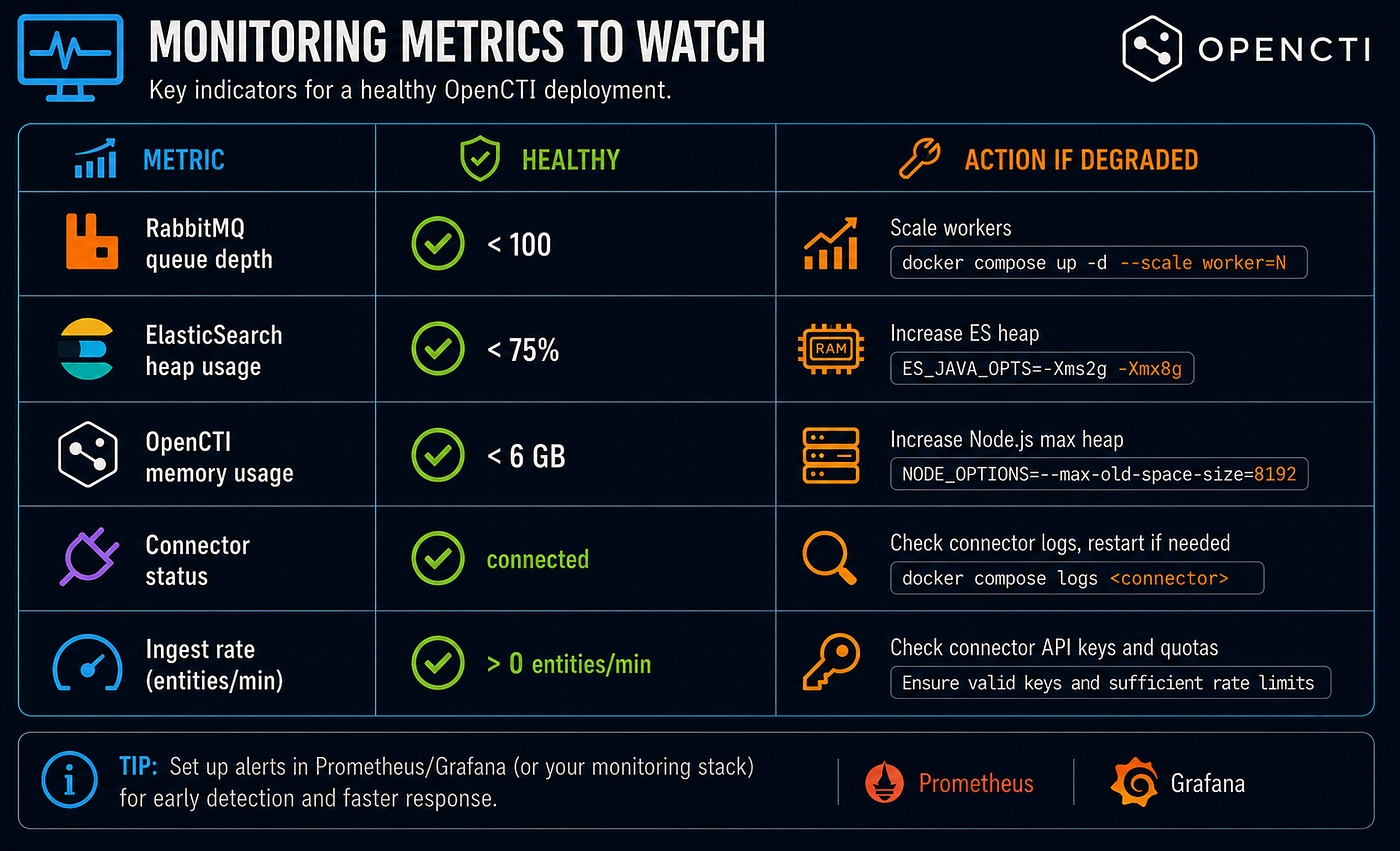
# Check RabbitMQ queue depth (should stay near 0 at rest)
docker exec $(docker ps -qf name=rabbitmq) rabbitmqctl list_queues name messages
Monitoring Metrics to Watch
Quick Reference
# Start everything
cd /home/andrey/openCTI
docker network create opencti_network 2>/dev/null || true
docker compose -f docker-compose.yml up -d
docker compose -f docker-compose.connectors.yml up -d
docker compose -f docker-compose.ai.yml up -d
# Stop everything
docker compose -f docker-compose.ai.yml down
docker compose -f docker-compose.connectors.yml down
docker compose -f docker-compose.yml down
# Access
# UI:      http://localhost:8080
# API:     http://localhost:8080/graphql
# MinIO:   http://localhost:9001
# RabbitMQ: http://localhost:15672
12. Troubleshooting
Known Issues — OpenCTI 6.2.0 + ElasticSearch 8.13
ILM Race Condition (resource_already_exists_exception)
ES 8.13’s ILM daemon auto-bootstraps rollover indices the moment an index template with lifecycle.rollover_alias is created. OpenCTI's elCreateIndex does a check-then-create which loses the race. This kills initialization and loops with restart: always.
Fix already applied: patches/back.js is mounted over the compiled bundle and makes elCreateIndex idempotent — it catches resource_already_exists_exception and returns null.
Re-initialization procedure (if ES volume is dropped):
# 1. Delete any leftover index templates from a failed run
curl -s -u elastic:${ELASTIC_PASSWORD} -X DELETE \
  "http://localhost:9200/_index_template/opencti*"


# 2. Flush Redis state
docker exec opencti-redis-1 redis-cli -a opencti FLUSHALL# 3. Start ES first, wait for green/yellow
docker compose up -d elasticsearch
until curl -s -u elastic:${ELASTIC_PASSWORD} \
  http://localhost:9200/_cluster/health | grep -q '"status":"green"\|"status":"yellow"'; do
  sleep 5; done# 4. Start the rest — OpenCTI will create 13 indices and load base STIX data (~5-10 min)
docker compose up -d
ElasticSearch Disk Watermark (cluster RED, no shard allocation)
ES 8.x refuses all shard allocation when disk exceeds 90% high watermark. cluster.routing.allocation.disk.threshold_enabled=false is set in docker-compose.yml.
To reclaim disk space:
docker system prune -a # frees ~47 GB of unused images/containers
Connectors Can’t Reach opencti Hostname
Both compose files must share the same Docker network. docker-compose.yml defines:
networks:
  default:
    name: opencti_network
    external: true
If the main stack was started without this, run:
docker network connect --alias opencti opencti_network opencti-opencti-1
Then add the networks: block to docker-compose.yml and run docker compose up -d to make it permanent.
OPENCTI_TOKEN vs CONNECTOR_ID
Connectors authenticate to OpenCTI using OPENCTI_TOKEN: ${OPENCTI_ADMIN_TOKEN}. The per-connector UUID variables (CONNECTOR_MITRE_TOKEN, etc.) are only used as CONNECTOR_ID — they identify the connector instance in the UI, not for authentication.
CVE Connector — Zero Vulnerabilities Imported (NVD API Key Bug)
connector-cve:6.2.0 has a bug: it sends the NVD API key as Bearer: <key> in the HTTP header, but NVD 2.0 API requires apiKey: <key>. The connector silently gets a non-200 response and imports nothing. Additionally, CVE_MAX_DATE_RANGE is required but missing from the image's default config — omitting it causes a TypeError: '>' not supported between instances of 'NoneType' and 'int' crash every 60 seconds.
Fix: Mount a patched api.py that uses the correct header, and add the missing vars:
connector-cve:
  image: opencti/connector-cve:6.2.0
  volumes:
    - ./patches/cve/api.py:/opt/opencti-connector-cve/services/client/api.py:ro
  environment:
    CVE_MAX_DATE_RANGE: 120
    CVE_MAINTAIN_DATA: "true"
    # ... other vars
patches/cve/api.py — change header from "Bearer": api_key to "apiKey": api_key:
headers = {"User-Agent": header}
if api_key:
    headers["apiKey"] = api_key
13. Usage Examples
13.1 Standard OpenCTI Workflows
Example 1 — Investigate an IP address
You received an alert from your SIEM about suspicious outbound traffic to 103.113.70.102.
In OpenCTI UI:
Search → type 103.113.70.102
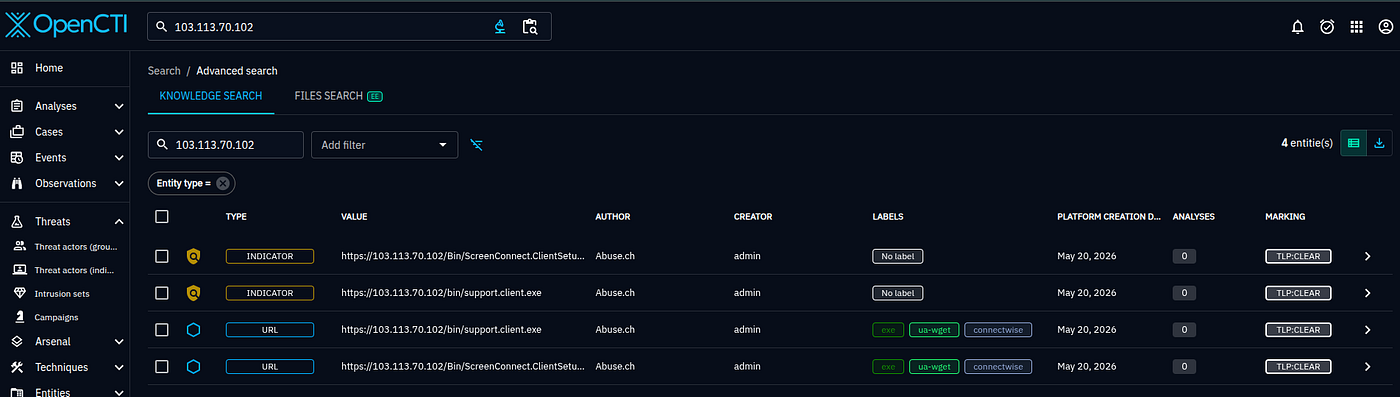
If AlienVault or URLhaus has seen it, you’ll find:
- Which threat actor uses this IP as C2
- What malware family communicates with it
- When it was first/last observed
- TLP marking and confidence score
- All reports that mention it
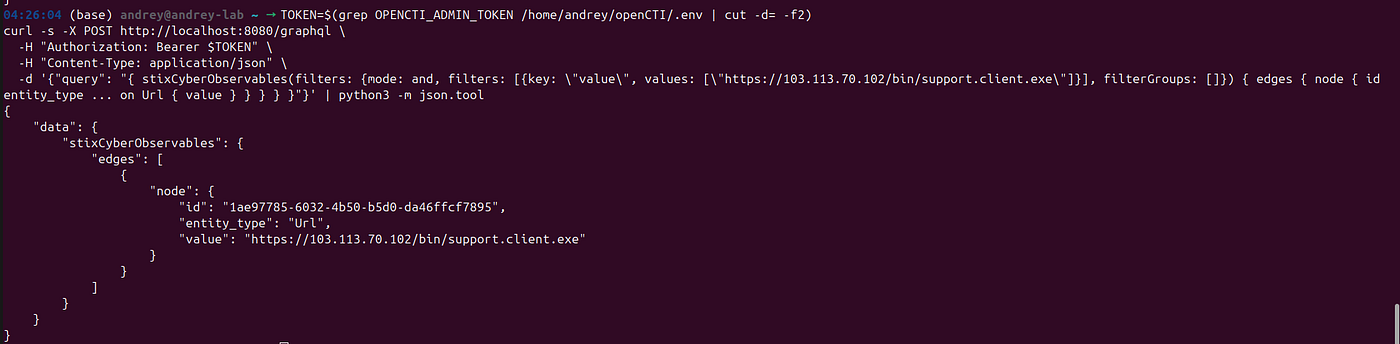
Via API:
 TOKEN=$(grep OPENCTI_ADMIN_TOKEN /home/andrey/openCTI/.env | cut -d= -f2)
curl -s -X POST http://localhost:8080/graphql \
  -H "Authorization: Bearer $TOKEN" \
  -H "Content-Type: application/json" \
  -d '{"query": "{ stixCyberObservables(filters: {mode: and, filters: [{key: \"value\", values: [\"https://103.113.70.102/bin/support.client.exe\"]}], filterGroups: []}) { edges { node { id entity_type ... on Url { value } } } } }"}' | python3 -m json.tool
Example 2 — Build an APT profile
You want to understand everything known about Lazarus Group before a threat briefing.
Threats → Intrusion Sets → search "Lazarus"
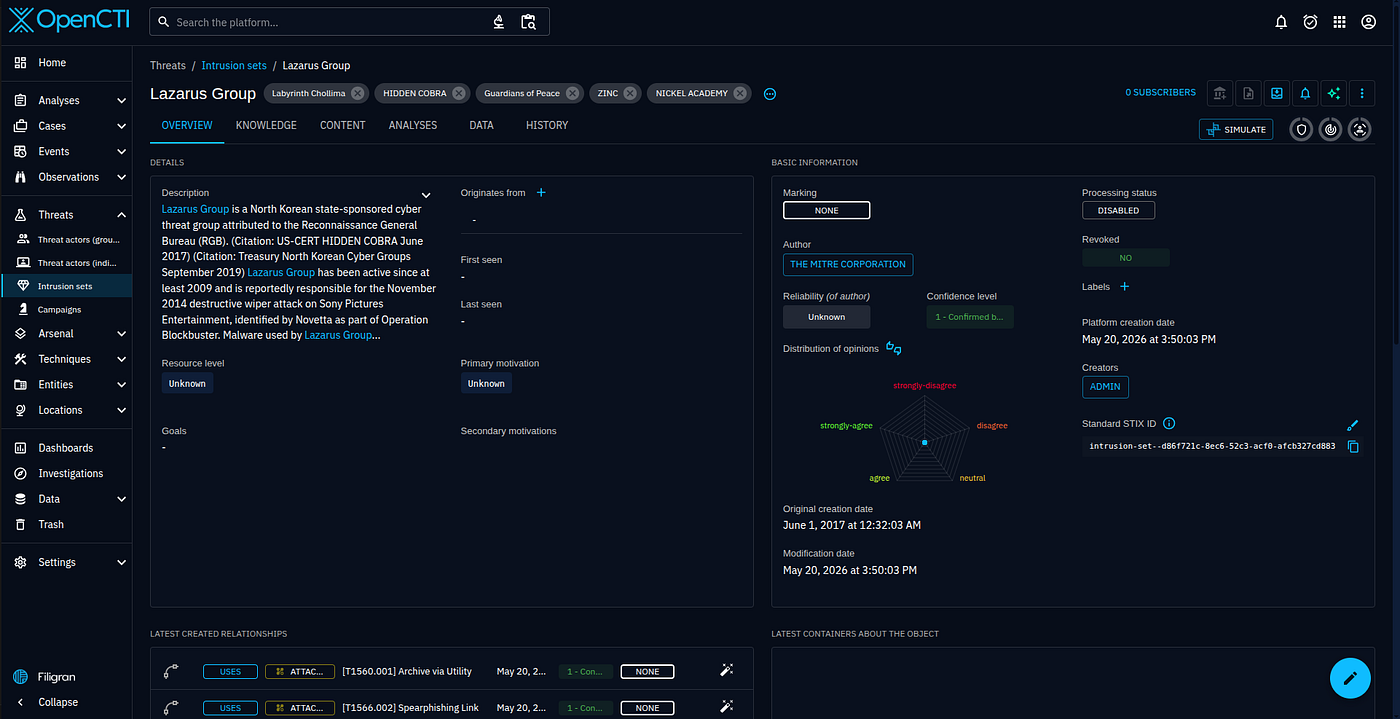
The profile shows:
- Attributed to: North Korea
- Motivations: Financial gain, Espionage
- Targets: Finance, Cryptocurrency, Defense
- Malware used: WannaCry, Hermes, BLINDINGCAN (all auto-linked by MITRE connector)
- Techniques: 80+ ATT&CK techniques with usage relationships
- Campaigns: Operation AppleJeus, Dream Job, etc.
- Timeline: chronological view of all activity
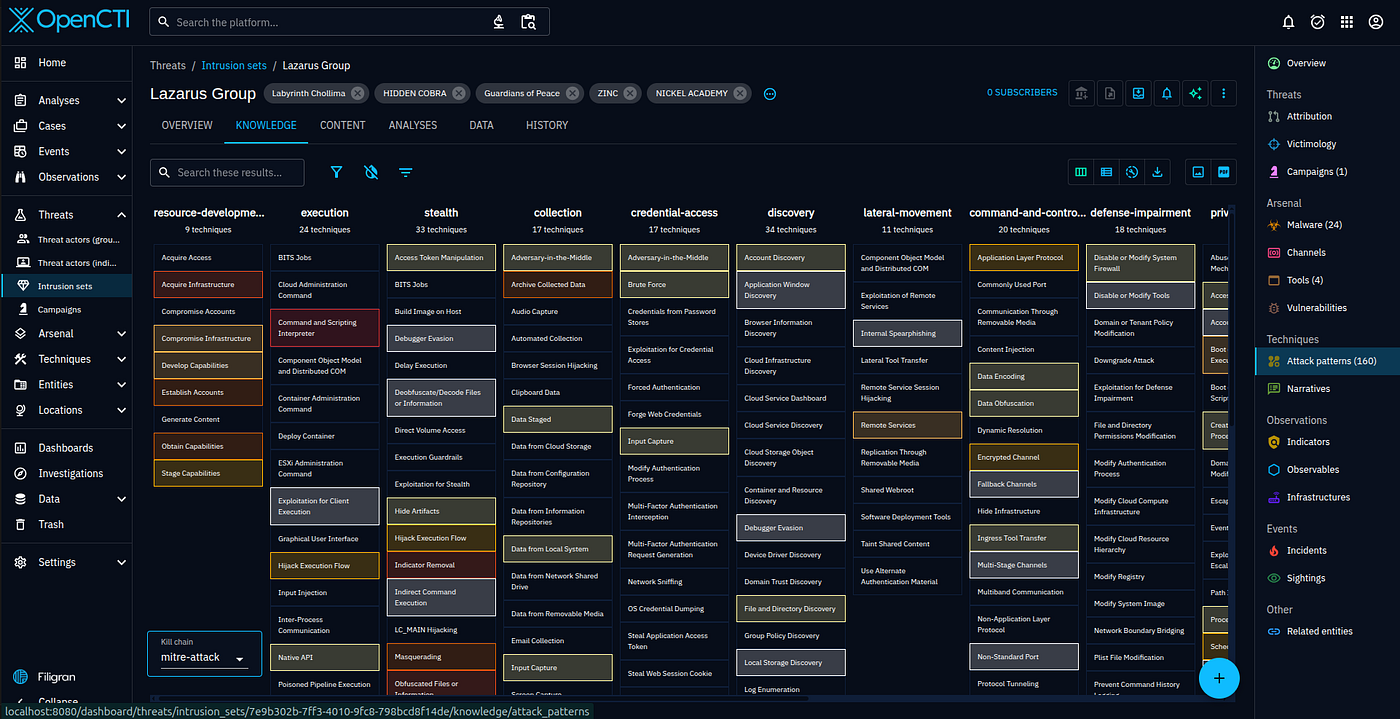
Click “ATT &CK Patterns” tab → heatmap showing which techniques Lazarus uses most.
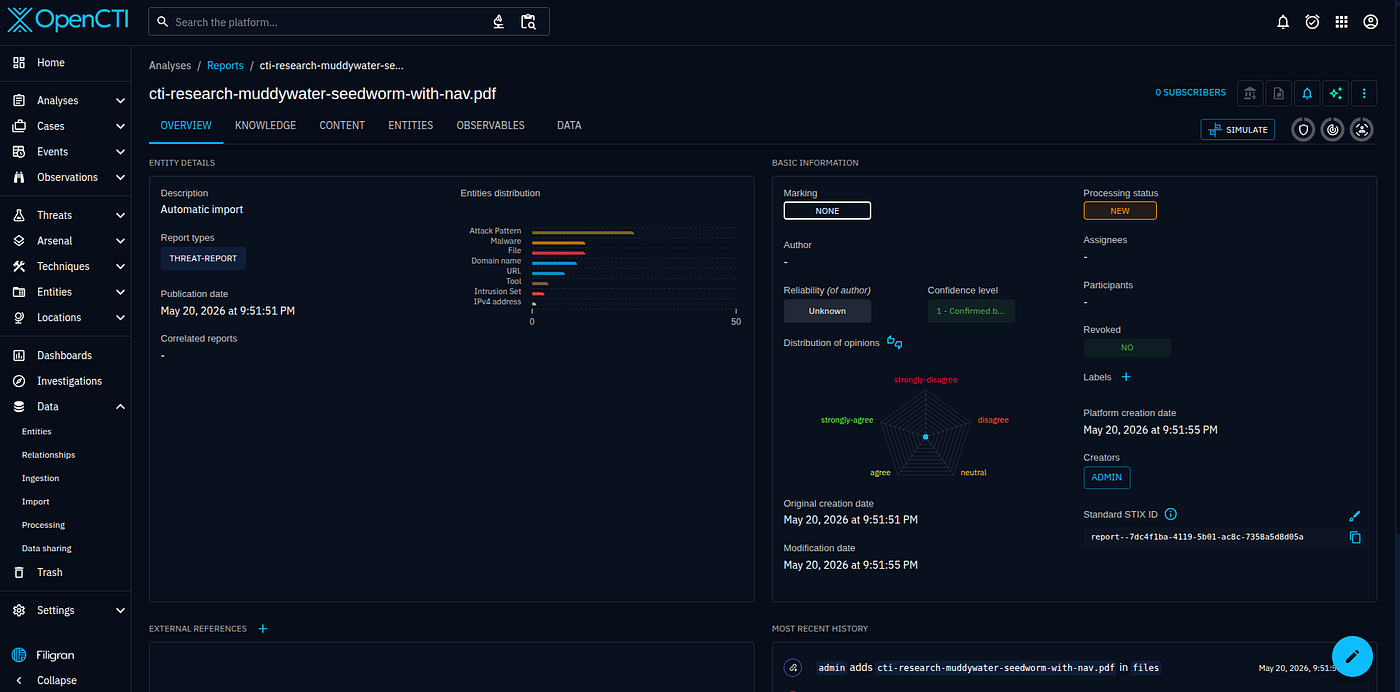
Example 3 — Import a threat report (PDF / blog post)
You found a Mandiant or CrowdStrike blog post about a new campaign.
Data → Import → drag and drop the PDF or paste the URL
Select format: "Auto detect" or "Report"
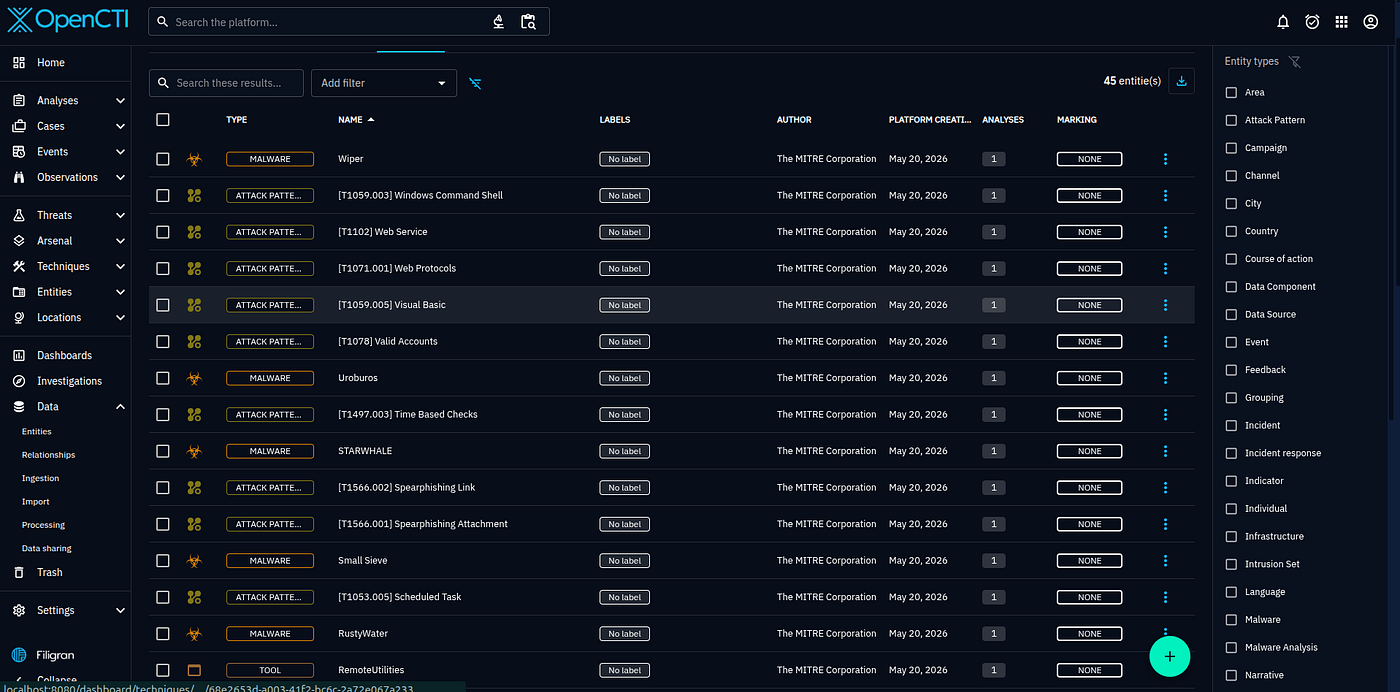
OpenCTI parses it and creates a Report object. The AI enrichment connector then picks it up automatically and extracts:
- Threat actors mentioned
- Malware families
- ATT&CK technique IDs
- Targeted sectors and countries
All as STIX relationships, visible immediately in the UI.
Example 4 — Track a CVE across your environment
CVE-2024–21762 (Fortinet FortiOS RCE) was just published. Check what you know about it.
Arsenal → Vulnerabilities → search "CVE-2024-21762"
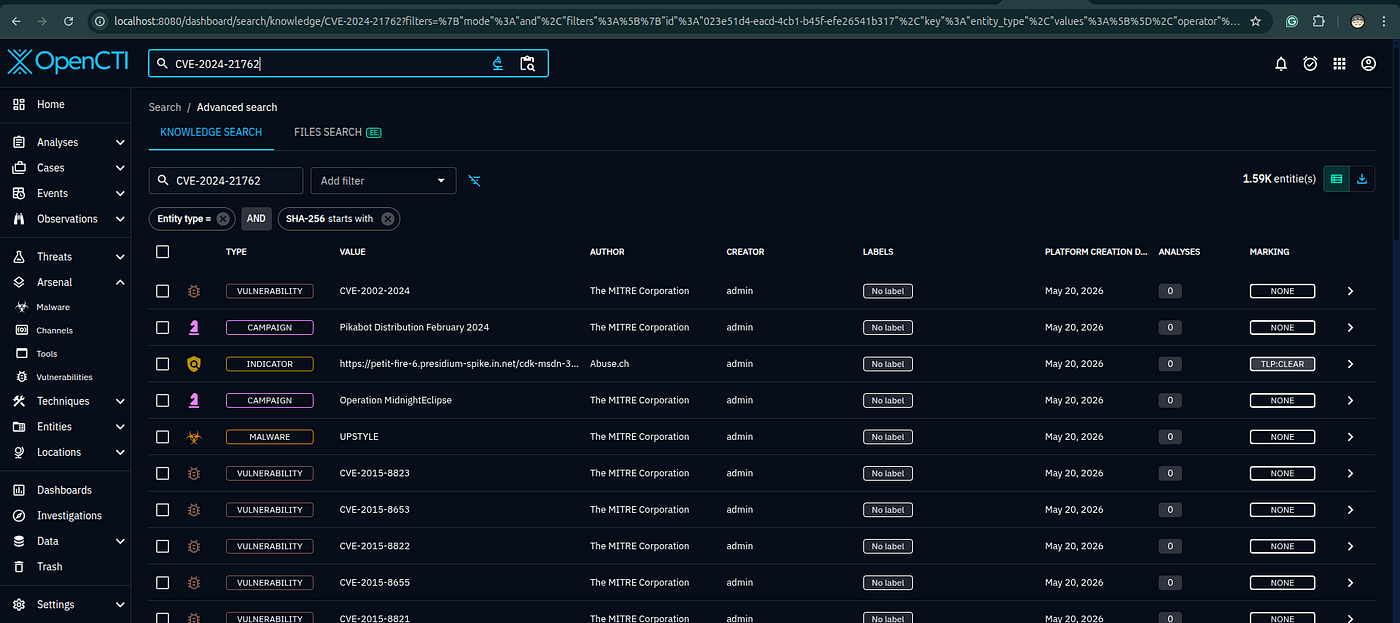
After the CVE connector syncs, you’ll see:
- CVSS score and vector
- Affected software versions
- Which threat actors exploit it (once AlienVault/MITRE data arrives)
- Which campaigns used it
- Related indicators (IPs, domains used in exploitation)
Example 5 — Create an incident from a sighting
Your EDR detected Cobalt Strike beacon on a workstation.
Activities → Incidents → Create
  Name: "CS beacon on WS-042"
  Type: "Intrusion"
  Confidence: 90
  Add object: link to Cobalt Strike (malware)
  Add object: link to T1071.001 (C2 over HTTP)
  Add observable: add the C2 IP
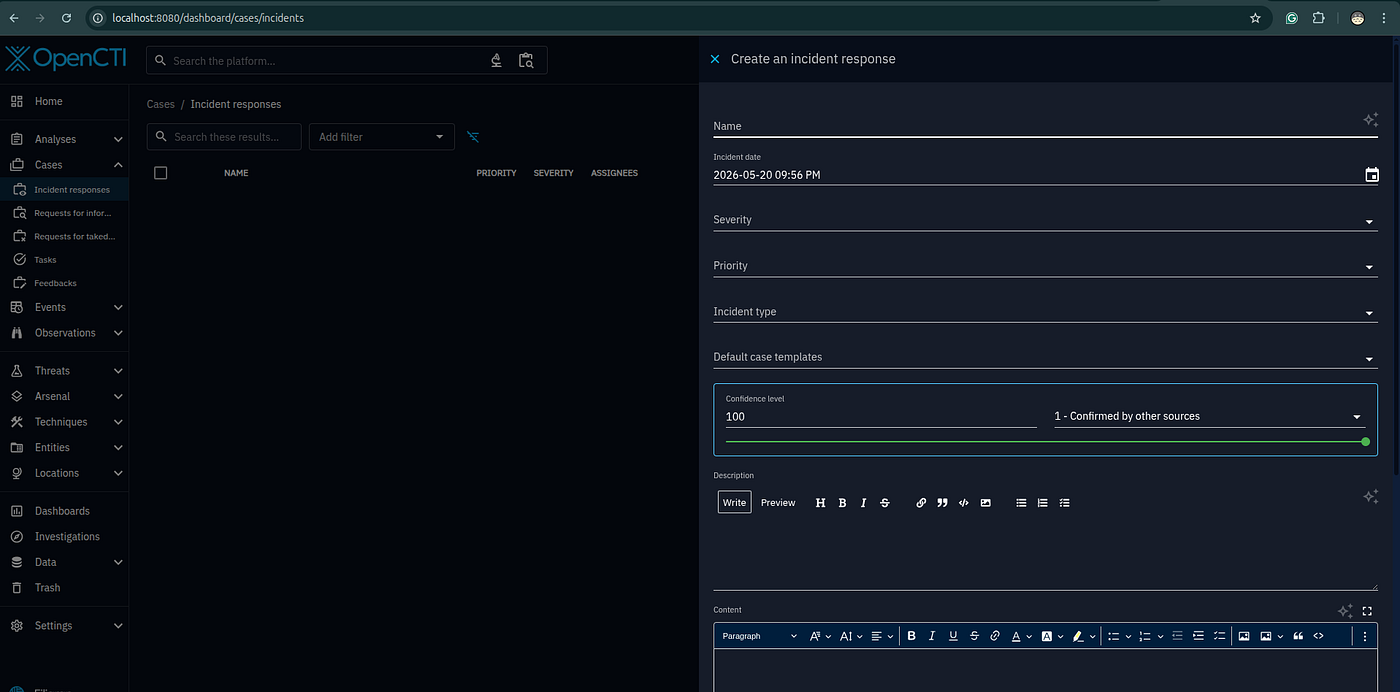
With sighting_incident rule enabled, future detections of the same C2 IP automatically raise new incidents without manual work.
Example 6 — Export IOCs to your firewall / SIEM
You want a live blocklist of all HIGH confidence IPv4 indicators.
Data → Indicators
Filter: Score > 70, Type = IPv4-Addr, Valid until > today
Export → CSV or STIX
Or use the built-in TAXII 2.1 server to push directly to your SIEM:
Settings → Taxii Server → Create collection "High confidence IOCs"
Configure your SIEM to poll: http://localhost:8080/taxii2/
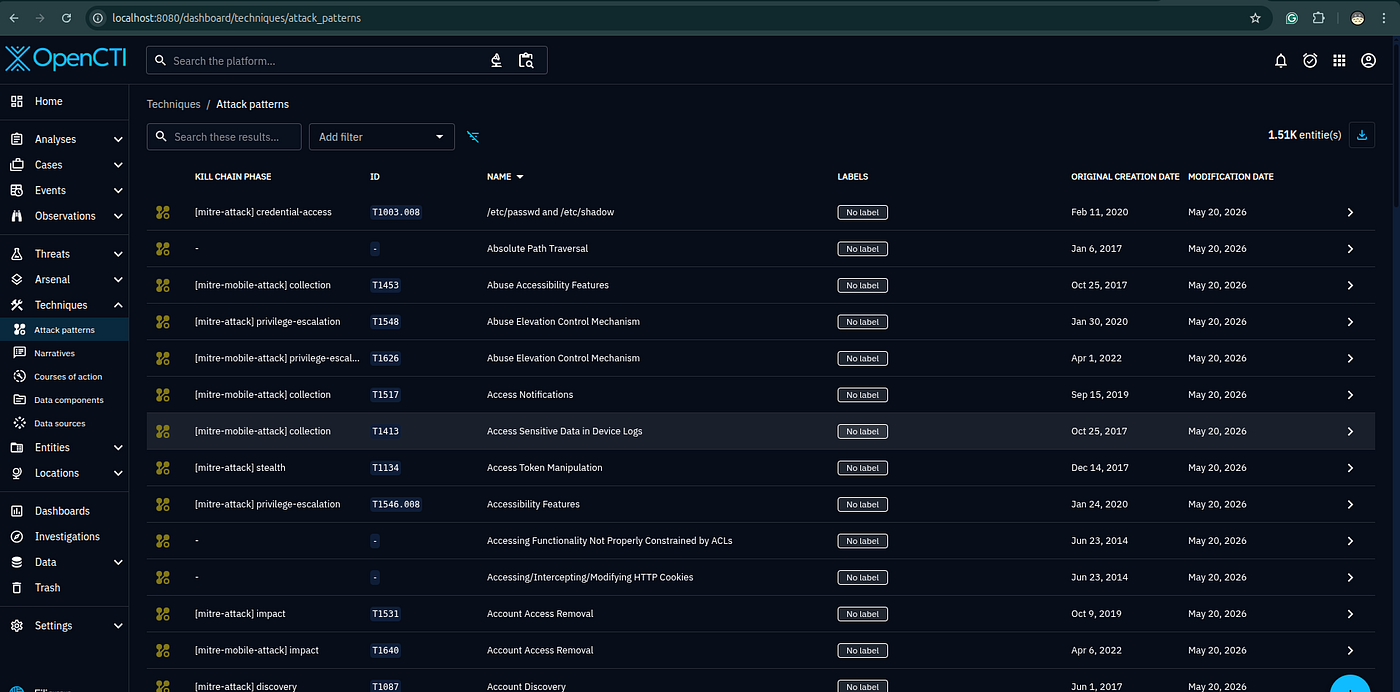
Example 7 — Map your detection coverage against ATT&CK
You want to know which techniques you detect vs which you’re blind to.
Technics → Attack Patterns
Filter by: used by (Lazarus Group)
Cross-reference the list with your SIEM detection rules. Techniques with no detection rule = gap in coverage.
Export the filtered list as CSV and import into ATT&CK Navigator for a visual heatmap of covered vs uncovered techniques.
Example 8 — Pivot from malware to infrastructure
You found a Ryuk ransomware sample (SHA256 hash).
Search → paste the SHA256
From the malware object, pivot to:
- Related indicators → domains and IPs used for C2
- Used by → Wizard Spider (threat actor)
- Campaigns → which ransomware campaigns used this variant
- Techniques → T1486 (Data Encrypted for Impact), T1490 (Inhibit System Recovery)
Each pivot is one click in the graph view.
Example 9 — Share intelligence with a partner org
You want to share a report with a partner but strip out RED-marked internal data.
Open the report → Actions → Share
Select TLP level: TLP:AMBER (only partner can see it)
Or use Workspaces → Sharing groups to create a federated share with another OpenCTI instance. All objects above RED are automatically excluded from the export.
Example 10 — Build a custom dashboard for your sector
Your org is in Finance. You want a live dashboard showing threats to your sector.
Home → Dashboards → Create dashboard "Finance Threat Landscape"
Add widgets:
  - "Threat actors targeting Finance" (bar chart)
  - "Most used techniques against Finance" (ATT&CK heatmap)
  - "New IOCs last 7 days" (timeline)
  - "Active campaigns" (list)
  - "CVEs affecting banking software" (table)
Each widget auto-updates as new data arrives from connectors.
If you like this research, buy me a coffee (PayPal) — Keep the lab running
Follow for practical cybersecurity research
If you’re interested in Offensive security, AI security, real-world attack simulations, CTI, and detection engineering — this is exactly what I focus on.
Stay connected:
→ Subscribe on Medium: medium.com/@1200km
→ Connect on LinkedIn: andrey-pautov
→ GitHub — tools & labs: github.com/anpa1200
→ Contact: 1200km@gmail.com