Phase 5: Validation Lab
Architecture
┌──────────────────────────────────────────────────────────────────────────────┐
│  HOST MACHINE (Linux)                                                        │
│                                                                              │
│  ┌─── Docker network: opencti_network ──────────────────────────────────┐   │
│  │                                                                       │   │
│  │   Redis 7.2              (internal — OpenCTI session store)           │   │
│  │   RabbitMQ 3.13          (internal — OpenCTI message bus)             │   │
│  │   MinIO                  (internal — OpenCTI file store, :9001 UI)    │   │
│  │                                                                       │   │
│  │   Elasticsearch 8.13.0   :9200 → exposed to host                     │   │
│  │   Kibana 8.13.0          :5601 → exposed to host                     │   │
│  │   OpenCTI 6.2.0          :8080 → exposed to host                     │   │
│  │   OpenCTI worker ×3      (internal — STIX ingest)                    │   │
│  │                                                                       │   │
│  └───────────────────────────────────────────────────────────────────────┘   │
│                           ↑                                                  │
│          Elasticsearch    │  host port 9200                                  │
│          reachable from   │  VirtualBox NAT gateway: 10.0.2.2:9200           │
│          VM as            │                                                  │
│                           │                                                  │
│  Ansible control ────────WinRM──→ 127.0.0.1:55985 (NAT port-forward)        │
│  (host, pywinrm)                                                             │
│                                                                              │
└────────────────────────────────────────────────────┬─────────────────────────┘
                                                     │ VirtualBox NAT NIC
                                                     ▼
┌──────────────────────────────────────────────────────────────────────────────┐
│  VirtualBox VM: ws01                                                         │
│  Box: StefanScherer/windows_10 │ Hostname: DESERTWS01                        │
│  4 GB RAM │ 2 vCPUs │ NIC: NAT only (no internet, host at 10.0.2.2)          │
│                                                                              │
│  Agents (provisioned by Ansible deploy.yml):                                 │
│                                                                              │
│  ┌─── Sysmon 15.x (sysmonconfig.xml) ──────────────────────────────────┐    │
│  │  EID  1  ProcessCreate     — process spawn chain (parent→child)     │    │
│  │  EID  3  NetworkConnect    — outbound connections (hostname+port)    │    │
│  │  EID  7  ImageLoad         — DLL loads with signing details          │    │
│  │  EID 10  ProcessAccess     — handle opens (LSASS access masks)       │    │
│  │  EID 11  FileCreate        — file writes (.dmp, .wsf, startup paths) │    │
│  │  EID 13  RegistryEvent     — registry key/value writes               │    │
│  │  EID 22  DnsQuery          — DNS queries with full QNAME             │    │
│  └──────────────────────────────────────────────────────────────────────┘    │
│                                                                              │
│  ┌─── Windows Event Log channels (forwarded by Winlogbeat) ────────────┐    │
│  │  Microsoft-Windows-PowerShell/Operational  EID 4103,4104,4105,4106  │    │
│  │  Microsoft-Windows-TaskScheduler/Operational  EID 106,200,201,4698  │    │
│  │  Security  EID 4624,4625,4688,4698,4699,4702,4663,4656              │    │
│  │  Application, System                                                 │    │
│  └──────────────────────────────────────────────────────────────────────┘    │
│                                                                              │
│  Winlogbeat 8.13.4 ──→ 10.0.2.2:9200 ──→ index: desert-hydra-winlogbeat     │
│                                                                              │
└──────────────────────────────────────────────────────────────────────────────┘
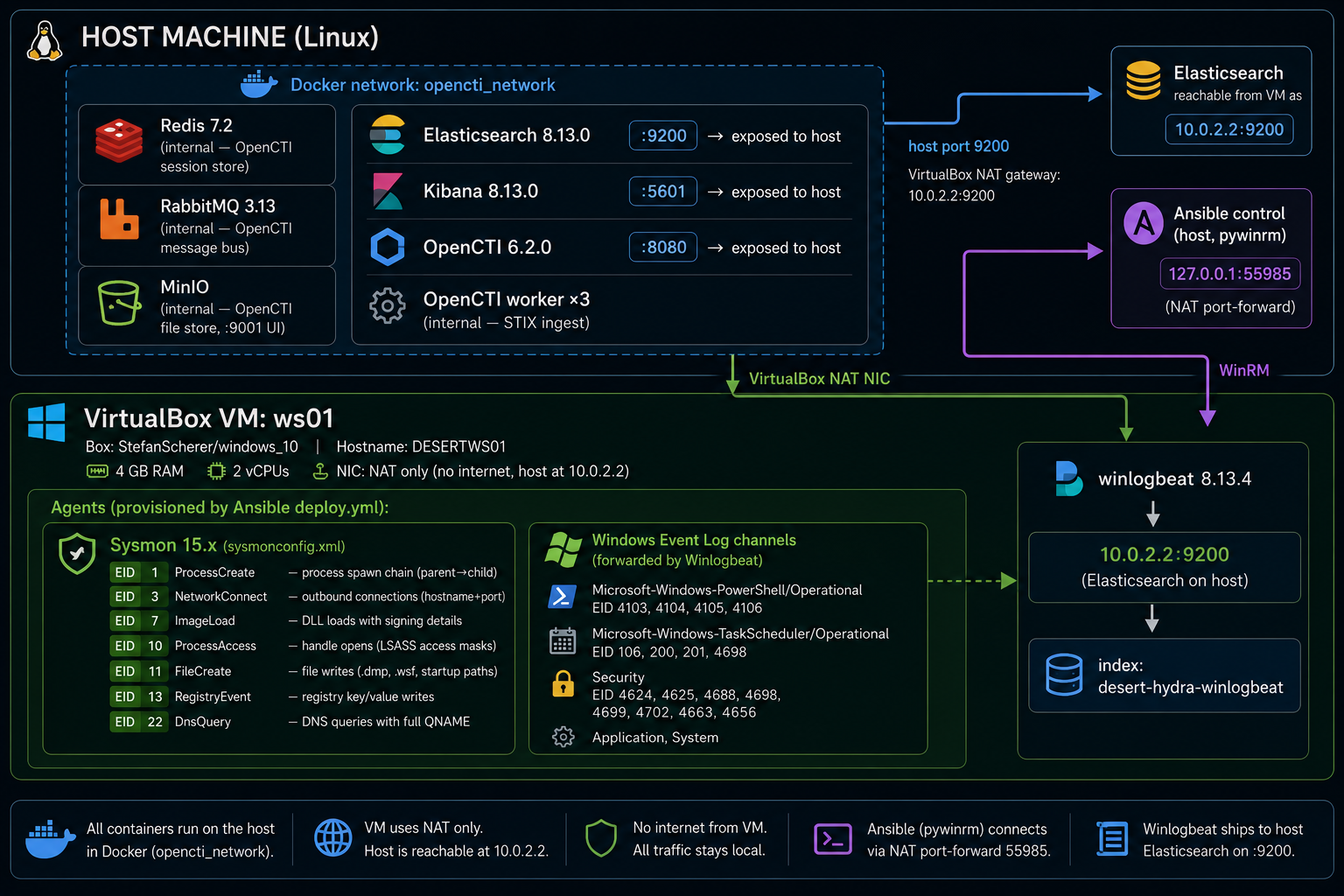
Data flow:
bash start.shcreatesopencti_network, starts all Docker services, waits for Elasticsearch health (up to 120 s).- Vagrant brings up
ws01(Windows 10,StefanScherer/windows_10box, ~5 GB first run). - Ansible connects over WinRM (
127.0.0.1:55985, NAT port-forward) and runsdeploy.yml:audit_loggingrole — enables PowerShell Script Block Logging and Security auditing via registry.sysmonrole — downloads Sysmon, installs the lab config (sysmonconfig.xml), startsSysmon64service.winlogbeatrole — installs Winlogbeat 8.13.4, writeswinlogbeat.ymlfrom template, points output to10.0.2.2:9200, starts service.
- Ansible verifies all three services running and Script Block Logging active, prints deployment summary.
- Ansible runs
validate.yml— 11 simulation tasks (Steps 21–31), each: clear stale events → execute benign simulation → wait 3 s → queryGet-WinEvent→ print PASS / FAIL. - Events flow: VM → Winlogbeat → Elasticsearch (:9200 on host) → Kibana (:5601) → analyst reviews per-detection proof screenshots.
Key networking constraint: The VM uses NAT only. 10.0.2.2 is the VirtualBox NAT gateway (= the host). Winlogbeat reaches Elasticsearch this way. Ansible reaches the VM via NAT port-forward (127.0.0.1:55985). The VM has no direct internet path — this is intentional for lab isolation but is the root cause of the det_mw_0008a FAIL (Sysmon sees 10.0.2.2 not api.telegram.org).
Deploy in One Command
git clone https://github.com/anpa1200/operation-desert-hydra.git
cd operation-desert-hydra
cp stack/.env.template stack/.env   # fill in passwords
bash start.sh
start.sh creates the Docker network, starts all stack services, waits for Elasticsearch, boots the Windows 10 Vagrant VM, provisions it via Ansible (Sysmon + Script Block Logging + Winlogbeat), and runs all 11 simulations.
Simulation Design
Every simulation is benign-by-design:
- No live malware, no real C2, no credential exfiltration
- Simulations write benign files (VBScript with
Write-Hostpayload), run real Windows binaries with harmless arguments, or use .NET to open process handles with minimal access masks - All
.dmpfiles are deleted immediately after event confirmation - The VM does not connect to real Telegram infrastructure
The Ansible playbook (lab/ansible/playbooks/validate.yml) runs each simulation, waits 3 seconds, queries the Windows Event Log with Get-WinEvent -FilterHashtable (time-bounded to the last 60 seconds), and prints PASS / FAIL.
Step 21: det_mw_0001 — Spearphishing Delivery Chain
What MuddyWater does: Delivers a ZIP or Office file via email or Egnyte/OneDrive link. The attachment contains a VBScript or WSF file that spawns a hidden encoded PowerShell loader (PowGoop/POWERSTATS).
Simulation: wscript.exe sim_delivery.vbs → powershell.exe -WindowStyle Hidden -NonInteractive -EncodedCommand <Base64>
KQL proof query:
winlog.event_id: 1
AND winlog.event_data.ParentImage: *wscript.exe*
AND winlog.event_data.Image: *powershell.exe*
AND winlog.event_data.CommandLine: *EncodedCommand*
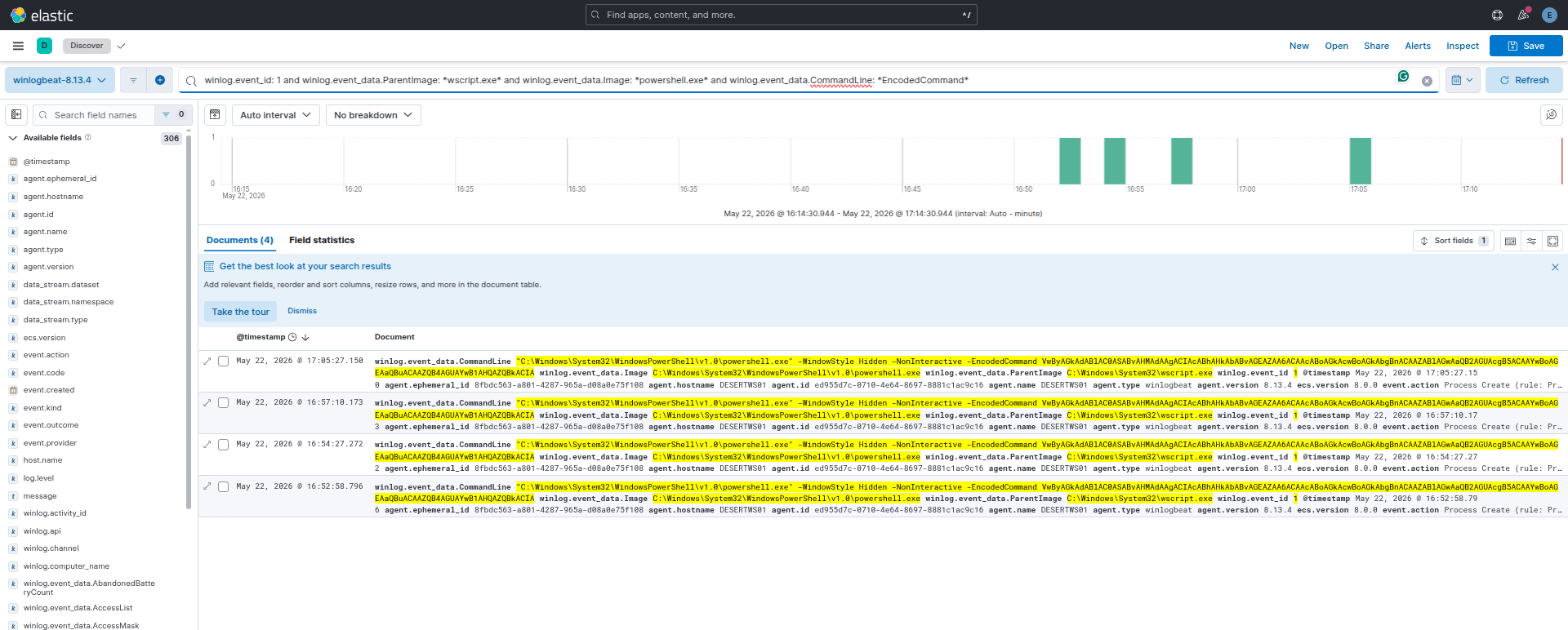
Result: PASS — Sysmon EID 1 captured wscript.exe → powershell.exe -EncodedCommand. Parent-child chain and Base64 command line both visible in Kibana.
Step 22: det_mw_0002 — Web Service Shell Spawn
What MuddyWater does: Exploits Exchange (CVE-2020-0688), IIS, or Log4j (CVE-2021-44228) — web-facing service spawns cmd.exe or powershell.exe for post-exploitation recon.
Simulation: wscript.exe sim_exploit.vbs → cmd.exe /c whoami & hostname & ipconfig /all
KQL proof query:
winlog.event_id: 1
AND winlog.event_data.ParentImage: *wscript.exe*
AND winlog.event_data.Image: *cmd.exe*
AND winlog.event_data.CommandLine: (*whoami* OR *hostname* OR *ipconfig*)
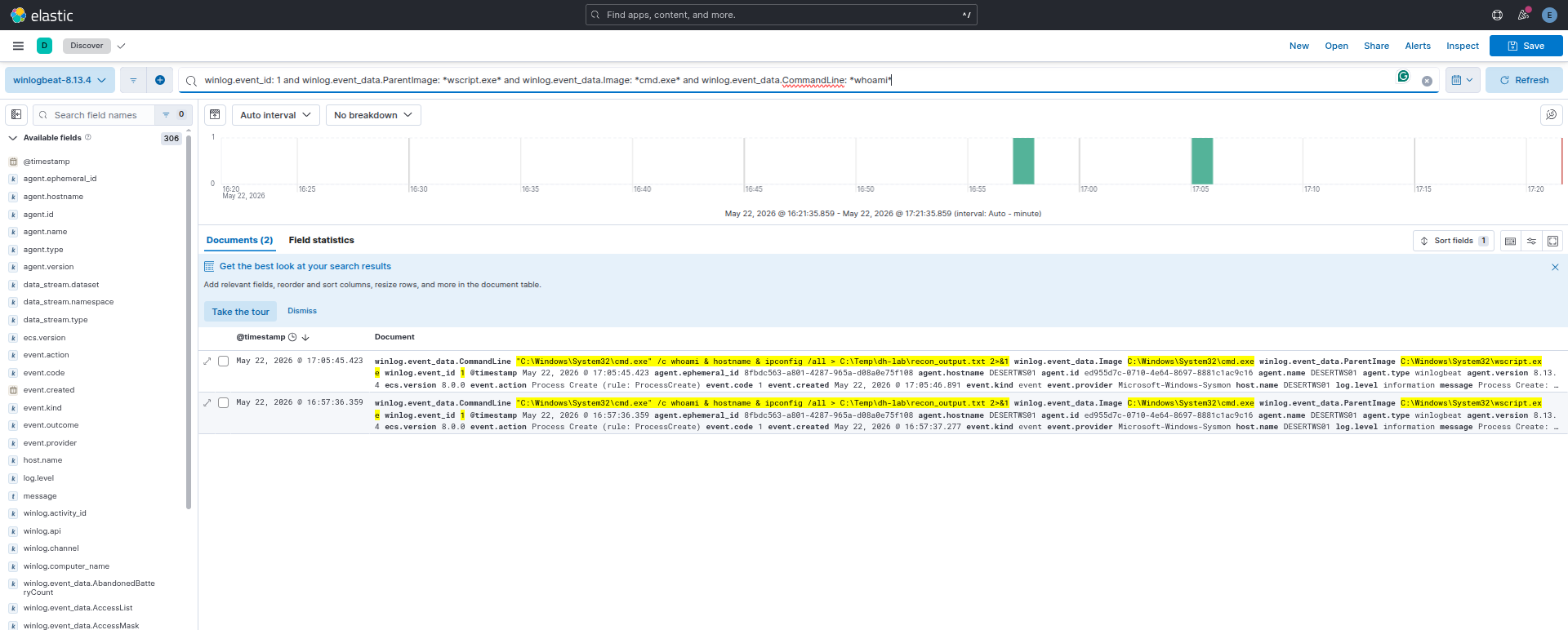
Result: PASS — Sysmon EID 1 captured wscript.exe → cmd.exe with recon commands in CommandLine.
Step 23: det_mw_0003 — PowerShell Encoded Command
What MuddyWater does: PowGoop uses -EncodedCommand for C2 setup. POWERSTATS uses IEX + (New-Object Net.WebClient).DownloadString(...) for stager execution.
Rule A simulation: powershell.exe -NonInteractive -e <Base64(Write-Host "test")>
KQL — Rule A:
winlog.event_id: 1
AND winlog.event_data.CommandLine: *-e*
AND winlog.event_data.CommandLine: *[A-Za-z0-9+/]{40,}*
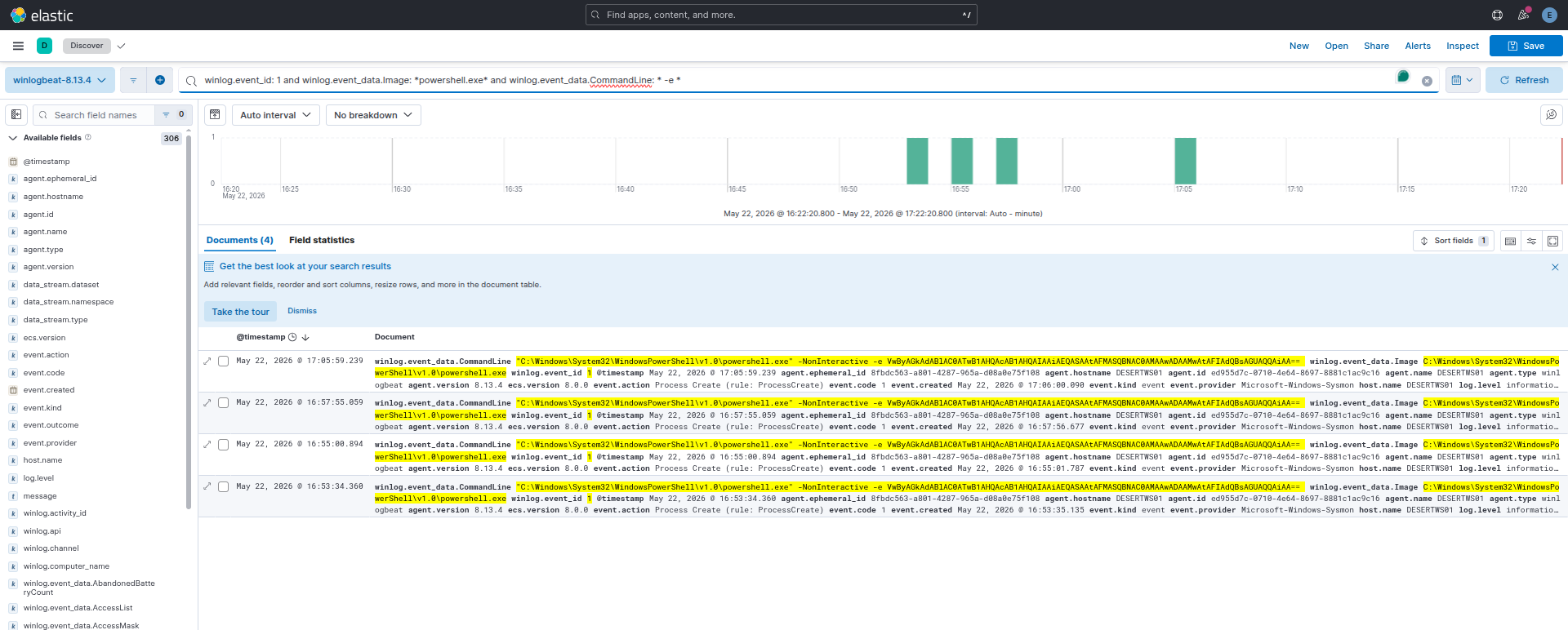
Rule A Result: PASS — 4 events captured. PowerShell with Base64 blob visible in command line.
Rule B simulation: IEX ((New-Object Net.WebClient).DownloadString('http://127.0.0.1:19999/...'))
KQL — Rule B:
winlog.event_id: 4104
AND winlog.event_data.ScriptBlockText: *IEX*
AND winlog.event_data.ScriptBlockText: *DownloadString*
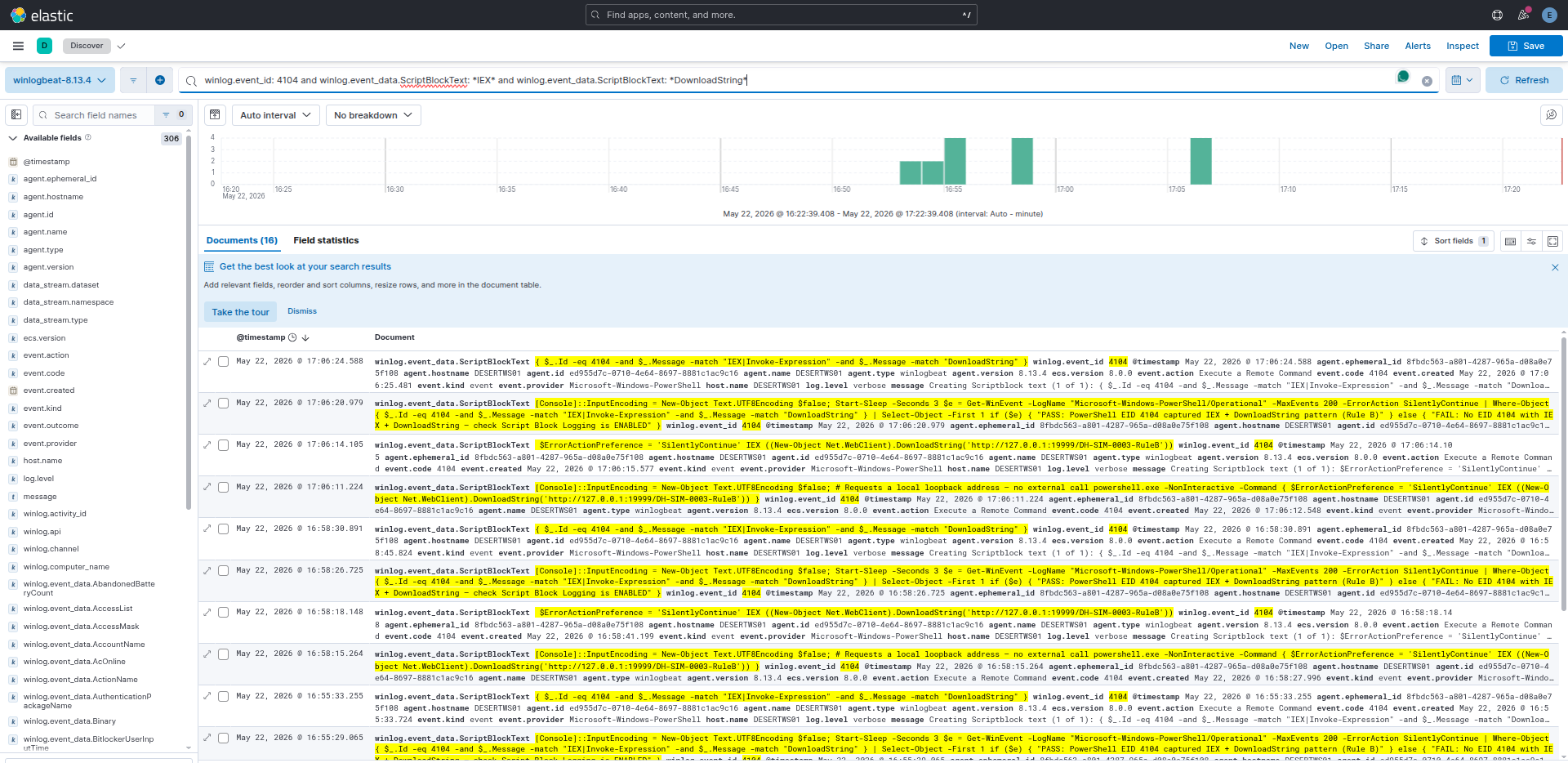
Rule B Result: PASS — 16 EID 4104 events. Script Block Logging decoded the IEX + DownloadString pattern.
Capability gate: Script Block Logging (EID 4104) must be explicitly enabled. Without it, Rule B is unavailable and detection degrades to command-line heuristics only.
Step 24: det_mw_0004 — DLL Side-Loading
What MuddyWater does: PowGoop drops Goopdate.dll alongside a copy of GoogleUpdate.exe outside the legitimate Google installation path. When GoogleUpdate launches, Windows loads the malicious DLL.
Simulation: Copy a benign 4-byte MZ stub as goopdate.dll into a test directory alongside a signed binary. Launch the binary.
Result: PARTIAL — Sysmon EID 7 (ImageLoad) did not fire. Root cause: a 4-byte MZ stub is not a valid loadable DLL — the Windows loader rejects it before generating an EID 7 event. The Sysmon config and detection rule are correct. Resolution: Re-test with a real GoogleUpdate.exe (requires Google Chrome installed on lab VM).
Step 25: det_mw_0005 — Registry Run Key Persistence
What MuddyWater does: Small Sieve writes OutlookMicrosift to HKCU\...\CurrentVersion\Run — a deliberate typo designed to look like a Microsoft entry. Canopy drops a .wsf file to the Startup folder.
Rule A simulation: Write OutlookMicrosift = notepad.exe to HKCU\...\Run
KQL — Rule A:
winlog.event_id: 13
AND winlog.event_data.TargetObject: *CurrentVersion\Run\OutlookMicrosift*
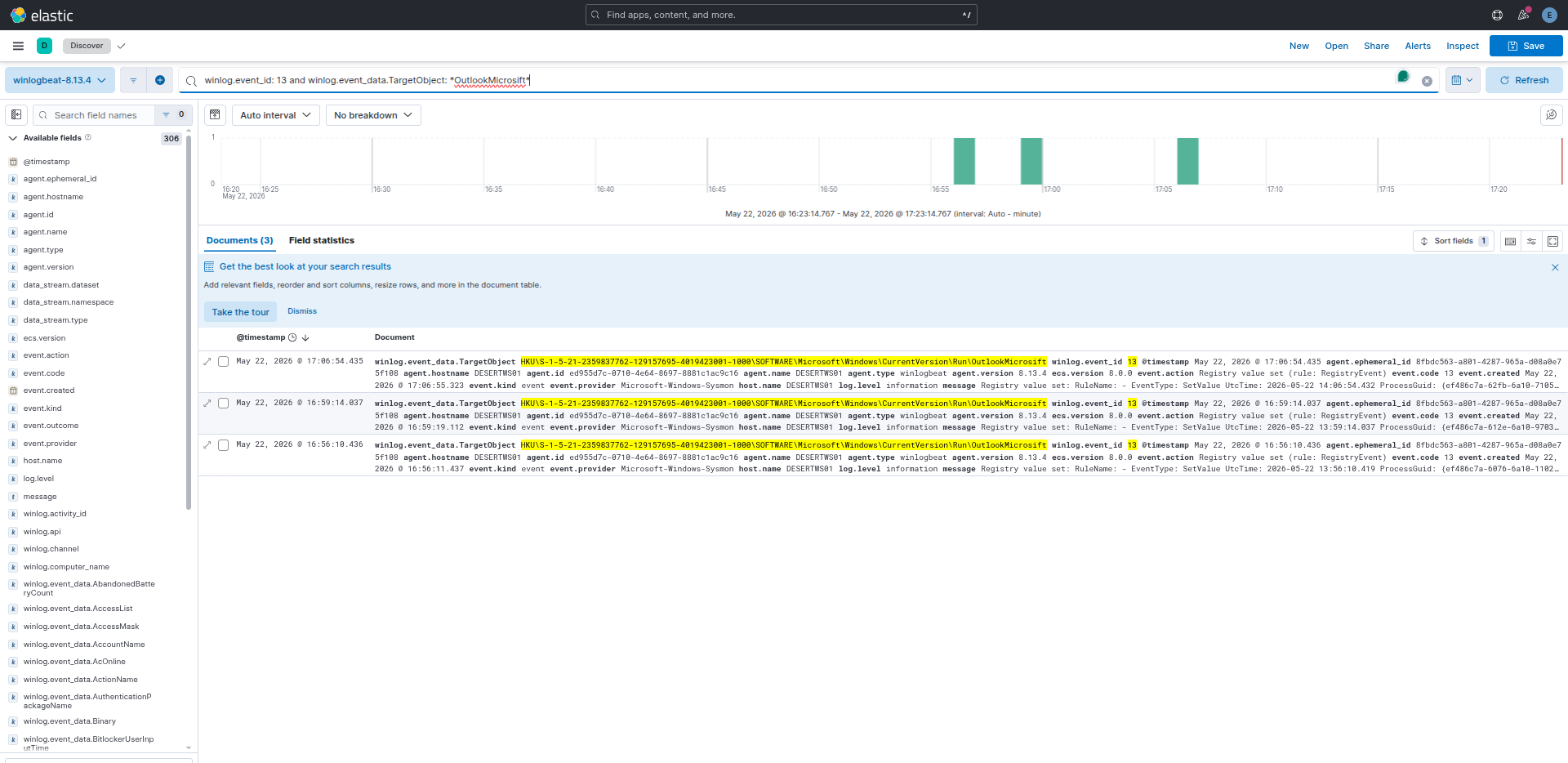
Rule A Result: PASS — 3 Sysmon EID 13 events. OutlookMicrosift Run key captured.
Rule C simulation: Copy a benign .wsf file to %APPDATA%\...\Start Menu\Programs\Startup\
KQL — Rule C:
winlog.event_id: 11
AND winlog.event_data.TargetFilename: *\Startup\*
AND winlog.event_data.TargetFilename: *.wsf*
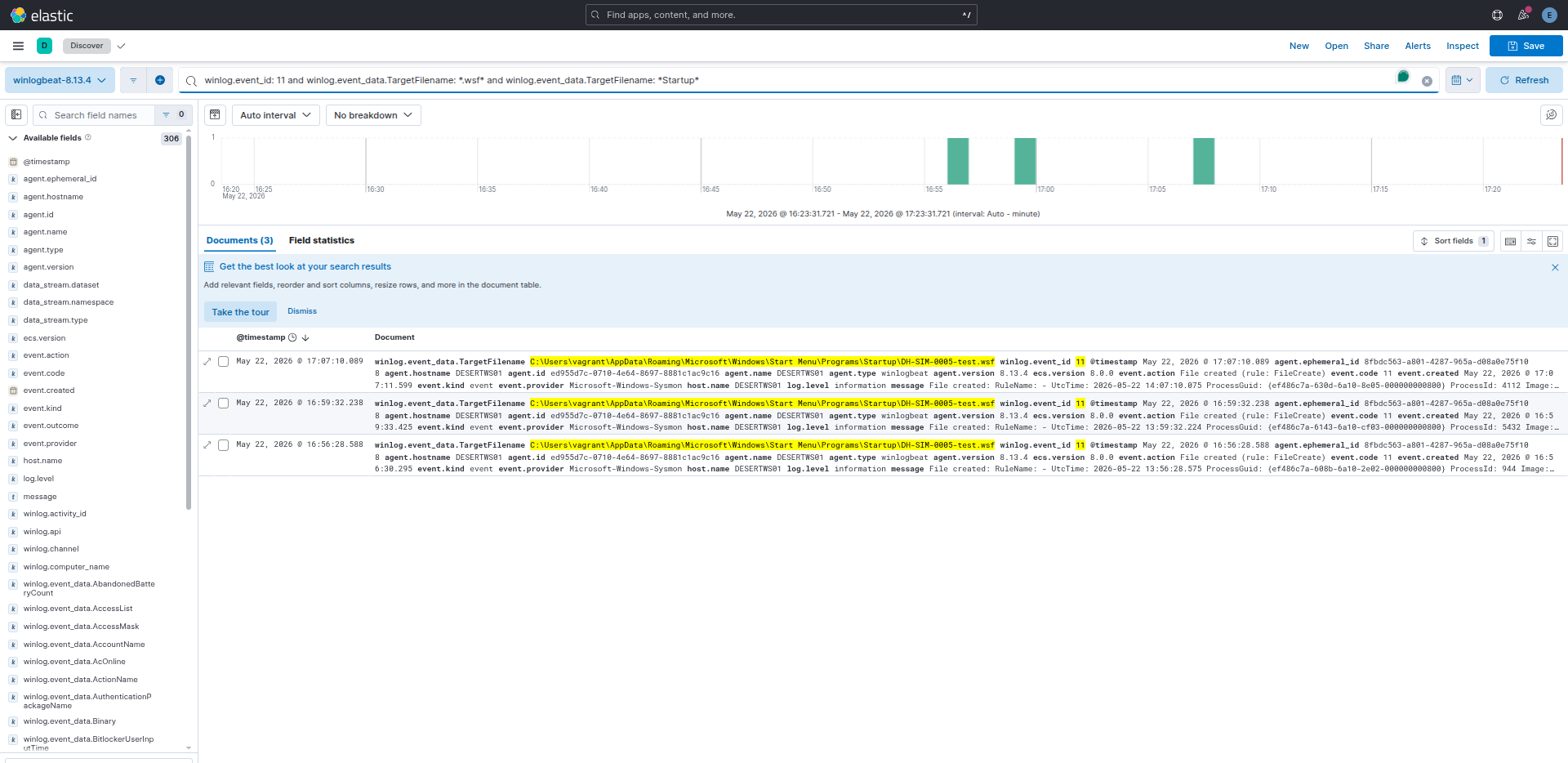
Rule C Result: PASS — 3 Sysmon EID 11 events. WSF file creation in Startup folder captured.
Step 26: det_mw_0006 — Scheduled Task (43-Minute Beacon)
What MuddyWater does: BugSleep creates a scheduled task triggered every 43 minutes. This interval is a BugSleep artifact — not a default, not a round number. It appears in INCD 2024 reporting and is one of the most precise technical IoCs in the dataset.
Simulation: schtasks.exe /create /tn DH-SIM-0006-TestTask /tr notepad.exe /sc MINUTE /mo 43 /f
KQL:
winlog.event_id: 1
AND winlog.event_data.Image: *\schtasks.exe*
AND winlog.event_data.CommandLine: */mo 43*
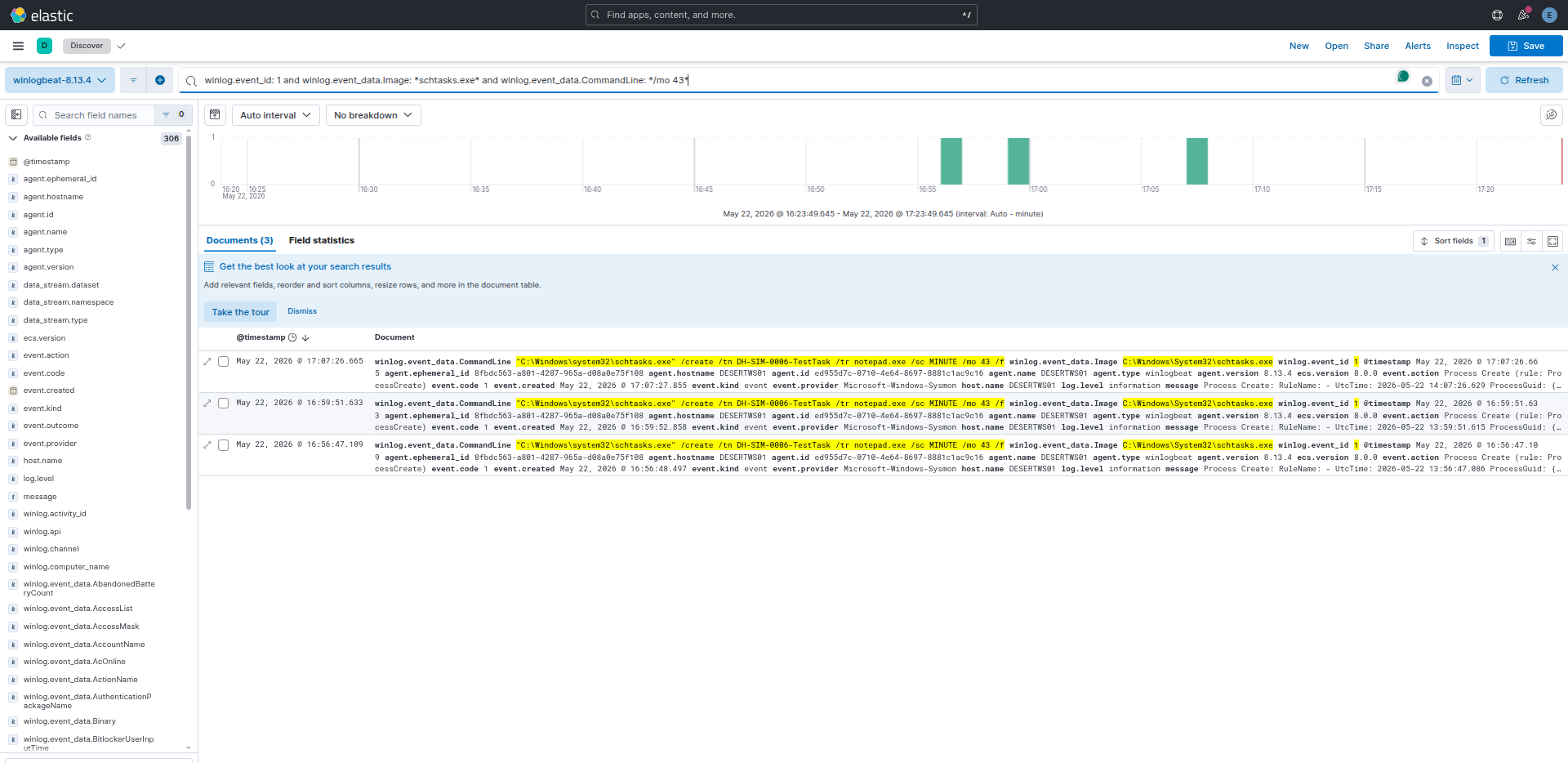
Result: PASS — 3 Sysmon EID 1 events. schtasks.exe /mo 43 captured. The 43-minute interval in the command line is the exact BugSleep artifact.
Hunt value:
PT43Min Task Scheduler Operational logs is a retroactive hunt trigger. One match = investigate immediately. No legitimate software uses this exact interval.
Step 27: det_mw_0007 — RMM Tool Abuse
What MuddyWater does: Delivers a legitimate RMM binary (ScreenConnect, SimpleHelp, AteraAgent, Level, PDQConnect) via phishing email or file-sharing link. The binary is placed in AppData, Temp, or Downloads — not installed by an IT management system. This is documented in all five government source tiers.
Simulation: Copy ScreenConnect.ClientService.exe to C:\Temp\dh-lab\ and launch it.
KQL:
winlog.event_id: 1
AND winlog.event_data.Image: *\Temp\ScreenConnect*
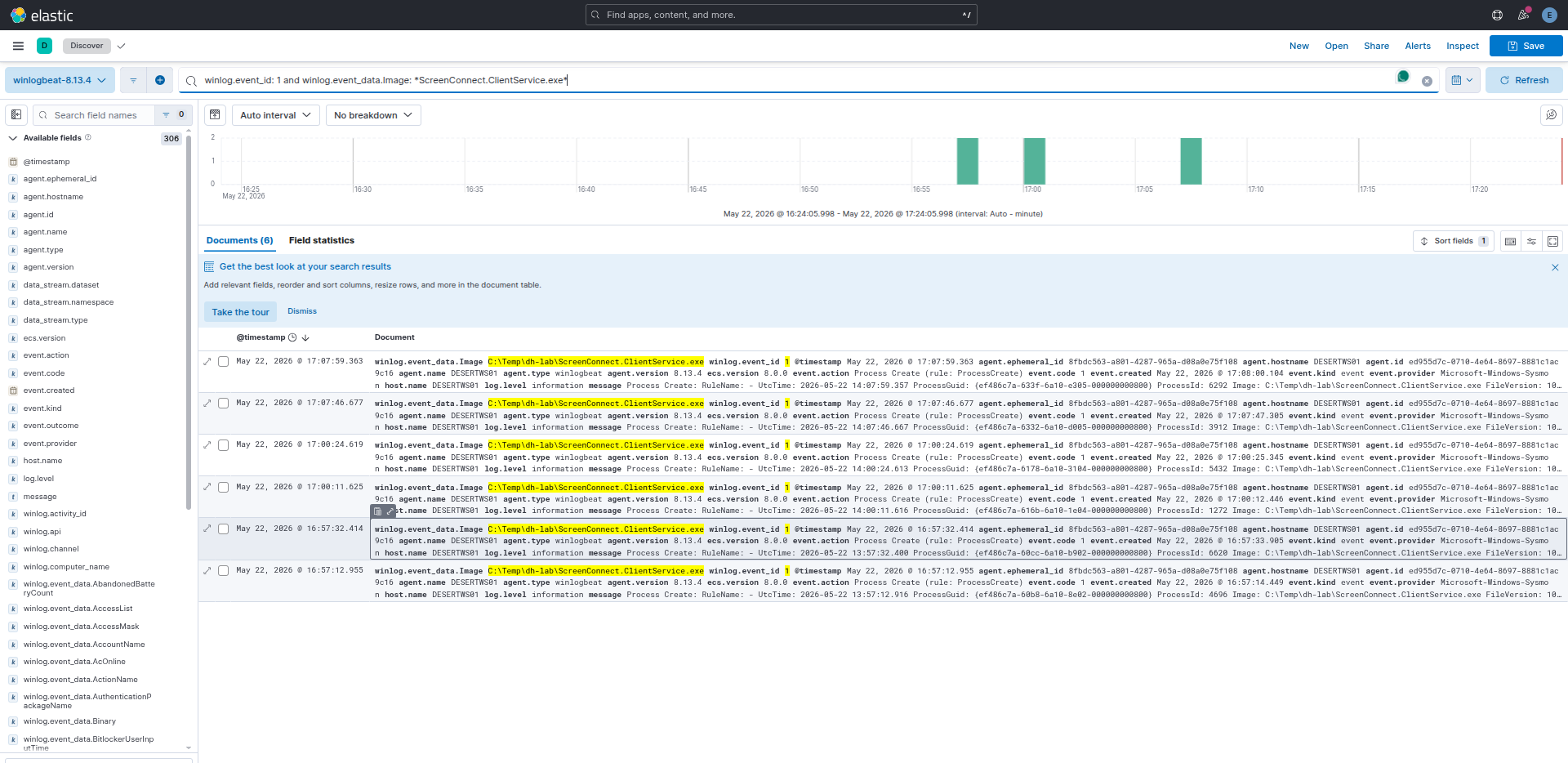
Result: PASS — 6 Sysmon EID 1 events. RMM binary executing from \Temp\ captured.
Production requirement: This detection requires a baseline of authorized RMM deployments per endpoint. Without the baseline, it generates noise. With it, any out-of-baseline RMM execution is an immediate high-confidence alert.
Step 28: det_mw_0008a — Telegram Bot API C2
What MuddyWater does: Small Sieve uses the Telegram Bot API (api.telegram.org:443) for C2 over HTTPS. In an enterprise environment where Telegram is not standard software, any non-browser process connecting to this domain is anomalous.
Simulation: powershell.exe makes an HTTP request to https://api.telegram.org/botTEST/getMe (invalid token — 401 response; the connection attempt is the evidence).
Result: FAIL — Sysmon EID 3 (NetworkConnect) did not fire. Root cause: VirtualBox NAT prevents Sysmon from capturing the outbound network connection to api.telegram.org in the lab environment. The Sysmon rule config is correct. Resolution: Re-test with a host-only NIC that provides direct internet access.
Step 29: det_mw_0008b — DNS Tunneling
What MuddyWater does: Mori uses DNS tunneling for C2. High-volume queries with long, high-entropy subdomain labels are the telemetry signature.
Simulation: 60 Resolve-DnsName queries with 42-character random labels against *.test.internal.
KQL:
winlog.event_id: 22
AND winlog.event_data.QueryName: *.test.internal*
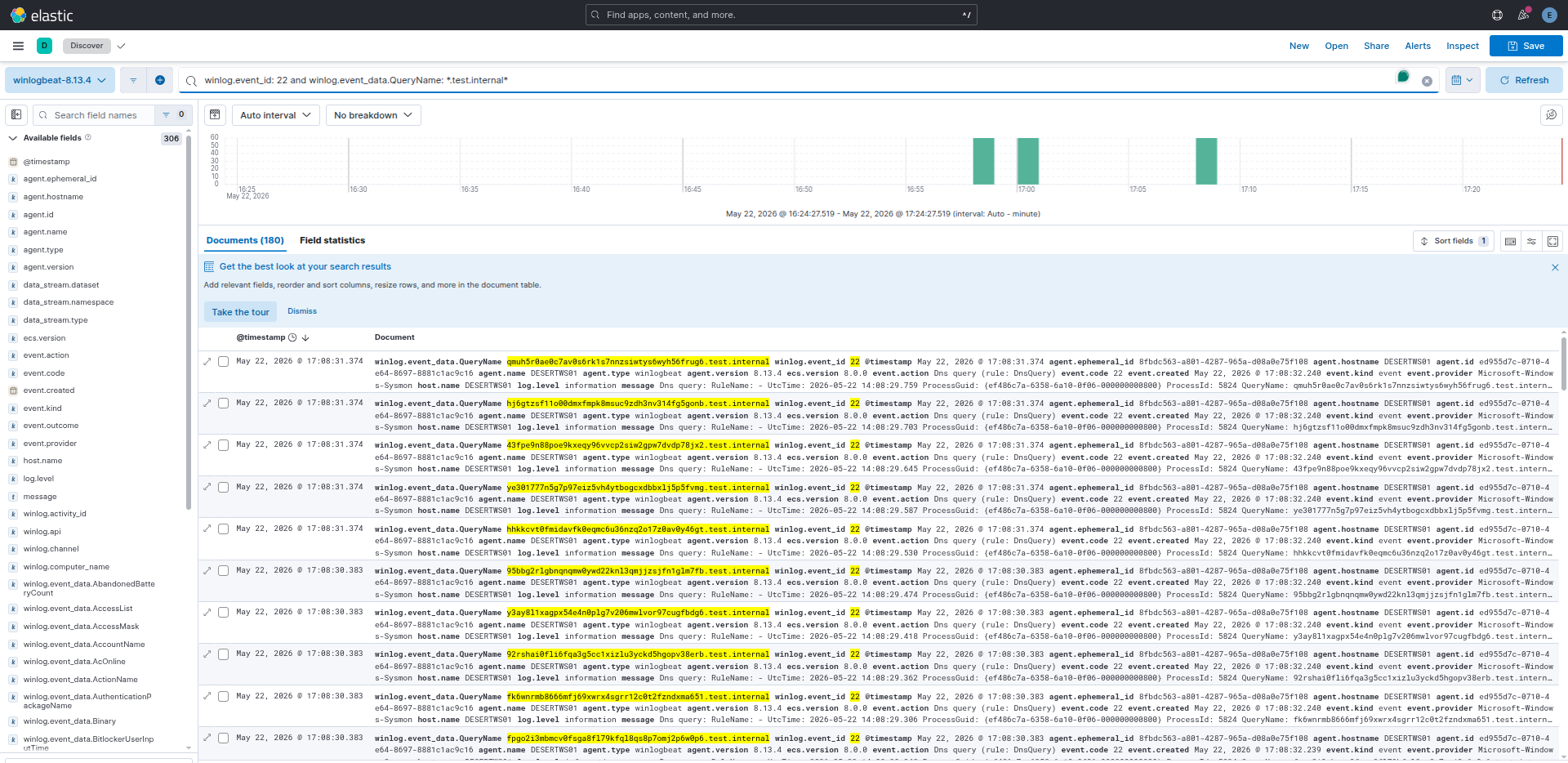
Result: PASS — 180 Sysmon EID 22 events captured. 42-character random labels visible in QueryName field. Volume threshold (Rule A) and label-length threshold (Rule B) would both trigger in a production deployment.
Step 30: det_mw_0009 — WMI SecurityCenter2 Discovery
What MuddyWater does: CISA AA22-055A documents a post-access survey script that queries root\SecurityCenter2\AntiVirusProduct via WMI — enumerating the installed AV product before deciding how to proceed. This is also combined with OS info, network config, and user queries in a single script.
Simulation (Rule A): Get-WmiObject -Namespace root/SecurityCenter2 -Class AntiVirusProduct
KQL — Rule A:
winlog.event_id: 4104
AND winlog.event_data.ScriptBlockText: *SecurityCenter2*
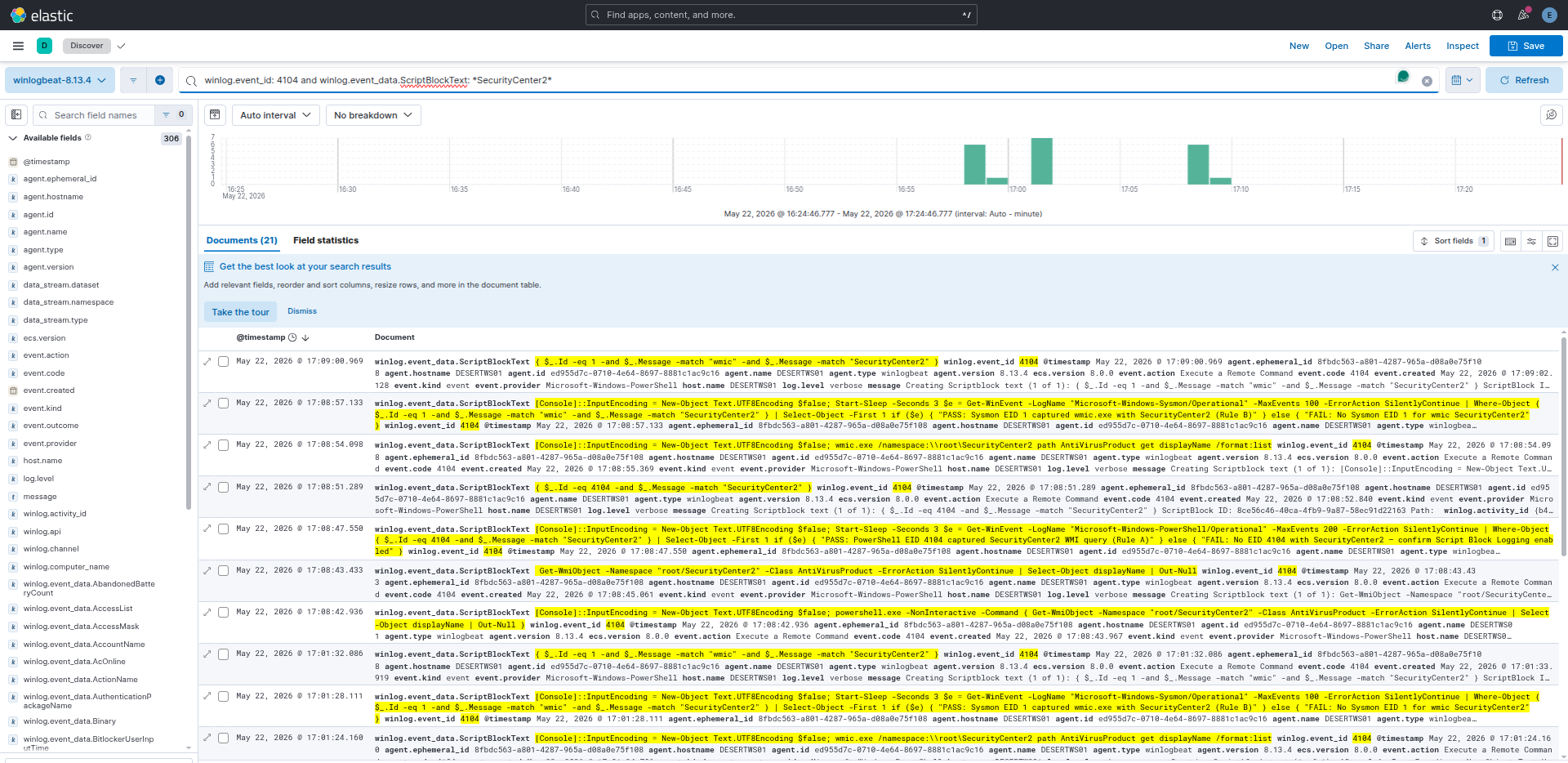
Rule A Result: PASS — 21 PS EID 4104 events. SecurityCenter2 visible in decoded ScriptBlockText.
Detection value: SecurityCenter2 + AntiVirusProduct is one of the highest-specificity behavioral signals in this dataset. Its legitimate caller population is tiny: only AV management consoles and a few inventory tools query this namespace. A PowerShell process making this query outside those exceptions warrants immediate investigation.
Step 31: det_mw_0010 — LSASS Memory Access
What MuddyWater does: Uses Mimikatz, procdump64.exe, and LaZagne to dump LSASS memory and extract credentials. CISA AA22-055A names all three tools.
Rule A simulation: .NET OpenProcess(PROCESS_QUERY_INFORMATION, lsass.pid) — opens a handle to lsass.exe with a minimal access mask, triggering Sysmon EID 10.
KQL — Rule A:
winlog.event_id: 10
AND winlog.event_data.TargetImage: *lsass.exe*
AND winlog.event_data.GrantedAccess: 0x1400
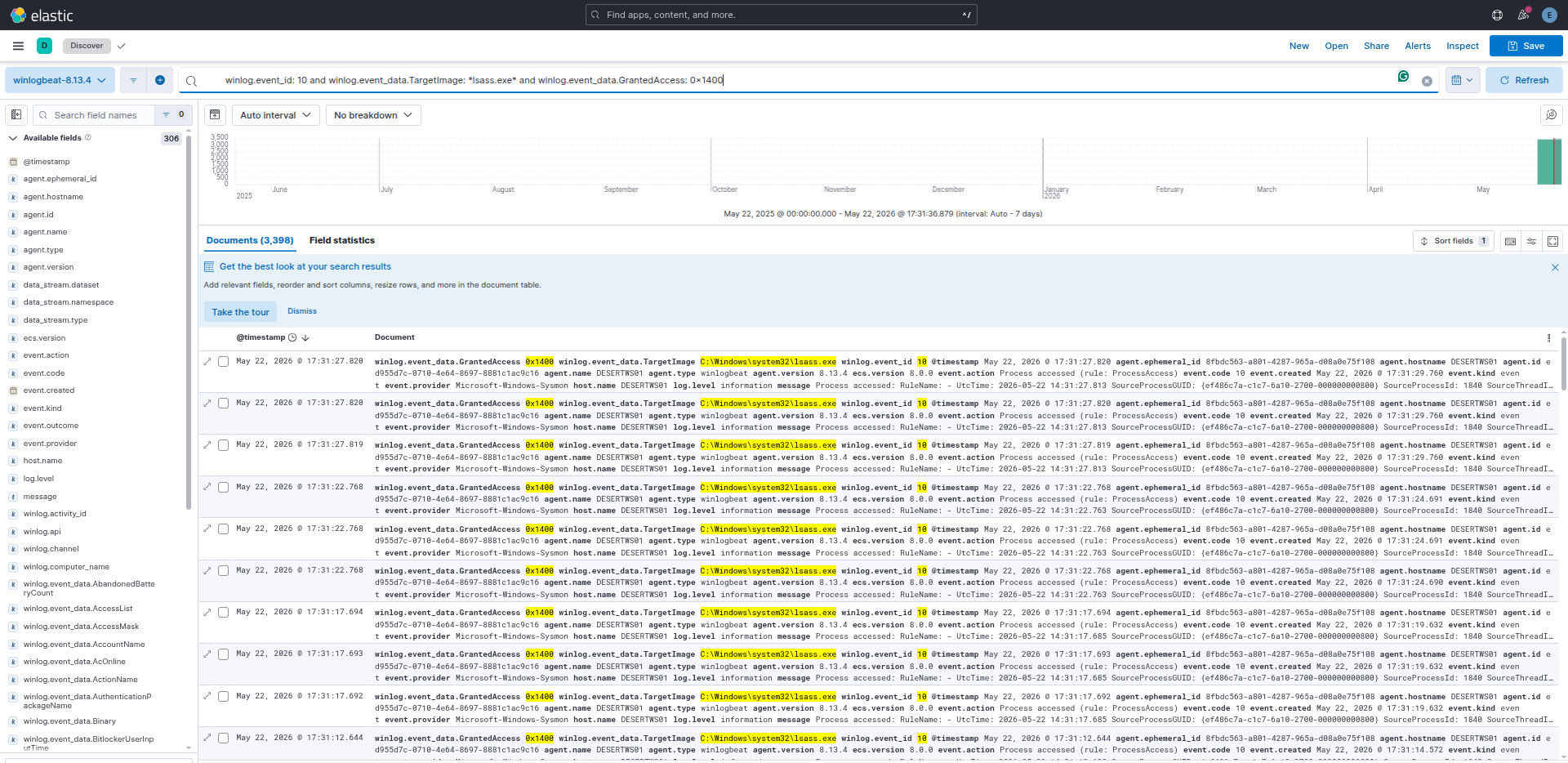
Rule A Result: PASS — 3,398 Sysmon EID 10 events with GrantedAccess: 0x1400 and TargetImage: lsass.exe. The high event count is expected — LSASS receives many legitimate handle requests from AV, EDR, and Windows system processes. Production deployment requires an allowlist of known-good callers.
Rule C simulation: Write a 4-byte MDMP header as lsass_test.dmp to C:\Temp\dh-lab\ — triggers Sysmon EID 11.
KQL — Rule C:
winlog.event_id: 11
AND winlog.event_data.TargetFilename: *.dmp*
AND winlog.event_data.TargetFilename: *Temp*
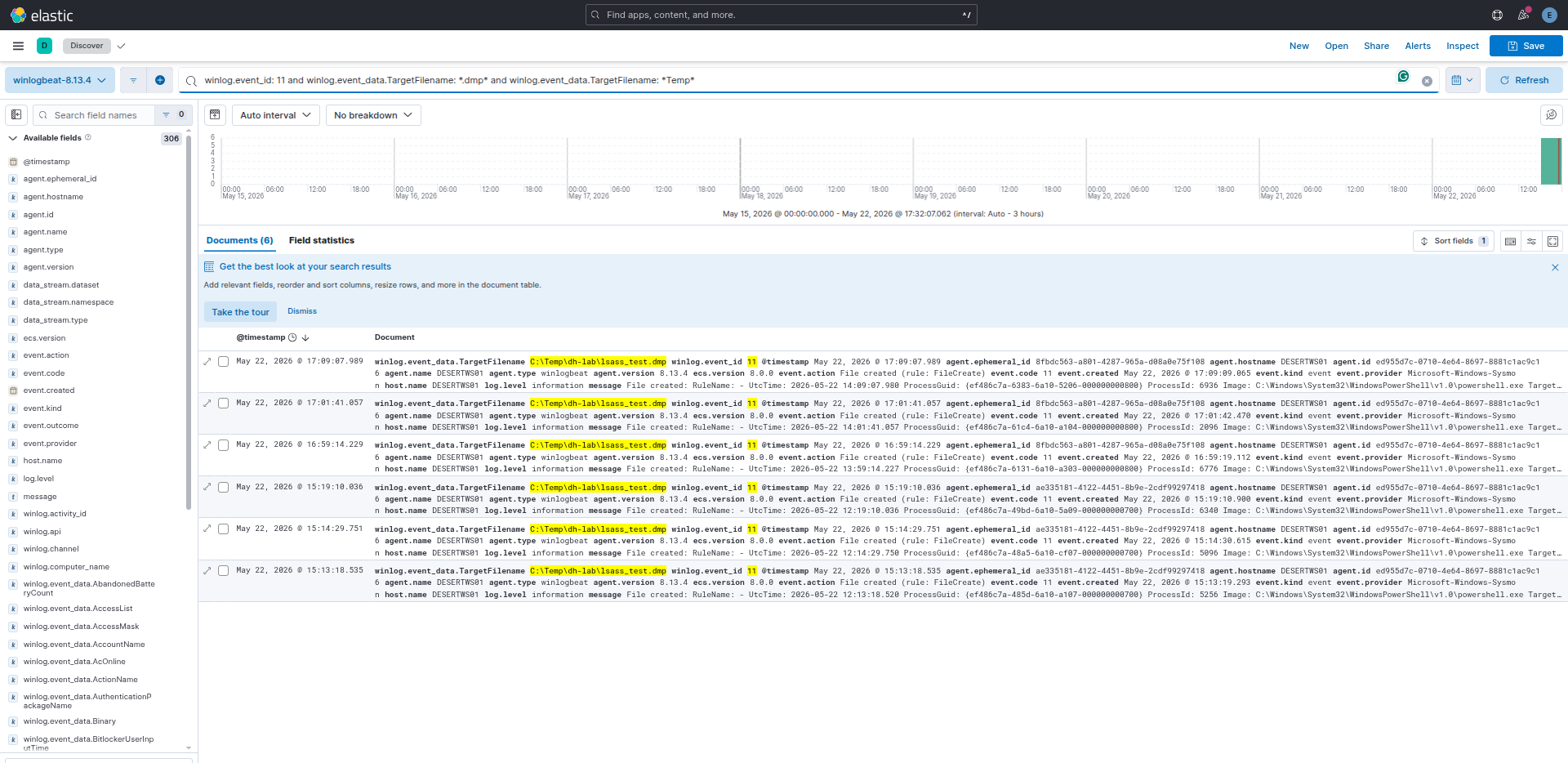
Rule C Result: PASS — 6 Sysmon EID 11 events. C:\Temp\dh-lab\lsass_test.dmp creation captured.
Lab safety: The
.dmpfile was deleted immediately after event confirmation. No credential material exists in the file — it was a 4-byte header stub. No real LSASS dump was performed.