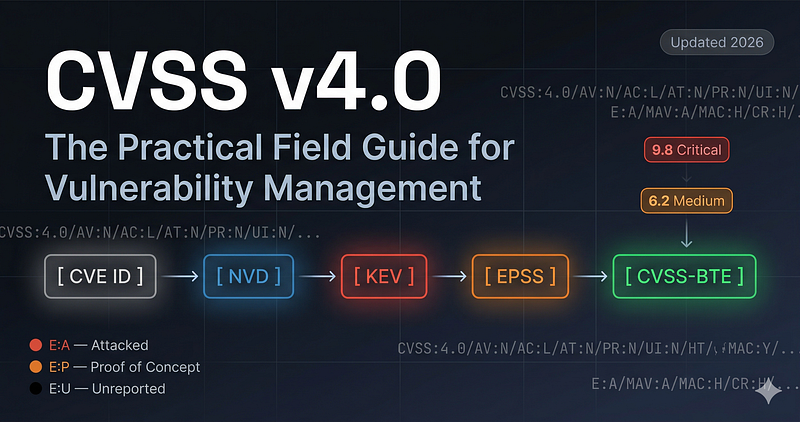
CVSS v4.0: The Practical Field Guide for Vulnerability Management
From a number that nobody trusts to a tool that changes how you work
Guide Contents
| Chapter | Link |
|---|---|
| Introduction & What Changed | this page |
| v3.1 vs v4.0 Side-by-Side | → Chapter 2 |
| Vector String Anatomy | → Chapter 3 |
| Three Metric Groups | → Chapter 3 |
| CVSS Lifecycle B→BT→BTE | → Chapter 4 |
| Threat & Environmental Metrics | → Chapter 5 |
| Worked Examples (Log4Shell, Erlang, Firmware, CitrixBleed) | → Chapter 6 |
| Industry-Specific Scoring | → Chapter 7 |
| CVSS vs SSVC | → Chapter 8 |
| Practical VM Workflow | → Chapter 9 |
| CVSS Enrichment Tool | → Chapter 10 |
| Regulatory Vulnerability Management Evidence | → Chapter 11 |
| Common Mistakes & Interview Q&A | → Chapter 12 |
| Quick Reference Cheatsheet | → Chapter 13 |
Introduction: CVSS Is a Tool, Not a Score
Every security team has a vulnerability scanner. Every scanner produces a list with numbers. And almost every team treats those numbers as the truth — sorting by score descending, starting at 9.8, working down.
CVSS v4.0 was designed to give security teams the tools to move beyond that.
The CVSS SIG (Special Interest Group), which maintains the standard at FIRST.org, is explicit in the Consumer Implementation Guide: CVSS-B represents a reasonable worst-case technical severity assessment for an unmitigated vulnerability, without organization-specific threat context or environmental factors applied. It is a starting point for prioritization — not a complete risk score.
This is a practitioner guide to applying CVSS v4.0 concepts — Base, Threat, and Environmental metrics — to real vulnerability management decisions. The CVSS v4.0 vectors used in worked examples are analyst-computed using the FIRST.org CVSS v4.0 calculator, as NVD's v4.0 coverage is still incomplete as of publication (many CVEs still show v3.1 scores only from NVD). This guide is not official FIRST.org documentation.
The Exploitation Gap
The FIRST.org EPSS model paper (Jacobs & Romanosky, 2023) reports that at any given time, fewer than 5% of published CVEs have a known working exploit in use. The EPSS dataset itself shows the median EPSS score across all published CVEs well below 0.05 — meaning less than a 5% predicted probability of exploitation within 30 days for the typical CVE. (FIRST.org EPSS Model, as of 2024.)
When E: is left as E:X (Not Defined) — the default from NVD and most scanners — CVSS v4.0 treats it equivalent to E:A (Attacked), producing the worst-case score. For CVEs with no exploit evidence, this is an inaccurate starting assumption that inflates every score in your scanner output.
The Operational Consequence
Consider a mid-size organization's typical scanner output:
Illustrative example — representative enterprise scanner report:
  Total CVEs:        847
  Critical (9.0+):    94  (all scored with E:X default — treated as E:A)
  High (7.0–8.9):    203

After applying Threat enrichment (CISA KEV, EPSS, ExploitDB checks):
  ~5 CVEs confirmed exploited (CISA KEV) or with public PoC + internet exposure
  ~22 CVEs with exploit signal (E:P) on accessible systems

After applying Environmental enrichment (asset context, network zones):
  ~5 true Critical (E:A + internet-facing, no compensating controls)
  ~22 High (E:P + exposure or E:A + internal with controls)
The numbers vary by environment. The principle is consistent: raw Base scores overstate urgency for most vulnerabilities, and Threat + Environmental enrichment concentrates effort where it actually matters.
CVSS v4.0 provides the mechanism to achieve this. This guide shows you exactly how.
1. What Changed in v4.0 — and Why It Matters
CVSS v4.0 was released on November 1, 2023. The changes are more significant than any previous version update — v4.0 is effectively a redesign of the impact and temporal models.
New Impact Model: Two Systems Instead of One
The biggest structural change: CVSS v4.0 separates impact into two systems:
Vulnerable System — the component directly compromised by the vulnerability (what the attacker hits first). Subsequent System — any system affected as a downstream consequence of exploiting the vulnerable system.
In v3.x, this distinction was handled through the vague "Scope" metric (Unchanged/Changed). In v4.0, it is explicit and granular:
v3.1 impact metrics:
  C (Confidentiality): None / Low / High
  I (Integrity):       None / Low / High
  A (Availability):    None / Low / High
  S (Scope):           Unchanged / Changed

v4.0 impact metrics:
  VC (Vulnerable System Confidentiality): None / Low / High
  VI (Vulnerable System Integrity):       None / Low / High
  VA (Vulnerable System Availability):    None / Low / High
  SC (Subsequent System Confidentiality): None / Low / High
  SI (Subsequent System Integrity):       None / Low / High
  SA (Subsequent System Availability):    None / Low / High
Why this matters operationally: In v3.x, if an SSH daemon vulnerability only affects the single server it runs on, you score it Scope:Unchanged. If it can propagate to a database behind it, Scope:Changed. These two scenarios produced different base scores, but there was no way to capture how much the subsequent system was affected. In v4.0, you can score a vulnerability that fully compromises the immediate system (VC:H/VI:H/VA:H) but has only partial downstream confidentiality impact (SC:L/SI:N/SA:N) — a much more precise description of real-world attack chains.
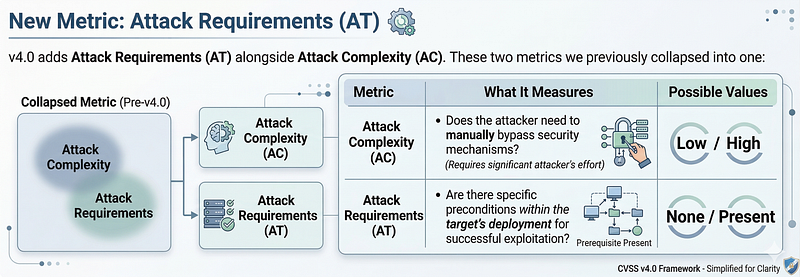
New Metric: Attack Requirements (AT)
v4.0 adds Attack Requirements (AT) alongside Attack Complexity (AC). These two metrics were previously collapsed into one:
| Metric | What It Measures | Values |
|---|---|---|
| Attack Complexity (AC) | Does the attacker need to bypass security mechanisms? (attacker's effort) | Low / High |
| Attack Requirements (AT) | Are there specific preconditions in the target's deployment for exploitability? | None / Present |
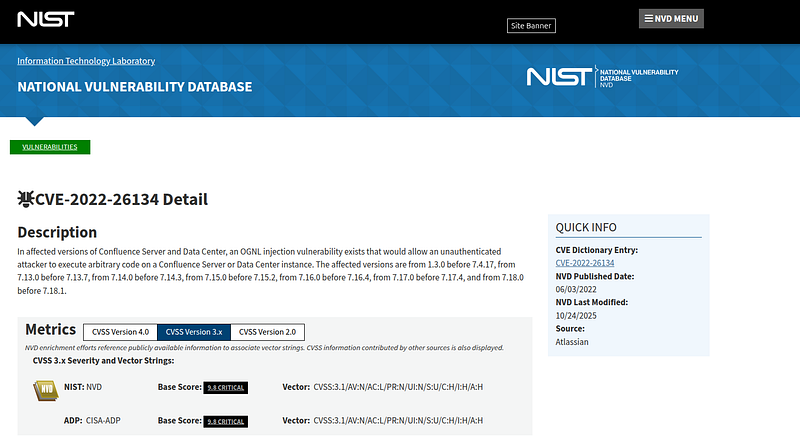
Real-world example: CVE-2022-26134 (Confluence OGNL injection):
AC:L— exploitation is straightforward, no bypass requiredAT:N— no special deployment preconditions; works against default installations
Contrast with a race condition vulnerability:
AC:H— attacker must win a timing race (active effort)AT:N— no special deployment needed; the race condition is intrinsic
Or a vulnerability that only triggers when a non-default configuration is enabled:
AC:L— once the config is present, exploitation is simpleAT:P— the non-default configuration must be present (deployment precondition)
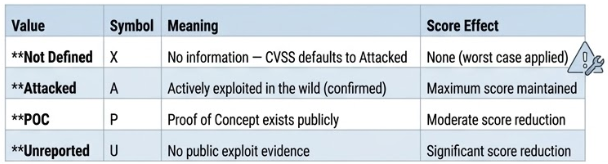
New Threat Metric: Exploit Maturity (E)
The old v3.x Temporal metric group is now the Threat metric group, containing a single metric: Exploit Maturity (E). The old Remediation Level and Report Confidence metrics were removed.
| Value | Symbol | Meaning | Score Effect |
|---|---|---|---|
| Not Defined | X | No information — CVSS defaults to Attacked | None (worst case applied) |
| Attacked | A | Actively exploited in the wild (confirmed) | Maximum score maintained |
| POC | P | Proof of Concept exists publicly | Moderate score reduction |
| Unreported | U | No public exploit evidence | Significant score reduction |
The E:X behavior: When a CVE is published with no Exploit Maturity specified — the default from NVD and most scanners — CVSS v4.0 calculates as if E:A, producing the worst-case score. Per the CVSS v4.0 specification, E:X is defined as "the value that gives the worst score." If you have 500 CVEs and never set Exploit Maturity, you are scoring all 500 as actively exploited. Setting E:U for CVEs with no exploit evidence is not optimism — it reflects the absence of evidence that E:A or E:P applies.
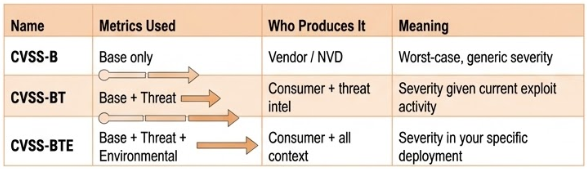
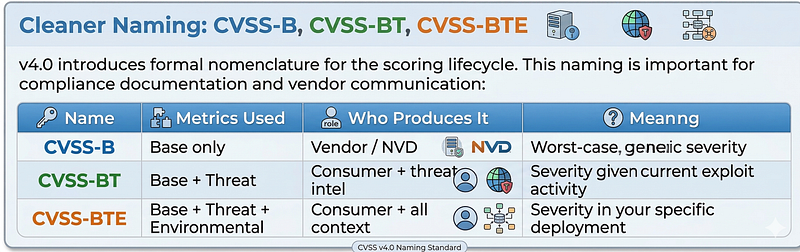
Cleaner Naming: CVSS-B, CVSS-BT, CVSS-BTE
v4.0 introduces formal nomenclature for the scoring lifecycle. This naming is important for compliance documentation and vendor communication:
| Name | Metrics Used | Who Produces It | Meaning |
|---|---|---|---|
| CVSS-B | Base only | Vendor / NVD | Worst-case, generic severity |
| CVSS-BT | Base + Threat | Consumer + threat intel | Severity given current exploit activity |
| CVSS-BTE | Base + Threat + Environmental | Consumer + all context | Severity in your specific deployment |
Supplemental Metric Group (New)
A new optional group of metrics that provide context without affecting the score: Safety (S), Automatable (AU), Recovery (R), Value Density (V), Vulnerability Response Effort (RE), Provider Urgency (U). These allow vendors to communicate operational context that the numeric score cannot capture.
Quick Start: Your First Enriched Score
Here is the minimum viable workflow to move from a scanner output to an actionable decision:
# 1. You have a CVE from your scanner — e.g., CVE-2024-21762 (FortiOS SSL VPN)
CVE=CVE-2024-21762

# 2. Check CISA KEV (30 seconds)
curl -s "https://www.cisa.gov/sites/default/files/feeds/known_exploited_vulnerabilities.json" \
  | python3 -c "
import json, sys
data = json.load(sys.stdin)
match = [v for v in data['vulnerabilities'] if v['cveID'] == '$CVE']
print('IN KEV:', bool(match))
if match: print('Due date:', match[0]['dueDate'])
"

# 3. Check EPSS (30 seconds)
curl -s "https://api.first.org/data/v1/epss?cve=$CVE" \
  | python3 -c "import json,sys; d=json.load(sys.stdin); print('EPSS:', d['data'][0]['epss'])"

# 4. Open FIRST.org calculator with the NVD base vector and apply your context
# https://www.first.org/cvss/calculator/4-0
What you get in under 2 minutes: A documented E: value (A/P/U), plus the decision of whether to apply any environmental adjustments — so your 9.8 either stays an emergency or becomes a scheduled patch.
Related Chapters
| Chapter | What you'll find |
|---|---|
| v3.1 vs v4.0 Comparison | See exactly where scores differ on real CVEs |
| Vector String Anatomy | Every metric explained with decision rules |
| Scoring Lifecycle (B→BT→BTE) | How scores mature from vendor to your environment |
| Threat & Environmental Metrics | KEV, EPSS, and environmental adjustment decisions |
| Worked Examples | Log4Shell, Erlang/OTP, CitrixBleed, MOVEit |
| Common Mistakes | The 8 errors that break CVSS in practice |
| Cheatsheet | Quick-reference for all metrics and SLA tiers |